STARTING UP
Set up your PlayStation®2 computer entertainment system according to its Instruction Manual. Ensure the MAIN POWER switch (located on the back of the console) is turned on.
Press the /RESET button. When the /indicator lights up, press the button to open the disc tray. Place the Virtua Fighter™ 4 Evolution disc on the disc tray with the label side facing up. Press the button again to close the disc tray.
Attach game controllers and other peripherals as appropriate. Follow on-screen instructions and refer to this manual for information on using the software.
PlayStation®2 [front panel]
•
i.LINK (IEEE1394) connector
MEMORY CARD (8MB) (FOR PlayStation®2)
Virtua Fighter™ 4 Evolution is a memory card (8MB) (for PlayStation®2) compatible game. When playing for the first time, if a memory card is inserted into MEMORY CARD slot 1, a system file will be created to save settings and records.
A minimum of 167KB is required to create a System File. Do not switch the power off or remove the memory card (8MB) (for PlayStation®2) while saving.
RECOVERY
•
P+K+G (when you are about to fall)
When you are just about to hit the ground, press P+K+G to spring back up and evade a Down Attack from your opponent.
OTHER ACTIONS
Some actions can only be performed by specific characters. A sample can be found in the Character Profile and Command List section on p.21.
REVERSALS
With this move, you can counterattack your opponent. Different directional buttons are used depending on attributes of the attacks (High/Middle/Low Attacks).
DEFLECTING
With this move you can deflect attacks from your opponent. If you deflect successfully, your opponent will stagger, which gives you a better chance to hit back.
ATTACKING BY THE WALLS
In many stages there are breakable walls. You can eject your opponent through broken walls, or inflict extra damage by hitting them against the wall.
CHARGE ATTACK
•
Push down on the last button you pressed
By holding down on the last button you pressed, you will be able to make a strong charged move.
CREATING/LOADING THE SYSTEM FILE
When you play Virtua Fighter™ 4 Evolution for the first time, a System File will be created automatically to save the settings and records. To create a System File, free space of 167KB is required.
When starting the game, any previous Virtua Fighter 4 Evolution data found on the memory card (8MB) (for PlayStation®2) inserted into MEMORY CARD slot 1 will be loaded automatically.
MAIN MENU
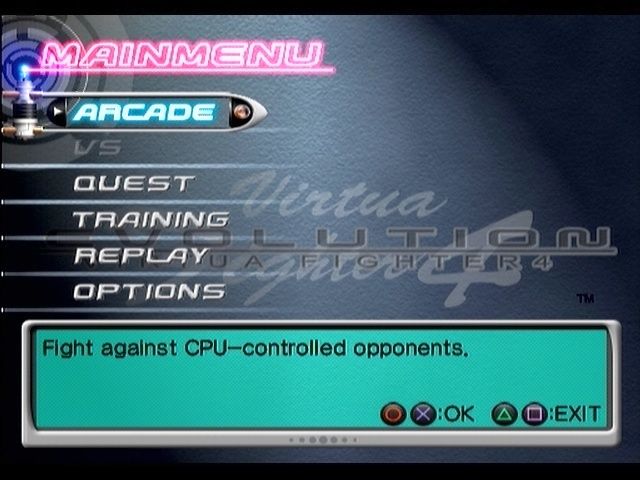
The MAIN MENU is displayed when you press the START button at the Title Screen. Make a selection using the directional buttons ↑↓ and press ◉ or ✖ buttons to enter. Pressing △ or ◉ buttons cancels the selection.
MAIN MENU ITEMS
Play against characters operated by the CPU through 11 stages. Unlimited Continues are possible in this mode.
Compete against a human opponent. A second DUALSHOCK®2 analog controller is required for this mode.
Fight your way through rival opponents at virtual arcades to become the top VF player.
Train your character and improve your fighting skills and techniques.
View replays of previously fought matches.
Adjust various settings, and save/load your System File.
HOW TO PLAY THE GAME
There are six items in the MAIN MENU. The following describes each item in detail as well as how to play the game.
ARCADE
Fight against CPU-controlled opponents. When this item is selected, the CHARACTER SELECT screen is displayed. If ROUTE is set to SELECT in OPTIONS: SETTINGS: GAME, you will be asked to choose a route before selecting a character.
Select a route with the directional buttons ↑ ↓ and press ◉ or ✖ buttons to enter.
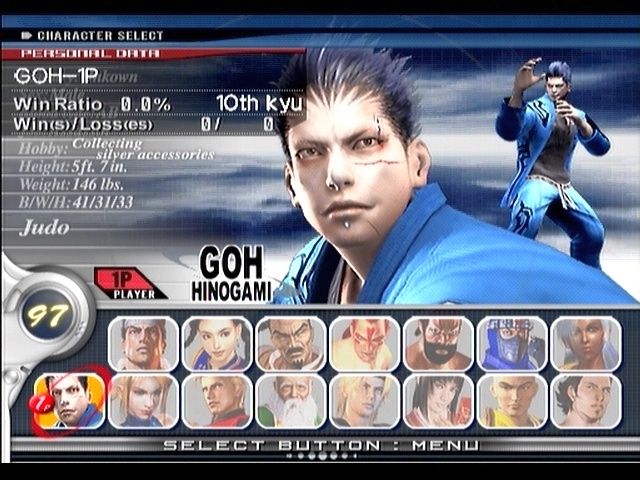
CHARACTER SELECT Screen
Also applies to VS, QUEST and TRAINING. Select a character with the directional buttons ← ➡ ↑ ↓ and press ◉ or ✖ buttons to enter.
Holding down START button lets you change the style of your character's outfit, and SELECT button displays the Player Data Select screen. When VS STAGE is set to SELECT in OPTIONS: SETTINGS: GAME, you can also choose the stage in VS mode.
Player Data Select
Also applies to VS, QUEST and TRAINING. By selecting Switch Player Data and pressing ◉ or ✖ buttons, you can choose one of two sets of Player Data for the highlighted character.
Player Data for each character contains a record of match results, proficiency level and character customization. In QUEST mode, Player Data can be edited by changing the ring name or purchasing equipment.
Loading Player Data
Player data is included in the System File stored on the memory card (8MB) (for PlayStation®2) inserted