Starting the Game
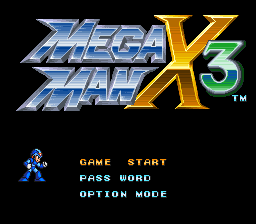
Insert the MEGA MAN X 3 Module into your Super Nintendo Entertainment System and turn it on. Watch the introduction and press START to jump to the title screen. Move the Control-Pad up or down to move MEGA MAN X to one of the three options on the title screen. Press START to select the option. Information on the menu items OPTION MODE and PASSWORD can be found in the corresponding chapters of the game manual.
•
Select GAME START to begin MEGA MAN X 3.
•
To end the game at any point, simply turn off your Nintendo Entertainment System and remove the module.
Weapon Selection Screen
The weapon selection screen is also your status screen. It shows you:
•
Energy tanks/current energy
Use the control pad to select the item you wish to use and press START to resume the game.
•
Weapons: Appear here when you collect them. Each time you defeat a Maverick Boss, you receive their weapon. You can recharge these weapons by collecting weapon capsules.
•
Lives: You start the game with two extra lives. By collecting Mega Man symbols, you can gain more lives. But remember: Zero only has one life, so use it wisely. •
Health Condition: You can enlarge the health bar by collecting the heart tanks hidden in each level. In addition, you can improve the health condition of Mega Man X and Zero by collecting power capsules. •
Energy Tanks: Use your weapons and armor to find hidden energy tanks. Recharge them by collecting power capsules. If your health condition becomes dangerously low, use one of these charged tanks to heal yourself.
•
Level Progression: You can only flee a level after you have destroyed the Maverick Boss that guards that level.
Robot Ride Armor
The armor takes damage when it is hit. You can then recharge it on the platform. However, if the armor breaks, you cannot use it again until you leave the level. Here is a list of some Robot Ride Armors:
•
Chimera: Simply use the normal control functions or regular attack and dash functions inherent to Mega Man X. •
Hawk: Press B to jump, then press the B button again and hold it to hover in the air. Press Y to fire rockets or shoot missiles.
Option Mode
Select OPTION MODE from the title screen to change the button assignments of the control pad or the sound mode.
•
Use the control pad to select the function you want to change. Then press the button that you want to take on that function.
•
SELECT L and SELECT R refer to the buttons used to change weapons during gameplay.
Button Assignments
Sound Mode
•
To change the sound mode from stereo to mono or vice versa, select SOUND MODE with the control pad and then press right or left.
To return to the title screen, go to EXIT and press START.

_1.png)
_2.png)
_3.png)

.png)


 (En,Fr,De,Es).png)