Starting the Game
•
1. Turn OFF the power switch on your Super Nintendo Entertainment System®. •
WARNING: Never try to insert or remove a Game Pak when the power is ON.
•
2. Make sure a Controller is plugged into Controller Socket 1 on the Super NES®. If you're playing against a friend, plug the other Controller into Controller Socket 2.
•
3. Insert the NHL '95 Game Pak into the slot on the Super NES. Press firmly to lock the Game Pak in place.
•
4. Turn ON the power switch. The EA SPORTS™ logo appears. If you don't see it, begin again at step 1. Play Mode Options
•
Exhibition: Play a single game using the teams as they were at the end of the 1994 season. When you have chosen an Exhibition With Trades, you can play a single game using the teams altered by trades you have made.
•
Practice: Set up a practice session with up to two skaters (plus goalie) per side.
•
Season: Begin a new season. NOTE: This erases your previously saved season. Also, continue your saved season at the point you left off. NOTE: Only one season can be saved at a time.
•
Trades: Trade players between the two selected teams.
•
Free Agents: Assign currently available players to a team.
•
Release: Move players from rosters to the Free Agents list.
•
Make Player: Create a new player that is saved on the Free Agents list.
Team Setup and Rules
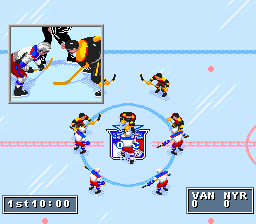
The Home team is on the right side at the top of the Game Setup screen, and the Visitor is on the left. The Home team always wears the light-colored jerseys, and the Visitor wears dark colors.
The Home team faces up-screen in the first period and third periods, down-screen in the second period.
Each game consists of three periods, and one or more overtime periods if necessary. Set the period length at 5, 10, or 20 minutes.
Roster Options
•
Default: Computer-chosen teams.
•
With Trades: User-updated teams (with created players, released player, signed players and trades).
Team and Player Strengths
All the NHL teams are represented in NHL '95. Every player in the game has certain strengths and weaknesses, based on their real performance in the 1993/1994 season.
Before the game begins, the Matchups screen appears. On this screen, opposing teams and starting players are compared. Team and player ratings range from 25 (bad) to 100 (excellent).
At the Matchups screen, press A or Y to see player ratings of the two teams currently competing. Press START to go to the next screen.
•
Press the A and Y buttons to scroll through the team matchups.
•
Press the X button to review the evaluation of the teams.
Trading Players
To trade players:
•
1. At the Game Setup screen, Control Pad up/down to highlight PLAY mode.
•
2. Control Pad right/left to select TRADES.
•
3. Highlight the teams that will be trading and press START. The Trade Players screen appears.
•
4. Control Pad up/down and press B to select the player(s) from Team 1 that you wish to trade.
•
5. Press Y to switch to team 2.
•
6. Control Pad up/down and press B to select or deselect the player(s) you'd like to trade and press START. The players have been traded.
Your trade must be ACCEPTED. It can be REJECTED if the trade is unfair.
Penalties and Off-Sides
When the Penalties option is On, the referees call all the penalties they see.
Penalty shots are awarded when a penalty is committed on the breakaway man (puck carrier that initiates the breakaway). There is a ding sound when a breakaway has occurred. One player is released from the penalty box when the opposing team scores on a Power Play.
The puck must enter the attack zone before any player on the offensive team enters the attack zone, or off-sides will be called. A referee window will pop up to warn you that you are about to have a man off-side.
The referees always catch the off-sides infraction (when you have it ON) and stop the action. The puck is faced off behind the blue line.
Injuries
Sometimes a player takes a vicious hit and must leave the ice for a period or the whole game. He is automatically replaced by a player best suited to play his position.
Line Changes
If you want to make line changes, set Line Changes to ON on the Game Setup screen. Fatigue bars on the right side of the line-name show how fresh (or tired) that line is. The longer the bar, the fresher the line.
You can make line changes whenever action is stopped (end of period, penalty, goal, face off, etc) or whenever you control the puck.
Before each face off, the Line Change window will appear on the screen for a few seconds. Press the letter corresponding to the line you want on the ice. If you don't press a button, the line next to the letter 'Y' will take (or remain on) the ice.
Unless a Power Play is beginning or ending, the line currently on the ice is listed next to the letter 'Y'.
To change lines during play:
•
Press and hold Select to bring up a
.png)

.png)