Control Configurations
There are four different configurations for controlling your car. Pressing up and down on the control pad will illustrate each of the four on screen in turn. Once the configuration you wish to use is on screen, press the A Button to return to the main menu.
Main Selection Screen
The Main Selection Screen will allow the player to access the various options available. To choose a particular option, use the control pad to highlight the various options. Once the option the player wishes to choose is highlighted, press the A Button.
Racing A Circuit
If the player chooses to take part in a single race, then a screen will appear which will allow the player to select which of the sixteen circuits to race on. Moving the Control Pad up and down will select each country in turn. Once the track which the player wishes to race upon is highlighted, pressing the A Button will take the player to Track Information Screen.
Track Information Screen
This screen offers an illustration of the circuit which you are about to race, along with some details, and beneath this the weather and the likelihood of rain. Included is the track record, and a little information about the circuit. Pressing the A Button will move you onto the Race Options Screen.
Race Options Screen
On this screen you are offered the opportunity to modify your car, take part in a Qualifying Lap, or Go To the Race straight away.
To configure your vehicle to suit a particular race, select Race Car Modifications. Should you wish to get straight to the race, highlight race and press the A Button.
Race Car Modifications
The player has the option to set up the car to suit the weather and track conditions. Use the LEFT/RIGHT Button to highlight your selection. To modify your selection, use UP/DOWN on the Control Pad.
There are four parameters that can be changed:
•
1 Tires: The choice is between Hard (default), Soft, and Wet tires. Harder tires wear more slowly, while soft tires improve grip and cornering but require changing sooner. Wet tires must be used if the track has rain on it. If the track is wet, both hard and soft tires handle very poorly. Tire condition is displayed on the control panel.
•
2 Aerofoil: The choice is between High, Mid (default), and Shallow. High improves cornering but increases drag and reduces acceleration. Low results in the best acceleration but the poorest cornering.
•
3 Gear Ratio: Select from Low, Medium (default), and High. Low gears improve acceleration but reduce top speed. Medium offers a balance of acceleration and speed. High has slower acceleration but offers a better top speed.
•
4 Gears: The choice is between Manual and Automatic (default) gears. Automatic relieves the player of the need to change gears, making the game easier to play, though there is a small penalty as the automatic gear change point is not the optimum setting.
From the track information, the player has to assess which characteristic, whether speed or acceleration, is better suited to any particular track.
Qualifying Lap
If the player selects Qualify, the player has the opportunity to compete for grid position. The player has to do one lap and the time taken will determine how many cars are in front of the car at the start of the race.
Go to Race
If you decide not to qualify for the race, then you can automatically begin the race from the back of the grid. This is the fastest way to get into a race, but it will be a lot easier to finish with the leaders if you begin the race at the front of the grid.
The player competes against eleven other cars of varying ability. The competitors' cars are grouped into three classes: four good, four average, and three poor. Each race will take place over five laps.
Pit Stops
The pits are located at the side of the track just after the starting line on almost any circuit, and the player may enter the pits on any lap. On the race tracks, the pits are identifiable as a separate lane separated from the main track by a line of large bollards, and are also shown on the in-game circuit map.
The only reason to enter the pits is to fit new tires. To perform a pit stop:
•
Enter the pits and stop the car by applying the brakes.
•
Select the new type of tire by moving the control pad up and down until the arrow is by the desired type.
An animation sequence of the tires being changed will display. The pit stop takes a random time between 5 and 9 seconds. All competitors' cars make one pit stop.
Race Screen Display
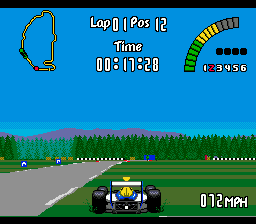
In addition to displaying the track, the in-race screen display contains other relevant information.
Options Screen
This screen allows the player to set various items. Pressing UP and DOWN on the Control Pad will select the options, and pressing LEFT/RIGHT on the Control Pad will change the selected item:
•
2. Speed - Kilometers per hour/Miles per hour
•
3. Audio - Sound effects/Music
Name Selection
Selecting this option will take you to a screen with your current name and a panel featuring all the letters.
•
Use the direction Button on the control pad to move the red line under your desired character, then press the A Button.
•
To delete a character, position the red line under DEL and press the A Button.
•
Once finished, move the red line to "end" and press the A Button.
You will then be taken to a screen to select your nationality by highlighting one of the flags and pressing
.png)

 (Rev 1).png)

.png)
.png)


.png)
.png)

.png)
