Tank Selection
Use the CONTROL PAD to choose the Spectre vehicle you wish to use. Different vehicles are useful for various strategies, and each of the 3 tanks has its own strengths and weaknesses.
If you wish to create a more finely tuned vehicle, select the Custom button. Hit START to lock in your selection.
If you select Strong, Speedy or Balanced, the game will now begin. If you select Custom, the Custom Spectre Settings screen will now appear.
Custom Spectre Settings
Each tank has three properties you can edit:
•
Speed: Speed may range from 1 to 9. You will need to experiment with these settings to become familiar with just how fast a setting feels to you. Hint: A Speedy craft may be more easily destroyed, but in many cases you can play "chicken" against the enemies, run past them and open fire.
•
Shields: Shields range from 1 to 9. Each point reflects a certain amount of damage. The greater the number of shields you have, the more damage you can sustain.
•
Ammo: Ammo may range from 1 to 5. Each point of ammo allows you to carry 10 cannon shots or 1 grenade launch. You may not carry more than the maximum number you set here.
You'll have 15 points to divide between speed, shields, and ammo. Use the C-PAD left/right to move to the proper slide bar, use the C-PAD's Up/Down button to raise or lower that property. When you have finished, press Start to begin the game.
Single Player Game
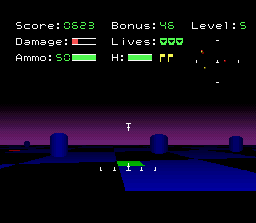
The single player game is played in levels of increasing difficulty. To complete a level you must collect all 4 flags on the level. Flags are represented in your radar as yellow dots. Your enemies are red dots. To collect a flag, just run over it. You will hear a "thud" sound confirming its capture.
You receive points for destroying enemy tanks, but don't hesitate as you get a bonus for completing the level before the time clock runs out. The time clock is displayed at the top of the screen and increases as the levels get more difficult.
On the lower levels, ignore the bonus and concentrate on killing enemy tanks. On the higher levels, your best bet would be to find the flags as fast as possible, rather than fighting the tougher and more varied tanks. Unless of course, you are really good at hunting tanks.
You receive an extra life for every 500 points you earn.
Basic Structures in the Cyber-Net
•
1. Data Flags - Your goals in the cyber-world. Get 4 of them from each cyber-zone before you can move on to the next. The flags represent the data that you are to gain, as you search the cyber-world for your clients.
•
2. Upload Points - Green Squares at which you can replenish your resources and repair damage done by the Intrusion Countermeasure Electronics (I.C.E.).
•
3. Warp Zones - Locations where you can quickly bridge to regions deeper in the cyber-net. Warp Zones are blue and are labeled with their level destination number.
•
4. Data Caches - Non-moving, indestructible corporately owned cubic structures. You don't have the tools to break into these private programs, so don't waste your time. As far as you are concerned, they just get in the way.
•
5. Data Cores - Similar to the corporate cyber structures, the cylindrical shapes indicate government-owned programs. Again, don't mess with them. They usually have nothing to do with the data you are after.
•
6. Static I.C.E. - Sometimes inactive defenders, the spherical structures are automated, mindless defenders that can be programmed to defend the cyber-net in a variety of ways. See MOBILE I.C.E. on page 13.
Counter-Intrusion Software
•
7. Warriors - Simple-minded cyber-space guardians, designed to home in on any nearby intruder and destroy them. The red, box-shaped Warriors are the first hostile defenders you are likely to meet. They will home in on intruders and shoot on sight. A single shot of your cyber-cannons should be enough to destroy these initial guards. Two Player Game
The view in the two player is the same as in the 1 player game, except the screen is split into upper and lower view ports. The top view is Player 1's. The lower view is Player 2.
There are four types of 2 player games:
•
Arena: A Total Free for All. Earn points for each opponent you destroy (see Scoring). The first player with 1000 points wins. After all lives are lost, 200 points are subtracted from the player's score, and the player is allowed to continue. If points are less than 200, game is over. Earn an extra life at 500 points.
•
Allied Attack: Its humans versus the drone tanks. The players must work to capture flags defended by Counter-Intrusion Software (robot tanks). Lives are shared. 500 points earns an extra life.
•
Base Raid: Two teams each with a human and a drone tank. Player 1 and his drone are green. Player 2 and his drone are yellow. No Jump. No Hyperspace. Capture your opponent's flag. First team to earn 1000 points wins. After all lives are lost, 200 points are subtracted from the player's score, and the player is allowed to continue. If points are less than
.png)

.png)