Accessing Options
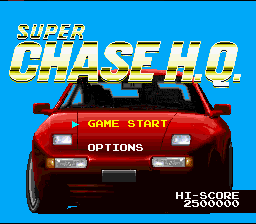
Select OPTIONS on the Title Screen and push Start. In the Options Screen, move the highlight bar to an option, and push left or right on the Control Pad to see its different settings. When finished, push Start.
Options Menu Settings
•
SHIFT: AUTOMATIC / MANUAL
•
STEERING: TYPE 1 / TYPE 2 / TYPE 3
•
CONTROLLER: TYPE 1 / TYPE 2
Shift Settings
If you want to shift your sports car manually with the L and R Buttons, choose MANUAL. In AUTOMATIC, your car automatically shifts up, but you can downshift with the L Button.
Steering Types
•
Type 1: Your steering wheel re-centers itself after a turn.
•
Type 2: Requires more steering control from you.
•
Type 3: You must correct the wheel for each dodge and turn.
Controller Settings
Select CONTROLLER with the Control Pad and a diagram appears showing the button settings for each format. Push left or right to see the settings for the other Controller format.
Difficulty Level
If this is your first undercover mission in a sports car, choose EASY until you become familiar with the vehicle. When you feel ready, move up to the NORMAL setting.
Game Start
To begin the game, select GAME START on the Title Screen and press Start. Before each of the five rounds of criminal pursuit, you'll be briefed on the crime you're investigating and the suspect.
Story and Briefings
At the very beginning of your assignment, you'll be filled in on all the facts currently available regarding the case. Before each round, HQ will send you any new information on the Car-Comp link.
If you prefer to let your instincts guide you rather than HQ, push Start on the story screen to skip the briefing and cut to the chase.
Car-Comp Link
Every undercover cop has a Car-Comp in his vehicle. It's a highly sophisticated computer linkup that sends messages to you from HQ. When a transmission comes through, your screen shows a close-up of the Car-Comp.
Dispatcher Nancy
Nancy puts together criminal information provided by the deep-cover agents. She briefs you on what to expect from the suspect you're chasing and the weapons he carries.
Suspect Description
From Nancy you'll learn what make of car the suspect drives and how he's armed. She can even send you a video image of what the car looks like.
You'll need to cruise around in search of the suspect. When you catch up to him, a CRIMINAL indicator appears by his vehicle. The suspects are spooky and will spot you quickly, so be ready to step on it.
Scoring
Your points accumulate from round to round. Each time you successfully make an arrest, the points are added to your total score. Earning points allows you to rank yourself against other undercover cops. You must capture the suspect to see the Bonus Screen.
Bonus Points
Bonus points are awarded for successfully capturing the criminal, making the arrest with time to spare, and not using all of your nitro accelerators. Low damage levels to your vehicle will also earn you bonus points.
Remember that smashing into the suspect's car doesn't damage your own. To make a quick arrest, hit the other car as often and as hard as you can.
Continuing the Game
Headquarters will only let you total three cars before suspending you. When you run out of time, or your car is totally wrecked, a "CONTINUE?" message appears at the top of the screen.
You have 9 seconds to make your decision and press Start. If you choose to Continue, you start again from the beginning of that round. You can only select the Continue option twice. If you do not continue, you return to the Title Screen.
Round 1: Freeway Chase
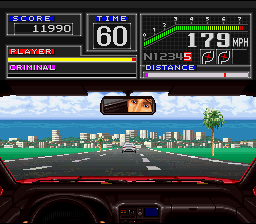
Your first chase will be down a wide freeway choked with traffic. Fortunately, it's a clear, sunny day and visibility is good. You'll be dodging and weaving through miles of slow Sunday drivers at speeds reaching 180 miles per hour.
Round 2: Desert Stake-Out
The next stake-out takes place in the desert down a dirt road at top speed. Avoid plowing through cacti, as they can damage your car. You must also dodge the flaming bottles of gas tossed at your car by dirt bikers.
.png)

.png)
.png)
.png)
.png)
.png)
.png)

.png)
.png)


.png)
.png)

.png)
