VS (2 Players)
Two players each select a character and proceed to battle stations.
•
Press L1/R1 before choosing your characters to select the stage.
STORY (1 Player)
Discover the profound world of BLOODY ROAR II! Develop your character's story as you win and advance. Learn more about each fighter's background and the evolution of his/her bestial counterpart.
The story begins when you select your character. Your opponents appear one by one and more of the story is revealed as you win and advance. If you lose, you can continue the story by selecting YES on the Continue screen.
SURVIVAL (1 Player)
Considerable experience required! Compete to see how many opponents you can defeat with a single life.
Since your Life Energy does not completely recover between rounds (as it does in other modes), it's much more difficult to win and advance.
•
Defeat 15 characters in Survival mode to access the Any Cancel combination attack feature.
WATCH
Take a ringside seat in a match between two computer-controlled characters.
Select both characters (or the same character twice) and grab the popcorn as you watch a pulverizing bout.
CUSTOM (1 or 2 Players)
Battle your way through the challengers. As you obtain each Custom fighting mode by meeting special conditions, your character gains new strengths and more combat upgrades become available.
Game Start
After setting your Custom options, select Game Start, and then select your fighting mode.
•
VS HUMAN: Two players compete.
•
VS COMPUTER: One player vs. the computer.
•
VS COMPUTER ALL MEMBERS: One player vs. all characters controlled by the computer.
•
PRACTICE: Hone your skills and beastly powers against a computer opponent.
•
Wall Display: Toggle ON/OFF to display or hide the background.
•
After Image Mode: Switch ON/OFF to display or hide the after-image of the characters during fights.
•
Default: Restore all default Custom settings.
•
Quit: Return to the Main Menu.
SETTING OPTIONS
Select OPTIONS from the Main Menu to display the Options Menu. Press the D-Pad ↑/↓ to select an option; press the D-Pad ←/→ to adjust the setting.
Press X, ○ or O to confirm, or press △ to cancel and exit back to the Main Menu.
•
The Controller Config and Quit options are also available from the Pause menu by pausing during gameplay.
Memory Card
Use the Memory Card to save, load and autoload game data.
•
Autosave: Turn automatic save. ON/OFF.
•
Load Memory Card Slot 1: Load data from the Memory Card.
•
Save Memory Card Slot 1: Save data to the Memory Card.
Controller Config
Reconfigure the fighting controls to suit the way you play. At the menu, hold down the button you want to reconfigure, and then press the D-Pad ↑/↓ to scroll through the available functions.
When finished, press Start to exit back to the Options menu.
Difficulty
Select the difficulty of defeating the computer player, from 1 (easiest) to 8 (hardest).
Attack Level
Set your fighter's attacking power from 1 to 8.
Time Limit
Set the length of time for each round: 20, 40, 60 or 90 seconds, or infinity.
Match Point
Set the number of rounds required to win a match, from 1 to 4.
Character Select
Adjust character selection to Normal or Quick mode.
Display Type
Choose a display mode that fits the TV you are using.
Sound Options
Toggle between stereo/mono sound and adjust the volume. You can also sample background music and sound effects.
Movies and Pictures
View different animations and illustrations as you win bouts under varying conditions.
Play Data
View the ranking of each play mode.
Vibration
Dual Shock analog controller only. Toggle the vibration feature ON/OFF.
Default
Restore all default Option settings.
Quit
Return to the Main Menu. (Ends the current fight when selected from the Pause menu.)
BEAST MODE
BEAST GAUGE
FIGHTING STRATEGY
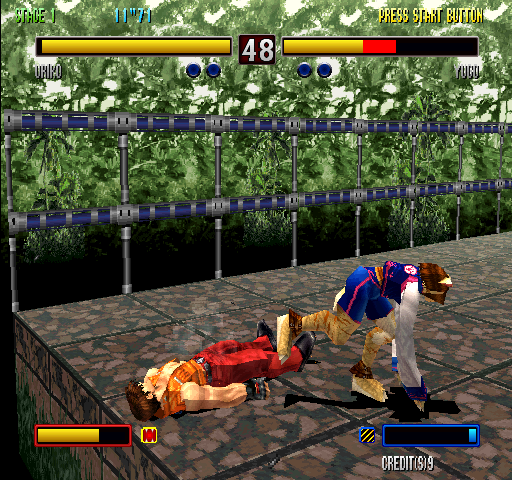
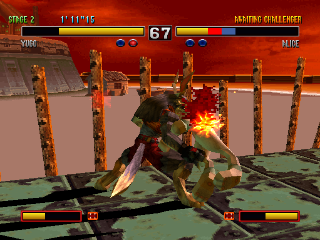
In BLOODY ROAR II, your fighting strategy is to concentrate on morphing into a beast whenever and as often as possible, and using your Rage Move to defeat your opponent. You can only morph when the Beast Gauge shows a "B."
At the start of a round, your Beast Gauge has a half charge and you can morph at any time by pressing the O button (default).
•
Check each character's profile beginning on page 19 for individual Rage Moves.
THE BEAST GAUGE
The Beast Gauge takes on different appearances to indicate its state:
•
APPEARANCE: Yellow (full)
•
STATE: Beast mode. The bar decreases as your Beast character takes damage. It empties when you unleash a Rage Move.
•
APPEARANCE: Yellow (empty)
•
STATE: When the Beast Gauge empties, Beast mode ends if you are knocked out or hit with the opponent's Rage Move.
MORPHING
Your fighter can morph into Beast form when the "B" mark appears in the Beast Gauge. You gain power and the ability to use your Beast'
.png)

.png)
_2.png)

.png)
.png)









.png)