PlayStation Setup
Set up your PlayStation game console according to the instructions in its Instruction Manual. Make sure the power is OFF before inserting or removing a compact disc. Insert the NBA ShootOut 2001 disc and close the Disc Cover. Insert game controllers and turn ON the PlayStation game console. Follow on-screen instructions to start a game. Console Top View
Console Front View
Playing the Game
PREGAME MENU
Use the Pregame Menu to set up your game attributes.
•
START GAME: Loads the game.
•
EDIT STARTERS/GAME OPTIONS/GAME RULES: See Edit Starters on page 12 and Game Options and Game Rules on pages 17–19 for more information.
•
DEFENSIVE MATCHUPS: Preset the defensive matchups for your team to take advantage of your opponent's weaknesses.
•
Press L1/L2 or R1/R2 to choose a team.
•
Press the Up/Down Directional Buttons to select a player for a matchup change and press [button].
•
Press the Up/Down Directional Buttons to select another player and press [button] to complete the switch.
GAME PAUSE MENU
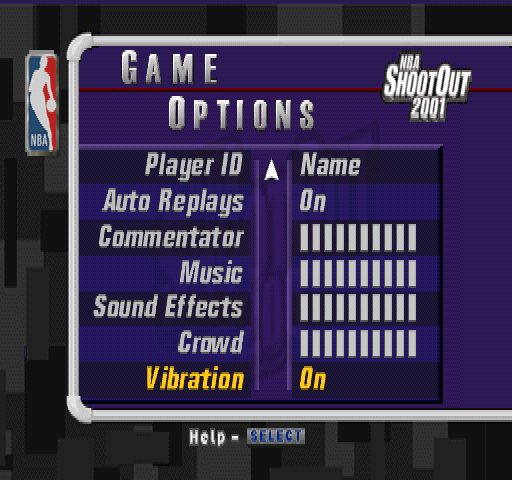
Press the START button to pause the game and bring up the following options. See Game Options on page 17 and Pregame Menu above for more information.
•
TIMEOUT: Use this option to call a timeout. Each team has seven timeouts per game.
•
SUBSTITUTION: Substitute a player off the bench for any player on the court.
•
Press the Left/Right Directional Buttons to select a player position.
•
Press L1 or R1 to cycle through the players on the bench and press [button] to view player info.
•
Press [button] to return to the Pause Menu.
•
Press [button] to return to the game after a player fouls out.
•
CONTROLLERS: Use this option to choose a team during the course of the game or to lock your controller onto a particular player for the entire game. This is perfect for multi-player games.
•
CAMERA VIEW: Choose the camera angle and zoom that provides you with the best possible angle of the court. The Close-up key is set to ON to zoom in when the ball is in the key.
•
REPLAY: Use Replay to view great plays a second time.
•
TEAM STRATEGY: By setting up an Offensive Playbook, Defensive Strategy and Defensive Matchups, you can control the flow of the game with On-The-Fly Play Calling. During the game, press the button combinations you set up to change your offensive and defensive sets.
OFFENSIVE PLAYBOOK
•
Press the Left/Right Directional Buttons to select Set or Play for the button combination.
•
Press the Up/Down Directional Buttons to select a slot.
•
Press L1 or R1 to choose a Set or Play.
DEFENSIVE STRATEGY
•
Press the Up/Down Directional Buttons to select a slot for the button combination.
•
Press L1 or R1 to choose a Play.
DEFENSIVE MATCHUPS
To switch a player's defensive assignment:
•
Press the Left/Right Directional Buttons to select the Offensive player column.
•
Press the Up/Down Directional Buttons to a player to switch his defensive assignment and press [button].
•
Press the Up/Down Directional Buttons to select another player for the defensive swap.
To change defensive pressure:
•
Press the Left/Right Directional Buttons to the Defensive Pressure column.
•
Press L1 or R1 to make a selection.
To change the Double Team option:
•
Press the Left/Right Directional Buttons to the Double Team column.
•
Press L1 or R1 make a change.
•
AUTO SUB: Auto Sub will allow the CPU to automatically substitute players off of the bench for players in foul trouble or tired and ineffective players.
•
PLAYER GAME STATS/TEAM GAME STATS: View up-to-the-minute player and team stats of the game.
•
SHOT CHART: The Shot Chart will show where on the court a player has taken his shots.
Pregame Setup
MENU NAVIGATION
From each menu, use the Up/Down Directional Buttons to highlight the menu options and the Left/Right Directional Buttons to cycle through the available options. Press [button] to bring up the next menu or [button] to return to a previous menu.
HELP
From each menu screen, hold the SELECT button for on-screen help. This will assist you in navigating through the game setup screens.
ROSTERS
The Rosters option gives you a chance to view and alter the roster of every NBA team. A team's roster cannot exceed 12 players.
EDIT STARTERS
Edit the starting lineups for the game or for any team from around the league. Substitute a starter for a player off the bench or simply switch players to different starting positions.
•
Press L1/R1 or L2/R2 to choose a team.
•
Press the Directional Buttons to select a starter. Press [button] to view his player stats, attributes and information. Press the Up Directional Button and then press the Left/Right Directional Buttons to view the stats of other players on the roster. Press


.png)



.png)
