Main Menu Options
•
Create Player: Build your own wrestler with unique looks and attributes.
•
Options: Customize game settings to match your play style.
•
High Scores: View up-to-the-minute statistics for each wrestler.
•
Biographies: Get in-depth information on all wrestlers.
Options Menu
There are four initial options. Press the button to select your choice.
Loading Extra Options
To load extra options from "The Basement", ensure your Memory Card is present. If the Memory Card was inserted after boot-up, enter any previous part of the game where the Memory Card will be read (e.g., exiting the Options menu). The game will load extra options while the Memory Card is being read.
Settings
Adjust settings by pressing the Directional Buttons to highlight, then pressing the Directional Buttons to toggle. Press the BUTTON to return to the Main Menu when finished.
•
Music Volume: Adjust from Silent to Full Volume.
•
Sound F/X Volume: Adjust from Silent to Full Volume.
•
Time Limit: Set game duration from 5 to 30 minutes.
•
Stereo: Toggle between Stereo and Mono audio output.
•
Difficulty: Choose Easy, Medium, or Hard skill settings.
•
Announcer: Turn the in-game announcer On or Off.
•
Camera Angle: Select Low, High, or Top camera angles.
•
Auto Save: (On/Off) When ON, automatically saves progress and updates wrestler statistics. If OFF, you must manually save data.
Controller Config
Highlight "Change" and press the BUTTON. Use the Directional Buttons to highlight an action, then press the button you wish to perform that action. Highlight "Done" and press the BUTTON when finished.
Save Game
After any match, you can save your game on the Save Game screen. Saved games can be accessed the next time you select the same wrestler. The Save Game screen allows saving multiple copies of the game in different memory slots.
If Auto Save is on, it will save game information to the first available slot on the Memory Card.
Delete Game
Use this mode to erase old saved games and free up space for new saves.
Default Controls
These are the default controls. Use Controller Configuration in the options menu to change settings. Visit Training mode to learn each wrestler's repertoire. Use the Moves List on the pause menu to review moves during a game.
•
Kick Out: Rapidly press any action button.
•
Climb Turnbuckle: Walk toward turnbuckle for 2 seconds, or press L2 when next to turnbuckle.
•
Exit/Return to Ring: Press L2 when near ropes or walk toward the ropes for a second.
•
Tag Teammate: Move to teammate and press the L2 BUTTON.
War Zone™ Basics
This section details screen elements, basic rules, and how to get started. See Start Game for details on each game type.
Selecting a Game Type
When START GAME is highlighted, press the BUTTON to go to the player select screen.
Players 1-4
Different games are available based on the number of human players. Press the Directional Buttons to toggle game menus for 1 to 4 players.
To Select a Game Type: Press to highlight a game, then press the BUTTON to select it.
Selecting Wrestlers
After selecting the number of players and game type, select your wrestler by pressing the Directional Pad. Press the X BUTTON when your choice is on screen. Up to two players can select the same wrestler, but one will be considered an impostor. Visit the Biography screen for wrestler attributes, moves, and background.
If you select any wrestler with a Memory Card inserted, the Memory Card will list all your saves for that wrestler.
Choosing a Created Wrestler
If you choose "Created Wrestler", you will go to the roster of saved wrestlers on your Memory Card to select one. If no Memory Card is present or you haven't saved a custom wrestler, you automatically get the default Created wrestler.
Fan Favorite or Rule Breaker
In War Zone™, each wrestler is either a face (crowd favorite) or a heel (rule breaker). In Create Player mode, you can choose to create a Fan Favorite or Rule Breaker.
The Rule Book
•
Each match by default consists of 1 round.
•
Wrestling outside the ring is illegal. You have 10 counts to return to the ring, or else be counted out and lose the round.
•
Biting, gouging, and striking with objects are expressly prohibited.
Screen Elements
Wrestler Name
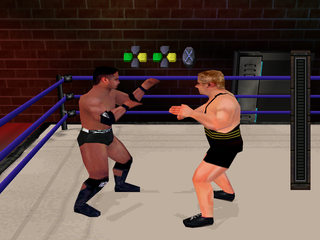
The wrestler's name initially appears white. As a wrestler scores hits, their name turns different shades of blue. When your wrestler's name is blue, you have an advantage in a tie-up. The darker the color, the greater your advantage.
The Power Meter
•
Green: You're in great shape—try anything!
•
Orange: You're tired. You'll need to mash buttons to escape holds and submissions.
•
Red: You're in danger—you can be pinned! Watch out for finishing moves!
Recovery Meter
When a wrestler is stunned, the Power Meter displays "Stun" and becomes a blue Recovery Meter that empties as stun time counts down. Rapidly press buttons to recover faster. If your
 (Rev 1).png)


 (Rev 1).png)









.png)
.png)