Setting Up
1. Set up your PlayStation game console according to the instructions in its instruction manual. Make sure the PlayStation game console power is OFF before inserting or removing a compact disc. 2. Insert the V-Tennis™ disc and close the CD door. Insert game controllers and turn on the PlayStation game console. Follow on-screen instructions to start a game. PlayStation Console Diagram
Game Modes
MATCH MODE
There are 8 women and 8 men players (called "useful players"), and computer players (which are system generated). You can even play against the same player!
•
DOUBLES-1P COM VS. COM COM
•
DOUBLES-1P COM VS. 2P COM
•
DOUBLES - 1P 2P VS. COM COM
TOURNAMENT MODE
In this mode you can challenge yourself to win "The World's Best Tennis Player" title. This competition is separated by men and women, and you can save each match on the memory card.
Screen Display
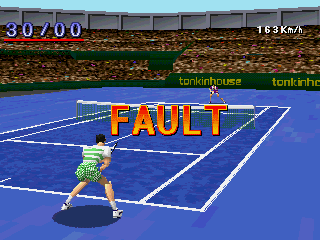
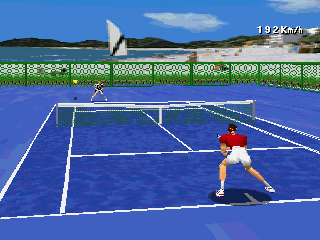
Active Match Screen
Option Screen
When you press the Start Button during the game or before a service toss-up, the OPTION Screen will be displayed. This screen can also be seen in the WATCH mode.
GAME START
When you press the Start Button in the Title Screen, the screen will take you to the MODE SELECT Screen. Select MATCH MODE and start the game by setting the match type.
You can browse through selections with the Directional Pad and finalize your selections with the X Button. To cancel a selection, press the Button.
Controls for Tournament Mode are different. Please refer to the appropriate section for clarification.
Match Mode Setup
1. Finalizing the Mode
Select Singles (5) or Doubles (D) Play with the LEFT or RIGHT Directional Pad. Use the UP or DOWN Directional Pad to select your desired mode, then press the X Button.
2. Player Select
You can select your desired player from one of the 16 useful players. As you scroll through Players, each Player's attributes appear below his or her name. Press the X Button to select a Player.
3. Court Selection
Select the court background of your choice. Depending upon whether you play a doubles or singles match, the background will differ slightly.
4. Surface Select & Set Match Select
Decide the court surface and match type; select your desired court surface with the left-right key. Use the down button to set match type. Press the X BUTTON to finalize your selection.
5. Coin Toss (Racket-Toss)
Before a match starts, there is a racket-toss (to decide serving or court side preference). When you press the X BUTTON, the racket will spin and fall down. The direction of the fallen racket will determine who gets the first choice of service or court side.
If you win the toss, select your choice by using the Directional Pad and finalize your choice with the X button. Now you are ready to play.
•
In this game, the position of the player after the court change is set up as follows:
•
Man VS Computer Mode - The same position as the start of the match.
•
Man VS Man/Watch Mode - Changes sides at each court change.
•
This set-up can be altered in the Option Screen, section TURN.
SURFACES
Hard Court
The surface is made of cement. This is a standard court surface, and the ball bounces highest on this court surface. This surface favors all-around players.
Lawn Court
A vivid green lawn comprises this surface. On this surface, balls will slide low and do not bounce very high. This surface is most advantageous for players who are good at serve-and-volley games.
Clay Court
The surface is natural clay. On this surface, the ball loses speed after bouncing on the court. It may take some time to get used to a clay bounce. Ground-stroke players have the edge on this court.
Carpet Court (For indoor courts only)
The surface is comprised of carpeting laid over concrete. This surface is only available when INDOOR is selected. A ball will not bounce as high on this court as it would on a hard court.
Hitting the Ball
4. Hitting the ball
To hit the tossed ball towards the opponent's court, press the Button - Fast Serve (for the first service), and the X Button - Slow Serve (for the second service). The higher the position of the ball you are hitting, the farther the ball will be travel.
High Technique
By pressing the R1 Button at the moment you hit the ball with the X Button, you can hit a spin serve.
By pressing the L1 Button at the moment you hit the ball with the X Button, you can serve a sliced serve.
About Operation - Strokes/Volleys/Smashes
In tennis, the act of hitting the ball in play is called a stroke, and there are many kinds of strokes. You can stroke the ball differently depending on where your opponent is located, your timing, and the button you press.
.png)

.png)
.png)
.png)

.png)


 (En,Fr,De,Es,It).png)








.png)

.png)


.png)



.png)