GETTING STARTED
Set up your PlayStation®2 computer entertainment system according to the instructions supplied with your system. Check that the system is turned on (the on/standby indicator is green).
Press the OPEN button to open the disc cover. Place the Barbie® in the 12 Dancing Princesses disc with the label side facing up in the disc holder, and then close the disc cover. Attach game controllers and other peripherals as appropriate. Follow the on-screen instructions and refer to this manual for information on using the software.
PlayStation®2 Components
Memory Card (8MB)(for PlayStation®2)
To save game settings and progress, insert a memory card (8MB)(for PlayStation®2) into MEMORY CARD slot 1 of your PlayStation®2 system.
You can load saved game data from the same memory card or any memory card (8MB)(for PlayStation®2) containing previously saved games.
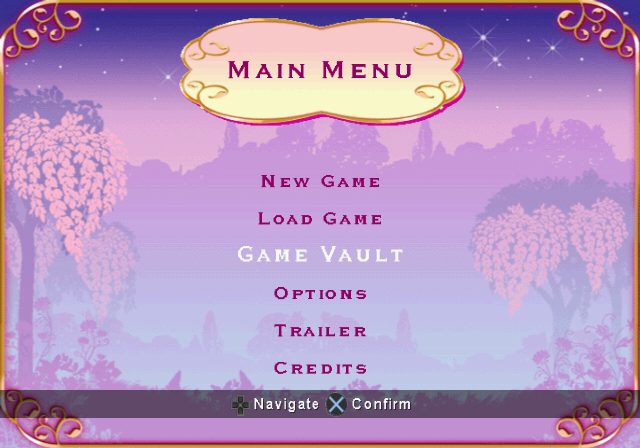
The Main Menu
To navigate the Main Menu, use the directional buttons or the left analog stick to highlight the option you want, then press to select it.
New Game
Select this option to start a new adventure. Enter your name using the directional buttons or the left analog stick to highlight letters, and then press to select them. Select 'OK' when you are finished.
If the name you entered already exists, you must select it from the list or enter a different name. If you choose to play using an existing name, your new game will replace it.
Load Game
If you've played before, highlight your name in the list, then press to load it.
Game Vault
As you complete different challenges during your adventure, you can come to the Game Vault and replay them - just for fun and as many times as you like!
Select Game Vault from the Main Menu and a large Map of the entire Adventure will appear. Use the directional buttons or the left analog stick to click through the different games that are available for you to play, and then press to select the game you want.
Options
Select this option to change game settings. Press the directional buttons or use the left analog stick to highlight the option you want to change, then press the directional buttons or use the left analog stick right or left to adjust the settings.
•
Sound Options – Adjust the volume of music, sound effects and voice-overs.
•
Picture Options – Adjust the position of the picture on your screen.
•
AutoSave Function – Turn the AutoSave function on or off (only available if you have a Memory Card inserted in your PlayStation®2).
•
Vibration Function – Turn controller vibration on or off.
Trailer
See a preview for the movie version of Barbie™ in The 12 Dancing Princesses.
Credits
See a list of all the people who worked on the game.
The Pause Menu
You can pause the game at any time by pressing START. A menu will be displayed with the following options:
Continue
Return to the current game.
Progress
Open a map that shows the area of the magical world that you are currently exploring. This map keeps track of the Princesses you have found by displaying their gems above the area where you found them.
It also shows the total number of Magic Charms you must collect to earn special fireworks, lights and fountains that you can use at the end of the game.
Magic Charms
You will find many Magic Charms scattered throughout the adventure. Collect as many as you can to gain extra fireworks, lights and fountains for your display in the My Show - Finale.
Be quick to catch them, though, or that nasty monkey, Brutus, will snatch them away before your very eyes!
Keys
You will find one gold, one silver and one bronze Key in each of the four areas of the enchanted world. These Keys unlock gates that lead to various activities you must complete. Any Keys you find will be displayed at the top of the screen.
Pressure Platforms
Sometimes Genevieve™ will need to stand on pressure platforms scattered around an area to open pathways or unlock doors.
Dance Star
Whenever you find a princess, you will return to the Central Pavilion where you can play a round of Dance Star and teach fantastic new dance moves to each princess you find.
The Vial of Elixir
The Vial of Elixir is your ultimate goal. You will need to complete all three activities in each of the four game worlds to find it.
The Enchanted Glen
Your adventure begins in a beautiful, magical glade among shimmering trees and sparkling pools. Explore this area to find the Golden Flute.
The three parts of the Flute are hidden in different places throughout the Enchanted Glen, and you must play a game to win each part. A floating disk marks the location of each game. Twyla™ will lead you to them.
Gemstone Juggle (First Part of the Flute)
The first part of the flute is hidden behind leaves in the branches of a magical tree. When apple-gems fall from the tree, press the directional buttons or use the left analog stick to move Twyla™ left and right and bounce the apple-gems back into the branches.
Knock the leaves loose until you find the flute. Three correct hits will completely uncover the flute and a fourth hit will dislodge it.
**Charm the Magpie (Second
.png)

.png)
.png)
.png)
