System Components
Setting Up the Game
Set up your PlayStation®2 computer entertainment system according to the instructions supplied with your system. Check that the system is turned on (the on/standby indicator is green).
Press the OPEN button to open the disc cover. Place the Carol Vorderman's Sudoku disc with the label side facing up in the disc holder, and then close the disc cover. Attach game controllers and other peripherals as appropriate. Follow the on-screen instructions and refer to this manual for information on using the software.
Memory Card
To save game settings and progress, insert a memory card (8MB)(for PlayStation®2) into MEMORY CARD slot 1 before powering on the system. At least 43KB of free space on the memory card is required to save game data.
This game supports saving and loading of game data in MEMORY CARD slot 1 only. You can load saved game data from the same memory card or from any memory card containing previously saved Carol Vorderman's Sudoku games.
Main Menu
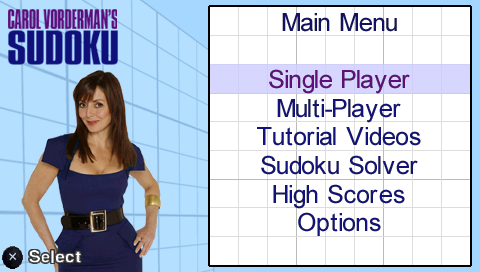
When the game loads, the Main Menu will appear. Use the menu controls to select options:
•
LET'S PLAY SUDOKU - Play the game. There are 3 game modes, described below.
•
HOW TO PLAY SUDOKU – Learn the game's interface and controls. You will also find over 30 minutes of videos, featuring Carol Vorderman explaining the intricacies of Sudoku. Carol will give you an introduction and a master class on Sudoku, with tutorials and hints for all levels of players!
•
PRINT & PLAY - Print puzzles to play them the old-fashioned way.
•
SUDOKU SOLVER - Get Carol's help solving ANY Sudoku puzzle. •
OPTIONS - Change the Assist settings.
•
QUIT - Quit the game and exit back to the Main Menu.
Game Modes
You can choose from three game modes:
•
CLASSIC - Select the puzzle difficulty and see how you fare against the clock. •
CAREER - There are 7 belts to earn throughout your career, starting with the White Belt Challenge. Each belt involves successfully completing a series of puzzles in a specified time. As you move higher up the belts, the puzzles increase in number and in difficulty, and the time allotted for each puzzle decreases. •
CHALLENGE CAROL - To beat Carol, you must overcome all of the Dan Challenges. Each Dan Challenge consists of a number of puzzles that you must successfully complete in a specified time. Start with the 1st Dan Challenge and work your way up to 4th Dan. As you move up the Dans, puzzle difficulty increases, while the times allotted decreases. To gain the ultimate accolade of Sudoku Master, you must earn your Black Belt AND beat the 4th Dan Challenge. Only then can you claim to have out-Sudoku'd Carol! Assists
Carol Vorderman's Sudoku provides numerous Assists to help you solve puzzles. These Assists can be very useful, especially if you are new to Sudoku. Think of Assists as the training wheels on your new bicycle. Try them out!
•
AUTO-HIGHLIGHTS - This visual highlight helps you focus on the appropriate mini-grid, row and column. You can turn this Assist on permanently from the Options Menu.
•
NUMBER SELECTOR HELP – Number selection buttons are grayed out if they cannot be legally placed in the currently highlighted box. (This Assist is not available in Career or Challenge Carol mode.)
•
RULE-BREAK WARNING - Boxes are highlighted when any inserted number breaks the rules of Sudoku. (This Assist is not available in Career or Challenge Carol mode.)
•
ERRORS - Incorrect numbers are highlighted when entered. (This Assist is not available in Career or Challenge Carol mode.)
.png)

.png)