GETTING STARTED
*Note: Illustration may not match all PlayStation®2 console types. For owners of SCPH-70000 series PlayStation®2 systems, refer to the setup instructions supplied with your system.*
Set up your PlayStation®2 computer entertainment system according to the instructions in its Instruction Manual. Make sure the MAIN POWER switch (located on the back of the console) is turned ON.
Press the RESET button. When the power indicator lights up, press the OPEN button and the display will open. Place the Dead To Rights® II disc on the disc tray with the label side facing up. Press the OPEN button again and the disc tray will close.
Attach game controllers and other peripherals, as appropriate. Follow on-screen instructions and refer to this manual for information on using the software.
Memory Card (8MB)(for PlayStation®2)
To save game settings and progress, insert a memory card (8MB) (for PlayStation®2) into MEMORY CARD slot 1 of your PlayStation®2 system.
You can load saved game data from the same memory card or any memory card (8MB) (for PlayStation®2) containing previously saved games. A saved game's data takes up 107KB.
MAIN MENU
Use the main menu to start a new game, load a previously saved game or change the game options.
GAME MODES
New Game
Start the story and uncover the truth in all its bloody glory. In the beginning, you can only select Normal and Easy levels. All other on-screen options become unlocked as you progress through the game.
Load Game
Here you can load a previously saved game and continue with the mayhem.
Instant Action
Show what you're made of by battling through four intense situations. Get out alive or start all over again. Here you have the same initial menu options as New Game.
Bonus
Play through Story Mode and Instant Action Mode to unlock art galleries, more advanced difficulties and additional weapons. You can also view the credits of the people behind the scenes.
Options
Use this menu to change the game settings.
Sound Effects Volume
Change the volume of the sound effects during play.
Music Volume
Change the volume of the music during play.
Reverse Horizontal Axis
Invert the way the camera moves on its horizontal axis.
Reverse Vertical Axis
Invert the way the camera moves on its vertical axis.
Vibration
Enable or disable vibration during play.
Audio
Switch the audio output between Mono, Stereo and Surround.
Video
Switch the screen ratio between 4:3 and 16:9.
Tutorial
Select this menu to familiarize yourself with some of the important game mechanics.
Replay
Select this menu to play a previously unlocked chapter. Once you have completed a chapter, it remains unlocked and accessible in Replay Mode.
Disarm Indicator
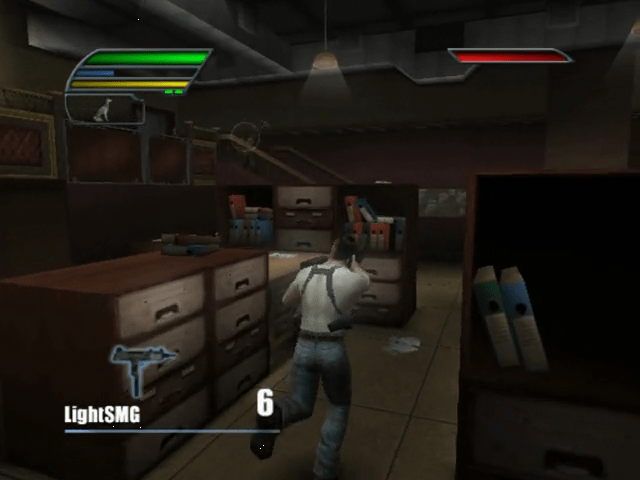
When this icon is green, Jack can perform a disarm. When the icon is red, he must wait to recover more adrenaline.
Shadow Status Icon
This icon shows whether Shadow is ready for action, seeking a target or carrying a weapon back to Jack.
Weapon(s) Equipped
This represents the weapon(s) Jack currently carries.
Ammo Remaining
This number shows how many shells are left in the currently selected weapon.
Targeting Reticule
Jack's current target is highlighted with this reticule.
Enemy Health Gauge
The red bar represents the targeted enemy's remaining life.
KEY GAME MECHANICS
Disarms
The ability to perform disarms is a signature feature of Dead to Rights® II. When Jack is standing in front of an enemy, press the button to grab an enemy and perform one of many deadly disarms. Performing a disarm equips Jack with the enemy's active weapon. Use the directional button with the disarm action to perform a variety of different disarms.
If Jack is behind an enemy and attempts to perform a disarm, he will snap the enemy's neck instead.
Warning: Bosses are immune to disarms and will knock Jack off.
Human Shield
During a gunfight, when Jack is standing near an enemy, press the button to grab an enemy and use him as a human shield. Holding a human shield depletes Jack's adrenaline. Press the button again to kill the enemy.
Wall Mode
With all the bullets that fly in Dead to Rights® II, sometimes you need to take cover. While standing near a wall or a flat surface, press the R2 button to enter Wall Mode. Jack can shimmy left or right along the surface and even peek around corners. Press the Auto-Target button and then the Fire button to spin out from hiding and shoot the targeted enemy. Jack can also enter Wall Mode while crouched.
Shadow
Shadow is Jack's best friend and can be summoned to assist him in several ways. He can perform kills, immobilize enemies and pick up weapons for Jack.
Press the L2 button while locked onto an enemy (using the R1 button) to send Shadow to attack. Shadow's actions are linked to the adrenaline gauge.
If the gauge is full, Shadow performs an immediate kill. If the adrenaline gauge is less than full, Shadow immobilizes the enemy by biting his hands. If no enemy is targeted

_1.png)

.png)

.png)
_1.png)
.png)


_1.png)