GETTING STARTED
Set up your PlayStation®2 computer entertainment system according to the instructions supplied with your system. Check that the system is turned on (the on/standby indicator is green).
Press the OPEN button to open the disc cover. Place the EAGLE EYE GOLF disc with the label side facing up in the disc holder, and then close the disc cover. Attach game controllers and other peripherals as appropriate. Follow the on-screen instructions and refer to this manual for information on using the software.
Memory Card (8MB) (for PlayStation®2)
To save game settings and progress, insert a memory card (8MB) (for PlayStation 2) into MEMORY CARD slot 1 of your PlayStation 2 system. You can load saved game data from the same memory card or any memory card (8MB) (for PlayStation®2) containing previously saved games.
Starting the Game
After creating your system data file, wait for the screen on the right to appear, then press the START button.
Now, you're all set to begin!
EAGLE EYE GOLF CONTROLLER
DUALSHOCK 2 ANALOG CONTROLLER CONFIGURATIONS
•
left analog stick (L3 button when pushed down)
•
right analog stick (R3 button when pushed down)
To enable more than two users to play "Eagle Eye Golf" together, take turns using two controllers inserted in controller ports 1 and 2. Up to four users can enjoy the game this way.
You can also use the multitap (for PlayStation®2) (sold separately) to enable more users to play together.
ENJOY GOLF
CREATE YOUR OWN PLAYER!
You can use the Character Edit feature to create up to four of your own players. You can also groom these characters by collecting Bonus Points.
You can use ready-made characters as well. See page 20 for details of the characters available.
CHARACTER EDIT
First, select the "Character Edit" option from the Main Menu.
When you select the "Character Edit" option and specify a character, the screen shown on the left will be displayed. Press the △ button to call up the Character Setup feature and improve your character's skills.
The first time you create a character, you get ten points. For every two Bonus Points, you can raise your character's status by one level.
Distribute your points wisely and groom your character as you see fit.
There will be a choice of four files: select an empty one. If you want to re-edit a character you created previously, align the cursor with the file in question and press △ button to delete the old character.
Specify your character's name, gender, and other features. When you have finished, select "Save" to save your work to a memory card (8MB) (for PlayStation®2).
UPGRADE YOUR PLAYER USING BONUS POINTS
EARNING STARS
When you score a Birdie or Eagle in either Tournament or Stroke Mode (both of which are single-player modes), you earn a STAR. Each STAR is worth one bonus point. Collect as many as possible, and make your player a force to be reckoned with.
Aim for as many Birdies and Eagles as possible!
Be careful when upgrading your character's status. Once upgraded, a character cannot revert to his or her former status!
ENJOY GOLF
HITTING THE BALL
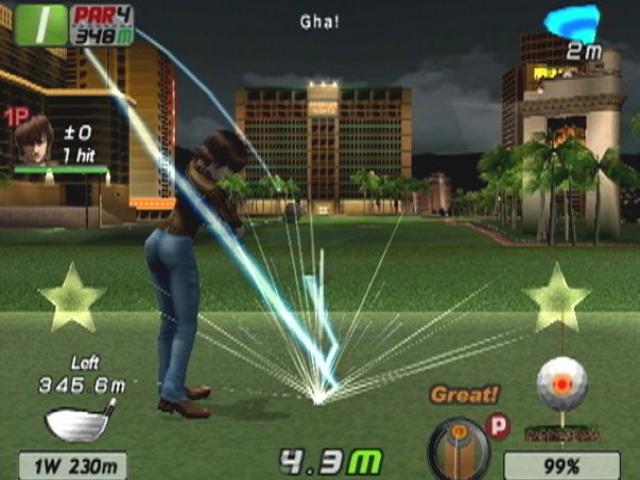
In "Eagle Eye Golf", the right analog stick is used to hit the ball. The key is to learn how to shoot the ball as straight as possible, which you will learn in this section.
Before you hit the ball, move the left analog stick right or left to set the "address", i.e. direction of the shot.
1. Once you have set the address, move the right analog stick down to set the power meter in motion.
2. When the Power Gauge has filled up far enough for the distance you want to cover, MOVE THE RIGHT ANALOG STICK UP! Make sure you stay inside the Impact Zone.
3. How was that? Good Job! Nice Shot!
Are you having trouble hitting the ball properly, no matter how you try? Perhaps you've invited a friend to play a game with you, but, being inexperienced, you find you just can't hit the ball straight. No problem: just select the Beginner Club and Beginner Ball options. Your player's status may drop a little, but at least you won't have to worry about staying inside the Impact Zone!
ENJOY GOLF
PUTTING
In 'Eagle Eye Golf", the gradient of the green is expressed by differences in the color of the gridlines, and by the white dots running along the gridlines. Read the following information carefully so that you will be able to read the green accurately.
The white dots on the grid flow from high points to low points. The steeper the green is, the more numerous the dots. Note that on the gentlest slopes, the dots don't flow at all.
When you putt on a green that slopes to the right, the ball will roll to
.png)

.png)
.png)
.png)

.png)


_1.jpg)



.png)
