GETTING STARTED
Set up your PlayStation®2 computer entertainment system according to its Instruction Manual. Make sure the MAIN POWER switch (on the back of the console) is turned on.
Press the RESET button. When the power indicator lights up, press the (OPEN) button to open the disc tray. Place the FantaVision™ disc on the disc tray with the label side facing up. Press the (OPEN) button again to close the disc tray.
Attach game controllers and other peripherals as appropriate. Follow on-screen instructions and refer to this manual for information on using the software.
MEMORY CARD
To save game settings and progress, insert a MEMORY CARD (8MB) (for PlayStation 2) into MEMORY CARD slot 1 before starting play. You can load your saved games from the same MEMORY CARD (8MB) (for PlayStation 2) or from any MEMORY CARD (8MB) (for PlayStation 2) containing previously saved FantaVision games. The game data, high score, and various settings can be Saved/Loaded using the MEMORY CARD (8MB) (for PlayStation 2). OPTIONS
In the Options Menu, various settings of the game can be changed. Select the item using the Left Analog Stick.
•
SOUND: Set the sound to STEREO or MONO.
•
BGM VOLUME: Turn the volume of the music UP/DOWN.
•
SOUND EFFECTS VOLUME: Turn the volume of the sound effects UP/DOWN.
•
VIBRATION: Set the DUALSHOCK 2 analog controller vibration function ON/OFF.
•
FLASH SOUND EFFECTS DELAY: Set the delay of the sound effects for the fireworks display.
•
EXIT: Exit and return to the previous menu.
PAUSE MENU
Press the START button to Pause the game. When the Pause Menu is displayed, select items using the Left Analog Stick and press the X button to confirm.
•
CONTINUE: Return to the game.
•
OPTIONS: Review and/or change Game Settings.
•
EXIT: Return to the Main Menu.
MAIN MENU
The following items can be selected in the Main Menu. Select items using the Left Analog Stick and press the X button to confirm.
•
GAME START: Starts the game.
•
TUTORIAL: Rules of the game.
•
SAVE/LOAD GAME: Saving and Loading game data.
•
EXTRA: Extra Menu unlocked through normal game.
•
EXIT: Exit to the Title Screen.
RULES OF THE GAME
After the Opening Movie is over, the Title Screen appears. Press the START button to advance to the Main Menu. Please read through the Tutorial Menu for a detailed walkthrough of the game. Select "Game Start" to begin the game.
•
OPTION (Save/Load Settings)
TUTORIAL MENU
•
Basic Rules: Explains the basic rules of the game.
•
Advanced Rules 1: Describes the different types of flares and explosions.
•
Advanced Rules 2: Describes Chain Reactions.
•
Advanced Rules 3: Describes the different types of items and STARMINES.
•
Two-Player Versus: Explains the basic rules of a two-player versus game.
HOW TO PLAY
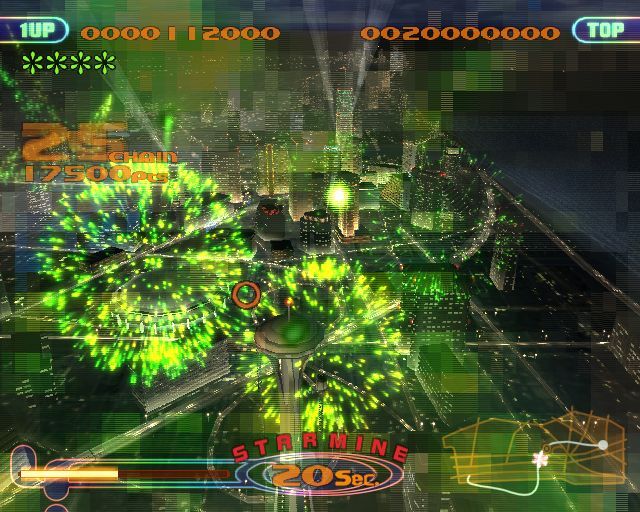
The cursor is used to mark your current position and to identify the desired flare to be captured. The Guideline that extends from the floating Cursor indicates the direction of the Cursor. Using the Left Analog Stick, move the Guideline to the desired flare. The Cursor will move across the Guideline to the desired flare. Press the button to capture the flare. The flares that can be captured are indicated by a Catch Cursor.
Catching the Flare
Seizing the flares with the Cursor is called a "catch." The Catch Cursor is displayed when there is a flare that can be caught at the tip of the Guideline. While the Catch Cursor is displayed, press the X button to move the Cursor across the Guideline and capture the flare marked with the Catch Cursor.
The captured flares are marked with a Catch Mark and the color of that flare is added to the Catch Display. Press the button to flash the captured flares. At least 3 flares of the same color must be captured before you can flash them into an explosive extravaganza.
After you have captured at least 3 flares of the same color, you may successively catch more flares of the same color. However, flares marked with the Catch Mark cannot be captured again. Match the Guideline to the flares and catch by pressing the Ⓧ button.
Flashing
Detonating the flares is known as "flashing." Press the Ⓞ button to flash (detonate) all of the captured flares when more than three flares of the same color are captured. Special items may appear when flares are flashed (detonated).
The on-screen Catch Display will be highlighted to identify when flares can be flashed (detonated). When flares are flashed, the Play Meter will replenish slightly. If you catch three or more flares of the same color, press the O button to detonate all of the captured flares
.png)

.png)
