GETTING STARTED
Set up your PlayStation®2 computer entertainment system according to the instructions in its Instruction Manual. Make sure the MAIN POWER switch (located on the back of the console) is turned on.
Press the RESET button. When the power indicator lights up, press the open button and the disc tray will open. Place the GUNGRAVE™ disc on the disc tray with the label side facing up. Press the open button again and the disc tray will close.
Attach game controllers and other peripherals, as appropriate. Follow on-screen instructions and refer to this manual for information on using the software.
PlayStation®2 Connections
MEMORY CARD (8MB) (for PlayStation®2)
GUNGRAVE™ supports MEMORY CARD slot 1. To save the game in GUNGRAVE™, manually save and load the game data from the Main Menu.
Insertion or removal of the memory card (8MB) (for PlayStation®2) after switching the console on may cause data to be overwritten or lost.
Controller
GUNGRAVE™ is a one-player game that is played using the DUAL SHOCK®2 analog controller. Connect the controller to be used to controller port 1.
DUALSHOCK®2 ANALOG CONTROLLER CONFIGURATIONS
•
left analog stick (L3 button when pushed down)
•
right analog stick (R3 button when pushed down)
The DUALSHOCK®2 analog controller will default to ANALOG mode (mode indicator: Red) on boot-up. The vibration function can be turned ON/OFF from the Option Screen.
STARTING UP
After inserting the GUNGRAVE™ disc into the console and turning on the power, the opening scene begins. Press any buttons to display the Main Menu on the Title Screen.
Main Menu
Start a new game.
Resume gameplay from a previous game.
Change game settings.
SAVE
After clearing each stage, there will be an intermission. At the intermission screen, if you select "SAVE & QUIT" from the menu displayed at the top of the screen, game-data to this point will be saved onto a memory card (8MB) (For PlayStation®2) (sold separately).
To save game data onto a memory card (8MB) (For PlayStation®2), insert a memory card (8MB) (For PlayStation®2) into MEMORY CARD slot 1. At least 80KB of free space is required. Only one file can be saved onto a memory card (8MB) (For PlayStation®2). After game data is saved, you can either return to the Title Screen or resume gameplay.
OPTIONS
Change settings such as gameplay settings, controller configuration and extra features. Details of each option item are as follows:
Settings such as Difficulty, Vibration, Rapid Shooting and Blood Display can be switched to ON/OFF.
You can adjust the volume of the BGM and sound effects, as well as Stereo or Mono.
Change control settings.
Gameplay data of this game will be displayed.
Additional features. The more you proceed in the game, the more items will be unlocked.
Save or load updated settings or stages you have cleared.
LOAD
On the Title Screen, if CONTINUE is selected, you can re-start gameplay from a point where game data was saved onto a memory card (8MB) (For PlayStation®2).
CONTINUE
To restart gameplay from an area where Grave was killed, select YES on the CONTINUE Screen. If NO is selected, the game will be over.
HOW TO PLAY
PURPOSE
You, as BEYOND THE GRAVE, have to proceed in the game by battling against members of the Syndicate. You must defeat enemies one after another, using both your guns as well as the coffin on your back.
As you progress, "GO!" will be displayed onscreen to indicate the direction you should head. The "TARGET" sign will be displayed when a key enemy such as a boss appears. Defeat the target in each stage to clear the stage and proceed.
GAME OVER
The game will be over when the Life Gauge displayed in the top right of the screen drops to 0. The Life Gauge drops when Grave is attacked with the Shield Gauge at 0, or if he's damaged by a bomb blast or exploding objects.
HOW TO VIEW A SCREEN
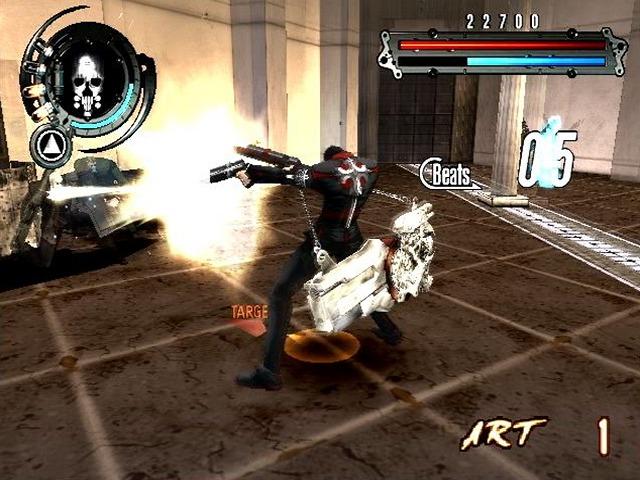
This counter shows how many Demolition Shots you have left. It can store up to 9 shots.
This gauge increases when the Beat Count reaches a certain amount. If this gauge is full, you will receive more Demolition Shots.
The current score. The score goes up by defeating enemies or destroying objects
.png)

.png)
.png)
.png)

.png)

.png)
_1.png)
.png)


_1.jpg)

_1.jpg)
_1.png)
_1.png)

.png)
_1.png)

.png)