You've got what it takes to create the greatest theme parks in the world! Whether you're building crazy coasters, talking to guests, riding the rides, or playing games, your job is to keep people happy — and keep Globo-Joy's saboteurs at bay! The options are endless! So what are you waiting for? Let's make some thrills!
Press the button at the Title Screen to be taken to the Main Menu. You'll see five options: New Game, Party Play, Coaster Builder, Load Game, and Options.
Use the left analog stick or directional buttons to highlight a selection, and press the button to confirm your choice. Press the button to return to the Main Menu or go up one level in the menu.
Game Modes
NEW GAME
Begin a new game and help Uncle Mortimer create the greatest theme parks in the world.
PARTY PLAY
Have a blast playing a number of 1-4 player mini-games.
COASTER BUILDER
Build and design thrilling new coasters!
LOAD GAME
Load previously saved data and continue your progress.
OPTIONS
Access and adjust various game options.
•
SFX Volume: Adjust the volume of the in-game sound effects.
•
Music Volume: Adjust the volume of the in-game music.
•
Speech Volume: Adjust the volume of speech.
•
Controller Vibration: Toggle controller vibration ON/OFF.
•
Camera Invert: Toggle camera inversion ON/OFF.
•
Movie Subtitles: Toggle movie subtitles ON/OFF.
•
Tutorials: Toggle tutorials during new games ON/OFF.
•
Menu Color Scheme: Change the menu colors to one of ten color schemes.
•
View Cutscene: Watch previously unlocked cutscenes here.
Press the button while roaming in your theme park to pause the game and open the Pause Menu. Use the left analog stick or directional buttons to highlight an option and press the button to confirm your choice. Press the button to resume your game or go up one level in the menu.
OPTIONS
Adjust the various game options. The available options are identical to those of the Main Menu.
TUTORIALS
Select from a variety of comprehensive tutorials to help you learn more about managing your park.
SAVE
Save your game so that you can continue from this point when you return.
EXIT TO HQ
Leave the park and go to the HQ. Here, you can customize your character, switch parks, save your game, adjust the game options, and view any trophies and prizes you've earned or achieved.
Starting a New Game
Select NEW GAME from the Main Menu to watch the intro movie with Uncle Mortimer. At the Character select screen, use the left analog stick or directional buttons to cycle through your available choices. Press the button to confirm your choice.
If you want, you can customize your character by highlighting APPEARANCE, CLOTHING, or EDIT NAME and pressing the button.
New to the Park
Customizing gives you the freedom to configure your character's appearance with various head, hair, clothing, and color options. Select an option and press the left analog stick or directional buttons / to choose the part you want to customize, then press the button to bring up a list of options for that category, and press the left analog stick or directional buttons/ to change the appearance of that part.
You can also edit your character's name by selecting the EDIT NAME feature. When you're ready to go, highlight START GAME and press the button to head to the park!
Loading a Game
Selecting LOAD GAME from the Main Menu will allow you to choose previously played game data and continue from where you left off. If you have unlocked more than one park, you can select which one you want to start from.
Saving the Game
In order to save your game, exit any mini-game you may be involved in and then press the button to enter the Pause Menu. Select SAVE and press the button to confirm your choice.
Game Screen
The Game Screen has a few functions that change according to the context of the action on the screen.
•
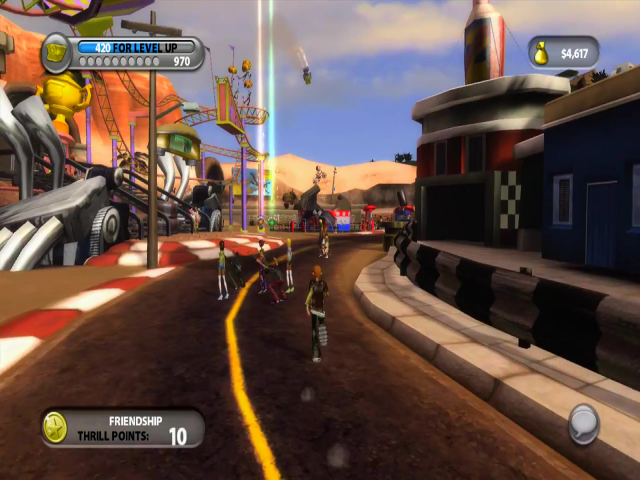
Status Window: The status window shows the amount of money you have, current progress toward your next park, and the amount of missions you've completed. The progress bar turns green as it fills up.
•
Action Button: This small circle in the lower right-hand corner of the screen changes according to what's available for you to do.
•
The HAND icon appears around attractions like Coasters, Rides, and Games. It will give you options to ride, play, manage, paint, and do many other things with your attractions.
•
When the icon is an ID CARD, you are speaking with a member of your staff. You can take control of a staff member and perform their duties.
•
If the icon is a CHAT BUBBLE, you can speak to a park guest.
•
A BRICKS icon means that you can build in this area.
•
Information Box: The information box tells you when you have unlocked new missions and designs, earned money, and other important information about your park.
Tutorials
Once you begin your first game, you'll be dropped into your park and ready for action. In front of you will be five tutorial icons, representing Business, Guests, Build, Games, and Upkeep. Approach the tutorial of your choice and select it.
You'll be given a thorough tour of the first mission for each icon, which will set you on the path to creating the greatest theme park ever. Completing all five of these will tell you everything you need to know! Each tutorial
.png)

.png)
.png)
.png)

.png)
_1.png)
_1.png)


 (En,Fr,De,Es).png)








_(En,Fr,Es).png)