Getting Started
Illustration may not match all PlayStation 2 console types. For owners of SCPH-70000 series PlayStation 2 systems, refer to the setup instructions supplied with your system. Set up your PlayStation®2 computer entertainment system according to the instructions in its Instruction Manual. Make sure the MAIN POWER switch (located on the back of the console) is turned ON.
•
When the power indicator lights up, press the OPEN button and the disc tray will open.
•
Place the WPT disc on the disc tray with the label side facing up.
•
Press the OPEN button again and the disc tray will close.
•
Attach game controllers and other peripherals, as appropriate.
•
Follow on-screen instructions and refer to this manual for information on using the software.
Main Menu
Use this menu to choose your game type, set options or view the credits.
Play Poker
The Play Poker option allows you to participate in either a Quick Draw or WPT Season game. Either Select an existing Player or highlight an "Empty" slot and press button to create a new player. See Create Player for more details.
Create Player
To create a new player, highlight an "empty" character slot and press the button to start the player creation process.
When creating a new player, you can use the available sliders to customize your player's Appearance, Face shape, Facial Features, Body, Tops, Bottoms, Shoes, Accessories and Personality.
•
On the Create Player menu, move the directional button UP and DOWN to highlight a feature to change.
•
Move the directional button LEFT or RIGHT to change the highlighted feature.
•
You can also press the button to randomize the features.
•
When you are satisfied with your selections, press the button to accept the changes you have made.
Select a WPT Pro
You can choose to play as one of the WPT pros. To do so, highlight an "empty" slot on the Select a Player screen and press the button to bring up a list of WPT pros to choose from.
Edit Player
To change the appearance of a character that has already been created, go to the Player Select screen, Highlight the desired player and press the button.
Quick Draw
For a quick game of poker, use the Quick Draw selection.
Quick Draw Options
•
Game - The game type. See Poker Games for more information.
•
Location - The arena in which the poker game is played: Select from The Illusion, Commerce Casino, The Bicycle Casino, WPT at Sea, Aviation Club de France, The Millennium Casino, Bay 101, Foxwoods Resort Casino, Borgata and Aruba.
•
Limit - Set the amount one can bet in a single turn: No Limit, Limit, Pot Limit, Half-Pot Limit.
•
Buy-in - Set the buy-in for the tournament.
•
Number of Players - Set the number of players for the game.
•
Opponent Skill - Set the skill of each opponent in the game: Amateur, Professional, WPT All-Stars.
•
Blinds/Ante Levels - The blinds increase over time. Set the amount of time before each blind increase: 5, 10, 15 or 20 minutes.
WPT Season
Ever wanted to be a professional poker player? Think of the fame and money you will earn as you battle your way to the top in WPT Season mode. Start out playing local small games and earn enough money to make it to the big World Poker Tour tournaments.
•
Satellite Game - The Satellite game is a great place to start and earn money and a chance at a free buy-in to the Super Satellite game.
•
Super Satellite Game - If you want to break in to the tournament finale, you should use the Super Satellite to get a chance for a free buy-in. Be careful; the stakes are higher and the competition is smarter.
•
Tournament Finale - This game is for the serious players only. With a steep buy-in and tough competition, you better get some practice under your belt before you sit at the table in the tournament finale.
Once you complete the tournament finale of your current level, you will move on to the next level of play. Work your way through amateur and professional seasons to earn entry to the Battle of Champions and a chance to become the WPT World Champion!
Achievements
While you are playing WPT under any Player Profile, you can earn trophies and Reward Chips by getting good poker hands, winning tournaments and other in game events. Your statistics, Reward Chips and trophies are recorded. Go to Achievements to view them.
Reward Chips
When you receive Reward chips, you can use them to purchase special items and clothing for your player. Use the edit player feature in the Player Select screen to adjust the appearance of your player.
See page 17 for more main menu options.
Poker Overview
Blinds
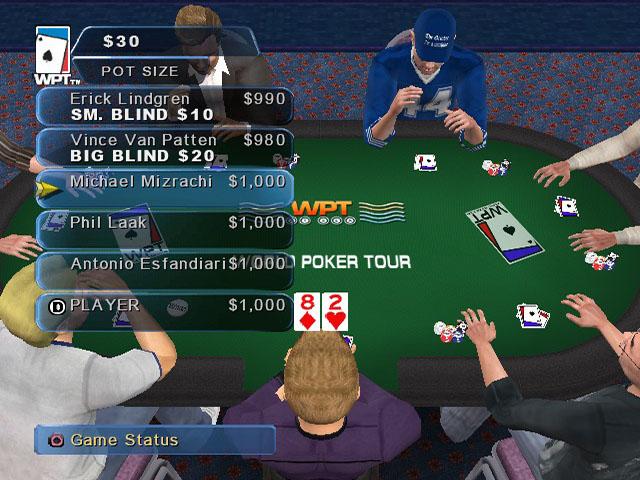
At the start of each hand two "Blind" bets are put up or "posted." The player immediately to the left of the dealer posts the small blind, which is equal to half the minimum bet. The Player to the left of the small blind posts the big blind, which is equivalent to the minimum bet for the table.
No other players put in money at the start of the hand. As the dealer rotates around the table so do the blinds. Blinds are posted at the beginning to assure that at least one player
.png)

.png)




.png)


_1.jpg)



.png)
