Cartridge Care
When not playing, keep the game pak in its box to minimize damage.
•
Do not expose the Game Pak to water, dirt, or excessive heat or cold. Be sure to completely dry a wet Game Pak before using it.
•
Do not attempt to take the Game Pak apart.
•
Do not bend the Game Pak or subject it to any violent impact.
•
To clean a dirty Game Pak, carefully wipe it with a soft cloth dipped in soapy water. Do not use paraffin, paint thinners, alcohol, or any similar solvent.
Getting Started
•
With the Power Switch OFF, insert the COOL SPOT Game Pak, its label facing towards you, into the Game Boy and press it down firmly.
•
Push the Power Switch to ON. After a second or so, the Nintendo Screen will appear. When the COOL SPOT Title Screen is shown you are ready to play COOL SPOT!
•
If the Nintendo Screen or Title Screen doesn't appear, push the Power Switch to OFF. Ensure your Game Boy is set up correctly (do the batteries need replacing?) and the COOL SPOT game pak is properly inserted before pushing the Power Switch to ON again.
Important Reminder
Always ensure the Game Boy's Power Switch is set to OFF before inserting or removing the COOL SPOT game pak.
The Title Screen
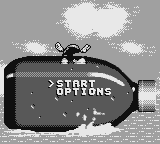
After the Nintendo Screen and the Virgin Interactive Entertainment Credits, you will see the COOL SPOT Title Screen. It has two options: 'START' and 'OPTIONS'. The Cool Arrow points to the selected option. The high score of 50,000 points is displayed. Your high score is lost when the Game Boy is turned OFF.
•
Press the Start Button on the Title Screen to begin play.
•
Press the Control Pad up or down to move the Cool Arrow between the options.
•
Press the A or B Button to select the option.
The Options Screen
Selecting 'OPTIONS' on the Title Screen presents three new options.
•
Press the Control Pad up or down to move the Cool Arrow between the options.
•
Press the A or B Button to change the highlighted option.
Skill
This option determines the difficulty. You can choose between 'EASY', 'NORMAL', and 'HARD'. This affects the number of Cool Points needed to complete a level, qualify for the Bonus Game, and earn an extra COOL SPOT character.
The Skill setting also determines the number and type of Uncool Characters you will meet in a level, and the possibility of an Uncool Character leaving behind a Cool Glass.
Music
The default is 'ON'. Select 'OFF' if you don't want to listen to the music.
Effects
The default is 'ON'. Select 'OFF' if you don't want to listen to any noises. It is recommended to keep effects on, as they help you anticipate what's around the corner.
Cool Points
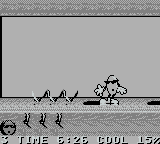
Every Cool Counter collected increases your Cool Points by a single percentage. Collect 100 percent for an extra COOL SPOT character and 10,000 bonus points. To see your score, pause the game.
Health
Represented by a SPOT. If COOL SPOT bumps into an Uncool Character, his health deteriorates, and the SPOT on the Status Panel disintegrates. The SPOT flashes when COOL SPOT has only one unit of energy left. A COOL SPOT character is lost when your health level is depleted.
Cool Spot Characters Remaining
When no more COOL SPOT characters remain, it's Game Over. You start with 3 COOL SPOT characters.
There are three ways to earn extra COOL SPOT characters: collect 100 Cool Points, find hidden 1-Up tokens, or score 50,000, 75,000, or 100,000 points, depending on the DIFFICULTY setting.
Your Score
You score points for removing Uncool Characters from play and acquiring Cool Collectibles.
Time Remaining
You have a limited time to complete a level. When time is running out, a jingle plays. The jingle gets faster until no more time remains. If the music runs out, you lose a COOL SPOT character.
If you have any COOL SPOT characters remaining, you will resume play from the beginning of the level or the last Restart Flagpole touched. You can increase your time limit by collecting Stopwatches.
Cool Hand
A Cool Hand always points the way to the cage where your SPOT friend is held captive. If you spot the cage before you have enough Cool Shots, a large Cool Hand will point back to the level, indicating you need to collect more Cool Points.
Controlling Cool Spot
•
Press the Control Pad left or right to move COOL SPOT in those directions whether he is on solid ground or in the air. When the Control Pad is held down, COOL SPOT will eventually run along solid ground.
•
Press the Control Pad down when COOL SPOT is on solid ground to make him look down. The screen will move slightly so you can spot what is below.
•
Press the Control Pad up or down when COOL SPOT is on a rope of any description to make him climb in those directions.
•
Press the Control Pad in any direction at any time then press the A Button to make COOL SPOT throw SPOT Shots.
•
Press the B Button to make COOL SPOT jump straight up, whether he is on a rope of any description or on solid ground. The longer the B Button is held down, the higher COOL SPOT will jump.
•
Press the Control Pad left or right then press the B Button to make COOL SPOT perform a somersault in those directions.
Hold It!
.png)

.png)
.png)
