Loading the Game
1. Make sure the power switch is OFF.
2. Insert the All-Star Baseball™ 2003 Game Pak as described in your Nintendo® Game Boy® Advance instruction booklet.
3. Turn the power switch ON.
Note: The ALL-STAR BASEBALL 2003 Game Pak is for Game Boy® Advance only.
All-Star Baseball 2003 supports up to two players using the Game Boy® Advance Game Link® cable (sold separately). Each player must have an All-Star Baseball 2003 Game Pak.
At the title screen, press START to advance to the Main Menu.
Controller Layout
Main Menu Options
•
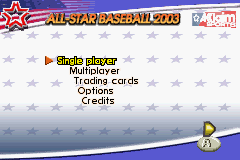
Single Player: Access all 1 Player game types: Quick Game, Exhibition, All-Star Game®, Batting Practice, Home Run Derby™, Season and World Series®.
•
Multiplayer: Allows 2 Player Exhibition Mode link between two Game Boy® Advance systems using the Game Link® cable.
•
Trading Cards: View and swap Trading Cards earned during games.
•
Options: Adjust various options.
•
Credits: View the roster of talents who made this game for you.
Options Settings
These are the basic game options. Note that several more are available in-game on the Pause menu.
•
Music Volume: Move slider right (louder) or left (softer) to adjust music volume.
•
Effects Volume: Move slider right (louder) or left (softer) to adjust effects volume.
Defense: Pitching
Pitch Selection
Each pitcher has up to five pitches to choose from. His best pitch is at the top of the list, his worst at the bottom. Press ↓ or ↑ on the Control Pad to highlight a pitch, then press the A Button to select it.
Adjusting Fielders
While the Pitch Select box is still up (before a pitch is actually selected), you can:
•
Press the L Button to toggle through Outfield positioning options.
•
Press the R Button to toggle Infield positioning options.
This allows you to adjust to game situations.
Aiming and Throwing
•
Press a direction on the Control Pad to move the pitch target to the desired location.
•
Once a pitch is selected and located, press the A Button to throw the pitch.
Offense: At Bat
•
Press the A Button to swing.
•
Press the B Button to bunt.
•
Press the Control Pad to move the batting target.
•
Press the Control Pad + R Button to tilt the batting target.
•
Press SELECT to toggle the batting target from contact swing to power swing.
On the Bases
•
Pressing a direction on the Control Pad + A Button will advance a runner from a given base. Use the same controls to return a runner to a previously occupied base.
•
On the batting/pitching screen (before a pitch is thrown), press a direction on the Control Pad + L Button to attempt a stolen base.
Pause Menu
Press START while a pitcher is on the mound and a player is at bat to access the pause options.
•
Play Ball: Return to gameplay.
•
Box Score: View current tallies for each team.
•
Manage Bullpen: While on defense, you can choose to bring in a fresh pitcher from the bullpen. Highlight the pitcher you wish to bring in and press the A Button.
•
Change Lineup: Swap player positions during a game.
•
Pinch Hitter: Substitute a different hitter. This player takes the current hitter's place both at bat and in the field. The other player is out of the game.
•
Game Options: Set game options (see Options section for details).
•
Change Controls: Choose to control the other team currently playing.
•
Quit Game: Quit the current game and return to the Main Menu.
Single Player Modes
The following modes are for one player. In most Single Player games (except Quick Game), you choose which teams compete and which team you control, as well as Rookie, Veteran, or All-Star difficulty levels.
Quick Game
Quick Game mode is a one-game match between two teams randomly chosen for you. You only need to choose your difficulty setting.
Selecting Teams and Difficulty Level
•
Press left arrow or right arrow on the Control Pad to toggle selection arrows among team areas and the difficulty selection.
•
Press up arrow or down arrow on the Control Pad to cycle through teams or difficulty settings.
•
Press the A Button to advance when your teams and difficulty are set.
In Quick Game, Exhibition, and All-Star Game modes, you can control either team. In modes like Season and Series, you only select the team you will control, and the computer picks opponents.
Exhibition
An exhibition game is a single game that doesn't affect standings or stats-it's just for fun. Setup is similar to Quick Play, except you choose teams.
All-Star Game™
This one-game midsummer classic is a favorite with players and fans. In this mode, you choose to control the American or National League All-Star team and set the difficulty level.
The All-Star rosters are automatically chosen by the computer based on the 2001 season. If you wish to change the roster players, press START to pause the game, then select Change Lineup.
Batting Practice
Brush up on your batting skills with Batting Practice. Once


.png)

_1.jpg)
.png)
.png)



 (En,Fr,De).png)

 (Beta 1).png)
.png)