Getting Started
•
Turn OFF the power switch on the Game Boy® Advance. Never insert or remove a Game Pak when the power is on.
•
Insert the Game Pak into the slot on the Game Boy® Advance. To lock the Game Pak in place, press firmly.
•
Turn ON the power switch. The Language Select screen will appear (if this does not happen, begin again at step 1).
Controls
Character controls are the same whether you play the OLD or NEW versions.
In Main Screen:
•
Control Pad: Moves the Character/Cursor
•
A Button: Jump/Make a Selection
•
B Button: Blow Bubbles/Cancel
•
R Button: Turns On/Off the score Display
•
L Button: Switches Display Modes
•
START: Pause Menu/Make a Selection
•
Default settings. You can change them in BUTTON SETTINGS screen.
In Selection Screen:
•
Control Pad: Move cursor
Game Modes
Below is a description of game modes available.
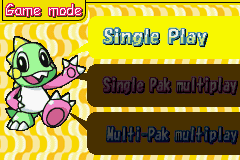
SINGLE PLAY
A single player mode. You play as BUBBLEN. Once you complete a stage, you can come back to it any time. Best scores are saved in the score ranking.
1 GAME PAK MULTIPLAY
Using 1 BUBBLE BOBBLE OLD & NEW Game Pak, you can play a multiplayer game with your friend. You can only play the OLD version. Best scores are not saved. Player 1 plays as BUBBLEN, and Player 2 plays as BOBBLEN.
Game Versions
There are 2 versions (OLD & NEW) of games available to play.
•
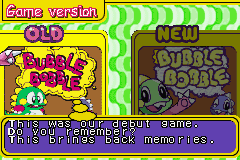
OLD: The 1986 arcade classic version. Stages, enemies & items are exactly the same as the original.
•
NEW: A Game Boy® Advance original version with vastly improved graphics and sound. An ITEM LIBRARY (See P.18) is also added to record all the items you discover during the game.
There are 2 save files on the screen. Select one file by pressing Right or Left on the Control Pad, and press the A Button to make your selection.
Starting the Game
Below is a description of how to start a game.
Title Screen
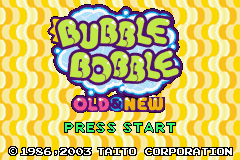
After turning ON the power switch on the Game Boy® Advance, an opening movie is played, followed by a title screen. Press the START to go to the SELECT SAVE FILE screen.
Select Save File Screen
There are 2 save files on the screen. Select one file by pressing Right or Left on the Control Pad, and press the A Button to make your selection.
About the Auto Save Function
The game is saved automatically at game over.
Continue the Game
On each save file, the player's progress is shown. Select a save file, and you can resume the game at the point where you left off.
Delete the Game
If you want to delete the data within a save file, first select a save file you want to delete. Then select DELETE. A confirmation message is displayed. Select YES to delete the data.
Game Modes Select
Once you select a save file, a GAME MODES SELECT screen is displayed. Select a mode you want to play by pressing Up or Down on the Control Pad, and press the A Button to make your selection.
Single Mode
OLD and NEW versions are available to play. Select a version you want to play by pressing Right and Left on the Control Pad, and press the A Button to make your selection.
1 GAME PAK MULTIPLAY
Only the OLD version is available in this mode.
2 GAME PAK MULTIPLAY
Both the OLD and NEW versions are available to play.
Game Version Select
In this screen, select either the OLD or NEW version by pressing the Right or Left on the Control Pad, and press the A Button to make your selection.
Game Title Screen
After selecting a game version, a corresponding game title screen is displayed.
•
OLD: Old version title screen is displayed. Press START to begin the game.
•
NEW: Select either GAME START or ITEM LIBRARY by pressing Up and Down on the Control Pad, and press A Button to make your selection.
Round Select Screen
In this screen, you can start a game from any round you have already completed. Select a round by pressing Up and Down on the Control Pad, and press the A Button to make your selection.
•
NOTE: When you start a game for the first time, you can only select to play from round 1.
Switching Display Modes
While playing a game, press the L Button to switch between Full Screen Mode and Scroll Mode.
Pause Menu
While playing a game, press START to display the PAUSE MENU.
•
RETURN: Exit the pause menu and return to the game
•
GIVE UP: Quit the game and return to the title screen.
•
BOBBLEN: Once certain conditions are met, you can play with CPU controlled BOBBLEN. Select this option to make BOBBLEN appear in the game.
Score Ranking
After the game ends, the Score Ranking screen is displayed. The Top 5 scores are shown in the screen. If your score is higher than the 5th highest score, your score along with your name (up to 3 characters) is saved. Select a character by

_1.png)
.png)
 (En,Fr,De,Es,It).png)
.png)


_1.png)





.png)