Starting the Game
1. Turn ON the power switch on your Sega Saturn™ system. 2. Make sure a control pad is plugged into the port labelled Control 1 on the Sega Saturn™ system. 3. Open the disc tray and place the Battlestations disc inside.
4. After the opening video sequence, press START and the Main menu appears. D-Pad UP/DOWN to select a 1 or 2 PLAYER game, and press START.
Press START at each screen to continue. To begin Arcade play immediately, see the Quick Start section. Press START to bypass the demo. Game Modes
Whether you crave pure head-to-head fighting or strategic missions, Battlestations supplies instant gratification. Select from three game modes:
•
ARCADE: Compete in multiple ship-to-ship battles against a friend or the computer. Earn Commission points when you sink your opponent's ship, and advance through 10 naval ranks to become Fleet Admiral. •
CAMPAIGN: Challenge a computer-animated Commander to one of 10 strategic missions, from recovering a lost research party to liberating your homeland. Deploy and mobilise an assigned fleet and lead your ships into one-on-one combat to secure your goal.
•
WAR GAMES: Compete against a friend in War, Capture the Harbour, and Capture the Flag. Create diverse War Games by placing the fleet of your choice in any of the 26 coastal locales.
Quick Start
These instructions take you directly to ship-to-ship fighting, known as Tactical Combat. To lead a mission, see Campaign or War Games.
To BEGIN Tactical Combat:
1. At the Main menu, D-Pad UP/DOWN to highlight 1 PLAYER or 2 PLAYER, and press C. A game mode screen appears.
2. Press START to select ARCADE. The ship select screen appears. 3. D-Pad to select a ship from the eight available, and press START. Tactical Combat begins.
Controlling a Ship Icon
In order to secure your position on the Strategic Map, keep in mind the objective of your selected mission, then deploy your fleet accordingly. You can place single ships on Auto-pilot, send them on their way, and form Task Forces to strong-arm the enemy.
TO PILOT A SHIP:
1. Press A to cycle through ships. A target box surrounds the selected ship.
2. D-Pad in the direction you want the ship to head.
•
To identify the ship you control, press Right SHIFT. An abbreviation of the ship's class appears.
Task Force
A group of up to four ships that travel together, perfect for an aggressive attack.
TO CREATE A TASK FORCE:
1. Draw near a friendly ship and press X. The friendly ship joins the lead ship.
2. To add a third or fourth ship, select a ship, draw near the task force, then press X.
•
To exit a Task Force, press X. The selected ship exits.
Note: Tactical Combat is always one-on-one. If you attack a Task Force, the first battle is against the ship nearest yours. If you win, the next battles are against the middle ships, then finally the outermost ship.
Auto-Pilot
Auto-pilot is essential for mobilising a great number of ships.
•
To assign Auto-pilot to a single ship or Task Force, press Z + D-Pad. The ship continues in the assigned direction until it is obstructed.
•
To resume manual control, select the ship and D-Pad.
Strategic Features
At the Strategic Map, the Submarine and Mine Layer each have a strategic feature you initiate by pressing Y.
•
Submarine: Submerge the Submarine and send it on a stealth mission to enemy lines. If an enemy ship is in the same vicinity, the enemy's icon turns red.
•
Mine Layer: Build up to two undetected mine fields with the Mine Layer. Enemy ships suffer damage and carry it over into Tactical Combat.
Party Time
When two opposing ships are in the same vicinity, their icons become red. At this point, either ship can initiate Tactical Combat.
Note: When Tactical Combat is initiated, all ship icons freeze. They resume course when you return to the Strategic Map.
•
To initiate Tactical Combat, press C.
Land-Based Structures
Three land-based structures appear in Campaign mode:
•
Missile Silo: Launches missiles at passing ships. Use a Troop Transport to initiate Tactical Combat with the silo.
•
Shore Battery: Initiates Tactical Combat with a passing ship. Any ship can engage in combat with a battery, but not every ship can destroy it.
•
Power Plant: Provides power to nearby batteries. Send in your marines and destroy a power plant to disable allied structures.
Mission Debriefing
At the end of a mission, you get a statistical summary to gauge your performance.
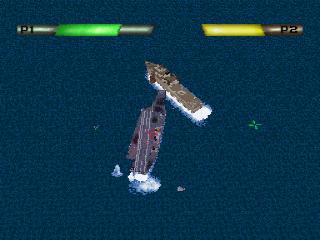
Tactical Combat
When a ship survives in Campaign or War Games mode, it moves to the next battle with damage suffered. To abort the fly-around view, press B.
Once a player initiates Tactical Combat from the Strategic Map, there is no turning back. This is a ship-to-ship fight to the death.
Note: In Arcade mode you engage immediately in Tactical Combat; the Strategic map is not available. Note: Before heading into battle, study your ship of choice and learn what distinguishes it from others.