USING THE SEGA SATURN
Set up your Sega Saturn system by following the instructions in the Sega Saturn Instruction Manual. Plug in Control Pad 1. For 2-player games, plug in Control Pad 2 also. •
Note: Fighting Vipers is for one or two players. •
Place the Fighting Vipers disc, label side up, in the well of the CD tray and close the lid. •
Turn on the TV or monitor and the Sega Saturn. The Sega Saturn logo will appear on screen. •
If nothing appears, turn the system off and make sure it is set up correctly before turning it on again.
Important: Your Sega Saturn compact disc contains a security code that allows the disc to be read. Be sure to keep the disc clean and handle it carefully. If your Sega Saturn system has trouble reading the disc, remove the disc and wipe it carefully, starting from the center of the disc and wiping straight out toward the edge. Stopping the Game
If you wish to stop a game in progress and return to the on-screen Control Panel, simultaneously press Buttons A, B, C and Start on the Sega Saturn Control Pad. When the game Title screen appears, press again to go to the on-screen Control Panel. QUICK START
Pressing Start at the Title screen brings up the Mode Select screen menu. Press the D-Pad UP or DOWN to highlight modes, and Button A, C or Start to select. For a one-player fight against the computer select Arcade Mode; to play against another person, select VS Mode.
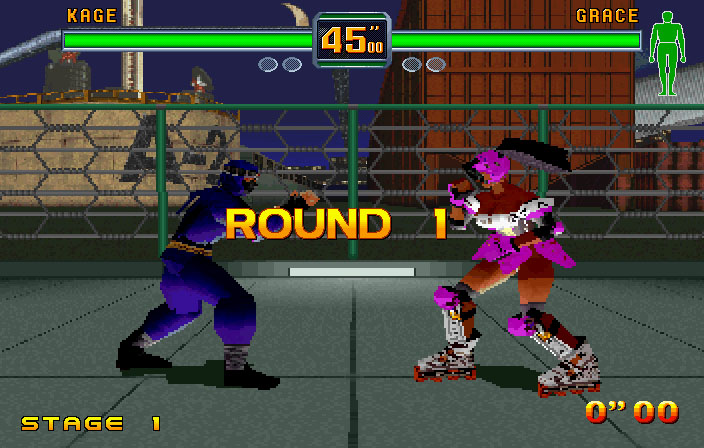
In both of these fighting modes, a Player Select screen appears. Press the D-Pad LEFT or RIGHT to highlight a fighter, and Button A, C or Start to select. In all fighting modes, Control Pad 1 controls the fighter facing right and Control Pad 2 controls the character facing left. The Control Pads are configured to default settings when you first play the game. The default setting [Type A] has these functions: •
D-Pad: Maneuvers your character
•
Start Button: Pauses game; restarts paused game
•
Button A: Performs defensive guard moves [D]
•
Button B: Throws punches [P]
The Control Pads can be reconfigured to suit your fighting style. The object of the fight is to reduce your opponent's life gauge to zero. Do this by punching, kicking, stomping, pounding and executing an arsenal of special attacks before time runs out. In the default setting the fighter who wins twice wins the match.
•
In Arcade Mode, you face each of the Vipers in sequence.
•
In VS Mode, the Player Select screen reappears after every stage.
STARTING UP
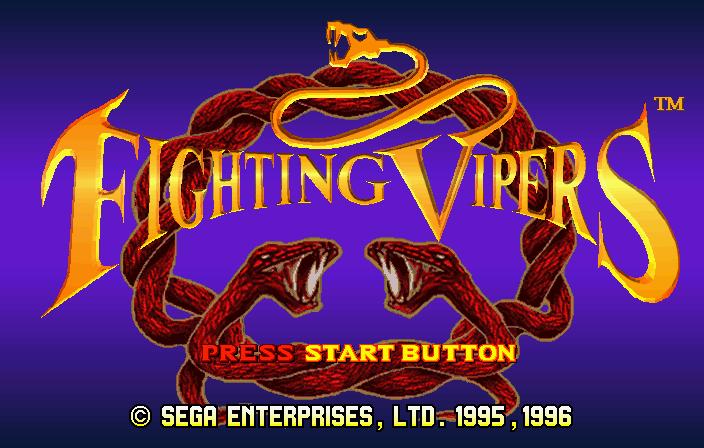
The Title screen appears after the Sega logo. Press Start at the Title screen to bring up the Mode Select screen, or wait to see the animated game intro and game demo that follow. Press Start at any time during the intro loop to return to the Title screen. In the Mode Select screen menu, press the D-Pad UP or DOWN to scroll through the modes, and press Button A, C or Start to select.
•
ARCADE MODE lets you take your favorite Viper through an eight stage tournament against computer-controlled opponents. Clear all the stages to see the game credits and a special animation sequence featuring your Viper.
•
VS MODE allows you and a friend to duke it out against each other in a combat ring of your choosing.
•
TRAINING MODE gives you a chance to practice your skills (or take out your frustrations) on a passive computer-controlled opponent.
•
TEAM BATTLE MODE lets you pick teams of Vipers to fight against squads created by the CPU or a human opponent.
•
PLAYBACK MODE shows video records of the matches you have saved. It also features exhibition matches so you can check out the competition without risking your life.
•
BACKUP RECORD displays fighting records for VS and Arcade Modes. •
OPTIONS lets you configure some aspects of the game, and sample the sounds, voices and music you hear in Fighting Vipers. Note: A second player can enter an Arcade Mode match by pressing Start on the unused Control Pad at any time during play. The Player Select screen appears, allowing the second player to choose a Viper.
Note: Arcade Mode and VS Mode both feature individual Options screens accessible from within those modes.
Note: Any game mode can be canceled at any time by holding down Buttons A, B, C and Start simultaneously. This returns you to the Title screen.
ENTER THE FRAY
ARCADE MODE
When you enter Arcade Mode, the Player Select screen appears. Press the D-Pad LEFT or RIGHT to highlight a Viper, and Button A, C or Start to select. Pressing the D-Pad UP or DOWN while a Viper is highlighted changes the armor for that character for the tournament. You have 20 seconds to select a Viper; when time runs out, the highlighted character is automatically selected. Press Button Y in Player Select to return to the Mode Select screen.
VS MODE
The VS Mode Player Select screen appears. Both players select Vipers to use in action against each other. Select fighters as in