The Serve
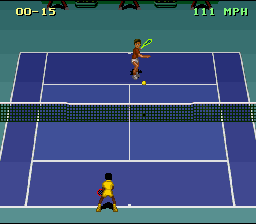
At the service, you see a cursor moving across the court. This is the spot where the ball will touch the ground if you release the button immediately. For a good serve, aim this cursor at the correct part of the court where you want the ball to land.
The cursor turns red if you hit a side spin serve.
Serve Controls
•
A/Y: fake top spin serve
•
B: easy serve—not very strong, but safe
•
X: stronger, high speed serve—but very risky
•
R: side spin right serve
Easy Control Serve
The easiest serve is the B button serve. Press the B button and hold it pressed until the computer moves the cursor and strikes the ball.
To serve using the other buttons, press and hold the button while controlling the direction of the serve with the control pad. The computer will strike the ball.
Full Control Serve
The easiest serve is the B button serve. Press the B button and wait until the computer moves the cursor and strikes the ball.
The player has complete control over all other serves. You must move the cursor to the right place and release the button at the right time to complete a successful serve.
Striking the Ball
When you press a button, your player swings his racquet back. He does not strike immediately! He strikes when you RELEASE the button.
While you are pressing the button, you can control the results of your shot in several ways:
•
Control the DIRECTION of the ball using the control pad.
•
Control the LENGTH of the shot by using UP and DOWN on the control pad.
The longer the elapsed time, the better the shot. For example, a very quick shot will result in a very sharp angle. The success of a shot also depends on the distance between player and ball.
Tips Against the Pros
•
Train by competing in EXHIBITION MODE against PROFESSIONALS.
•
Learn which are your opponent's weakest shots and try to play to them.
•
Rush the net whenever possible. But be sure to prepare for it—a fast long shot is good preparation and may give you enough time to move up.
•
CONCENTRATE! Especially during semi-finals and finals.
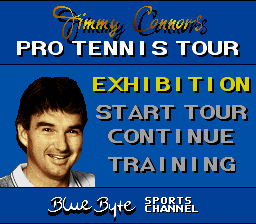
Main Menu Structure
Exhibition Menu Structure
Exhibition Mode
The EXHIBITION Menu allows you to modify almost all of the play characteristics for a single match. Unlike the TOUR mode, you can play as a player other than Jimmy Connors. You can also play doubles with one or two human players. The Playing Court Options
Choose this option to select your favorite playing surface. Grass, Hard, Clay, Indoor, Desert, and Antarctica courts are available.
•
GRASS COURT: Ball jumps very low, but moves very fast.
•
HARD COURT: Ball jumps high and moves fast.
•
CLAY COURT: Ball jumps low and moves slowly.
•
INDOOR COURT: Ball jumps very high and moves very fast.
•
DESERT COURT: Ball jumps very low, and moves very slowly.
•
ANTARTICA COURT: Ball jumps very low, and moves very slowly.
The TRAINING COURT reacts like a GRASS COURT.
Number of Sets to Win
Choose one, three, or five sets needed to win the match. Remember that a best of three match can last five sets, so playing the match may take a long time.
Play Mode Options
Play Mode allows you to choose Singles or Doubles play, and the number of human players playing the match.
Singles options:
•
human player vs. computer opponent
•
human player vs. human opponent
•
computer player vs. computer player (computer demo)
Doubles options:
•
two human players vs. two computer opponents
•
human & computer players vs. two computer opponents
•
human & computer players vs. human & computer opponents
•
two computers players vs. two computer opponents (computer demo)
Player Identity
After you have selected the options above, you can choose the identity of your player and your player's opponent from the sixteen players available.
To change the player selected, press a button on the control pad when the text above the player you want to choose is highlighted.
Control Mode and Skill Level
Select EASY or FULL control. After you have chosen your player(s), you will be asked to choose EASY or FULL playing mode for your human player(s) and the skill level AMATEUR, INTERMEDIATE, or PROFESSIONAL for your computer opponents. Continue for each player.
The Easy Mode
If you choose the easy mode in the SELECT PLAYER Menu or START TOUR, your player's movements on the court are controlled by the computer, so that you can concentrate solely on your strokes and hitting the ball.
The serve is much easier in EASY mode: you only need to hit the correct area of the court with the cursor after you press the button. It does not matter when you release the button. When you have made all the choices above, press start to begin the match.
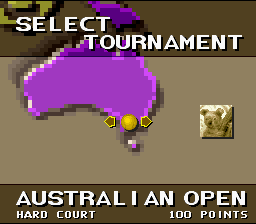
Start Tour
Select this option to begin a new tournament year. You play as Jimmy Connors, ace tennis pro. Each month you choose and play a single tournament from the list of one to three tournaments available. You earn ranking points each time you win a match. The number of points
.png)

.png)





_1.png)
.png)
_1.png)
.png)
 (En).png)
.png)
.png)
.png)