Starting the Game
•
Turn off your Super Nintendo Entertainment System by sliding the POWER bar away from the Game Pak slot. •
For one player football action, plug a single controller into the system.
•
For two-player competition, plug in a second controller.
•
For three- or four-player action, connect your Multi-Player Adapter to the second port on the system and connect the second, third, and fourth controllers directly to the Multi-Player Adapter.
•
Insert the NCAA Football Game Pak, label facing front, in the system Game Pak slot.
•
Turn on the system by sliding the POWER bar toward the Game Pak slot.
•
As the title screen sequence rolls, press START to go to the first set-up options screen.
Multi-Player Game
The person who presses B first takes control of the player closest to the ball, and the person that presses B second takes control of the player who is second closest to the ball.
If a pass or a pitch is made to a player not controlled by the second user, it will give control of the new ball carrier to the owner of the previous ball carrier. For example, if Player 1 controls the QB and Player 2 controls a WR, and the play calls for a handoff to the RB, Player 1 maintains control of the RB after the handoff. If, however, Player 2 was controlling the RB before the handoff, then Player 2 maintains control.
Setting Up for Play
To get set for NCAA Football action, you make a quick series of choices about the kind of competition you're up for, what team you want to take onto the field, what opponent you want to take on, and so forth.
Here's how to set up for play, organized by the heading on each menu of choices you'll see.
Game Options
The GAME OPTIONS screen lets you choose EXHIBITION or TOURNAMENT play. Use the control pad up and down keys to highlight your choice, then press START or A.
EXHIBITION competition consists of just one game with two teams of your choice for 1-4 players. Use the control pad to scroll through the teams. Hit START to select a team. Select a Home Team then a Visiting Team.
In TOURNAMENT play, you take a team of your choice through a grueling single-elimination tournament involving 16 teams in all. You can choose any of 16 collegiate powerhouse teams from the last four decades—the 60s, 70s, 80s, or 90s—or set up your own "Sweaty Sixteen."
Use your up and down control pad buttons to highlight the "BEST OF" from the decades you want, or choose USER SPECIFIED to create your own tournament field. Press Y, B, A or START to confirm your choice.
If you've chosen a decade, you'll next see the field of teams on a SELECT TEAM screen. Use your up and down control pad buttons to scroll through and highlight the one you want to control, then press START.
You'll see your team in the tournament elimination diagram that appears, above or below the team you face next. You can scroll right and left through the elimination diagram using the left and right control pad buttons. Press START when you're ready to begin play, and you'll go to the TODAY'S MATCHUP screen.
Today's Matchup
On this menu, you specify the length of each quarter in the game to be played, and the weather conditions under which the game will be played (EXHIBITION play only). Use the control pad buttons to highlight your choices, and press START to confirm them and go on.
Player Selection
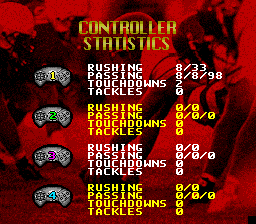
On this screen, you assign controllers to each of the two teams slated to play. You can assign two controllers per team. If only one player is playing, the Super Nintendo will control the other team. Use the control pad to select the controller to be assigned, and to place the controller under the team it's assigned to. When you're finished, press START.
On the Gridiron
NCAA Football is easy to play and tough to master. After reading the following tips, keep this instruction book handy—you'll find yourself turning to the "GAME CONTROLS" and "THE PLAYBOOK" sections frequently as you get the hang of player controls, strategy, and other fine points of execution and competition.
The Kickoff
When your team is kicking off, press and hold the B button until you reach the power you want. Release the B button. Hit the B button again to mark the angle of the kick.
The Player Under Control
The player under your control is highlighted by a colored disk under his feet on screen. At the start of each play, the quarterback is automatically defined as the player under control on offense. The default defensive player differs with each defensive type.
As detailed under "GAME CONTROLS," you can change the player under your control during plays, both on offense and on defense. It will switch between players slower if more than one person is trying to switch at once. Let the first player press switch and so on.
Selecting Plays
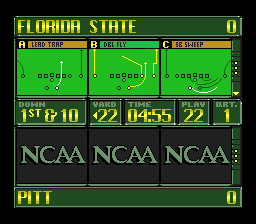
After each kick-off, play from scrimmage, change of possession, and touchdown, players on both offense and defense get to select a play from the playbook. The computer will choose a default play for you (not necessarily one of the three listed).
You have as long as the play clock has left if you are offense. If you are defense, you have 5 seconds after the offense chooses a play, or the computer will choose for you
.png)

.png)
.png)
