Getting Started
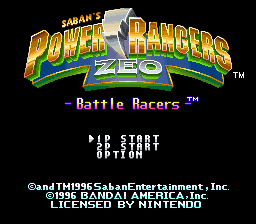
Insert the game pak in your Super NES unit and turn the power on. The Title Screen will appear. Select either 1 Player Start (1P Start), 2 Player Start (2P Start), or OPTION by using the Control Pad to highlight the desired choice, and then press the START or B Button.
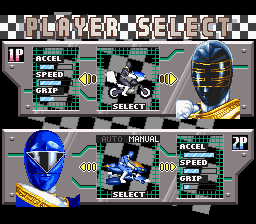
If you select 1P Start or 2P Start, you will move directly to the Player Select Screen.
If you select OPTION, you will access the Option Screen. Press the START Button again to return to the Title Screen. The Option Screen allows you to:
•
Select Mono or Stereo sound
•
Choose the difficulty level (Novice, Pro, and Expert)
•
Choose the position of your rear view mirror on the Game Screen (up or down)
•
Set up the configuration of the Controller
How to Play the Game
POWER RANGERS ZEO Battle Racers is a combination racing game and Demolition Derby complete with Blasters. It is played on 5 Tracks which include a total of 16 race courses filled with obstacles and speed energizers. There are no rules in Battle Racers except one: win the race any way you can! The game can be played in 1 Player or 2 Player-Simultaneous Modes.
1 Player Mode Setup
If you select the one Player Mode, you will be able to choose Race, Time Trial, or vs CPU Modes. After you choose any of these Modes, you will advance to the Player Select Screen.
You can choose one of the following eight Characters and their corresponding Vehicle:
•
ZEO RANGER 1 (Pink) - Hover Craft
•
ZEO RANGER 2 (Yellow) - Dune Buggy
•
ZEO RANGER 3 (Blue) - Hover Craft
•
ZEO RANGER 4 (Green) - Dune Buggy
•
ZEO RANGER 5 (Red) - JET CYCLE
•
The GOLD RANGER - JET CYCLE
•
KING MONDO - 3-Wheel Chopper
Each Character/Vehicle has three attributes which are shown on the left side of the Player Select screen:
•
Acceleration: Refers to how fast the vehicle can accelerate.
•
Speed: Indicates the vehicle's top speed.
•
Grip: Refers to the vehicle's traction.
Press the Control Pad to highlight one of the Characters and press the B Button to select your choice.
Transmission and Course Selection
After you select a Character/Vehicle, you can choose between Manual and Auto Modes. In Auto Mode, the vehicles automatically shift their own gears as you accelerate and decelerate. In Manual Mode, you must shift gears yourself. Press the R Button to upshift and press the L Button to downshift.
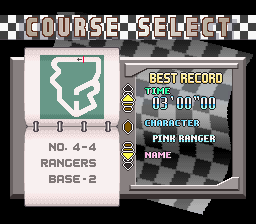
After you select a Character, you will advance to the Track Screen which lists your opponents. Then, you automatically advance to the Course Select Screen. Press the Control Pad up or down to access a Course, then press the B Button to select your choice and start the race.
1 Player Modes
There are three different 1 Player Modes of play: Race Mode, Time Trial Mode, and vs CPU Mode.
Race Mode
In the Race Mode, you compete against three other drivers. You have to successfully complete five Tracks to win. Each Track has a predetermined number of Courses in it. For example, Track 1 includes Courses 1 and 2.
Points are awarded based on your finishing position:
At the end of each race, you advance to the Results Screen where the point totals for the latest race are shown. The screen shows the four characters in the race, their times and their points.
Then, you advance to the Driver's Score Screen where the total points for all the races in all five Tracks are shown. If you finish in first or second place after all five Tracks, you win!
After the Driver's Score Screen, you advance to the Best Time/Name Entry Screen where you can enter your name if you have finished the race within a specific amount of time.
Time Trial Mode
Time Trial Mode is like a practice mode. It allows you to race on any of the sixteen tracks in the five Courses. You can choose any of the eight characters, and you race for five laps against the clock.
When you finish a race, you can choose to retry the Track, change to a different Course, change drivers, or end the game. Use the Control Pad to highlight your desired choice and press the B Button to activate the choice.
vs CPU Mode
In the vs CPU Mode, you choose a Character and the computer chooses your opponent. You can race for five laps on any of the 16 Tracks with five Blaster shots per race.
When you finish a race, you can choose to retry the Track, change to a different Course, change drivers, or end the game.
2 Player Modes
There are five 2-Player-Simultaneous Modes of play: Race Mode, 2P vs Mode, Point Race Mode, Bumper Chase Mode, and Blaster Master Mode.
2P Race Mode
In Race Mode, you and a friend each race against the computer in a split screen format. On the Racing Screen, the top screen shows player 1 vs the computer and the bottom screen shows player 2 against the computer.
2P vs Mode
The 2P vs Mode
.png)

.png)
.png)
.png)
