Controls
Getting Started
1. Turn OFF the power switch on your Nintendo® Game Boy® Advance. Never insert or remove a Game Pak when the power is on.
2. Insert the Game Pak of Hi Hi Puffy AmiYumi: Kaznapped! into the slot on the Game Boy® Advance. To lock the Game Pak in place, press firmly.
3. Turn ON the POWER switch. The Title Screen will appear (if you don't see it, begin again at step 1).
WARNING: Rapidly switching the POWER may cause a battery-backed Game Pak to lose your stored information.
Menu Navigation
On the Title screen, when you press START for the first time you will be taken to a Tutorial Game that shows you the ropes of Puffy AmiYumi's exciting world.
On the Main Menu screen, choose from the following selections by using the + Control Pad to scroll through the menu. Press the A Button to make your choice or the B Button to return to the previous screen.
World Tour
Travel to exciting locations, find Kaz, recover your stolen instruments, and try to catch Harmony as she embarks on her whirlwind world tour. Backstage
Go backstage on Puffy AmiYumi's Tour and view all that you have collected and unlocked.
Options
•
Select Level: This sets the game's difficulty level. Options include EASY, NORMAL, and a third choice you can unlock.
•
Reset: This is used if you want to start everything from the very beginning. ( NOTE: If this option is selected as YES, old data from previous games will be erased. )
Main Menu Interface
*+ Control Pad : SELECT*
*B Button : ACCEPT*
*A Button : BACK*
Backstage Features
•
Exit: Return to Main Menu screen.
•
Puffy AmiYumi Photo Album: View all unlocked videos from here.
•
Fashion Change: Want a change of clothes? Here, you have a selection of Ami and Yumi's unique wardrobe collection. •
Sound Test: You can hear the Background Music and Sound Effects that occur in the game.
•
Game Select: Select your favorite type of game from this menu. Options at first include a TUTORIAL GAME and two additional games you can unlock.
Backstage Interface
*SELECT : BACK*
*+ Control Pad : ACCEPT*
Encore Mode
Upon completion of the World Tour Mode you have the option to go back and play your favorite levels again in Encore Mode. Here you can pick up anything you may have missed the first time through, and find items you might have not seen before.
On the Encore Mode Screen, use the + Control Pad to scroll through the menu. Press the A Button to select a level, or the B Button to return to the previous screen.
World Tour Game
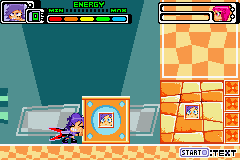
In World Tour mode, try to collect musical notes, your instruments, and avoid enemies. To complete the level you must recover your speakers.
•
Life Meter: Displays current character and how many lives you have left. If you run out of lives you will have to start the level over.
•
Energy Meter: Display of how much energy remains. If you run out of energy your character starts again at an earlier point in the level.
•
Musical Notes: The total number of Musical Notes you have collected. Collect all the Musical Notes and you will be rewarded with a prize.
•
Character Change Meter: When this meter is full you can change your character by pressing the L Button.
•
Jam Attack Meter: This meter fills when your character runs or attacks an enemy. When full, Ami and Yumi get together and do a Jam Session Attack by pressing the L Button and R Button at the same time. 



 (En,De).png)
