Getting Started
1. Switch the Nintendo® Game Boy® Advance system OFF. Never insert or remove a Game Pak while the Game Boy® Advance is ON.
2. Insert the SIGMA STAR SAGA™ Game Pak into the slot on the Game Boy® Advance. Press firmly to ensure the Game Pak is correctly inserted.
3. Switch the Game Boy® Advance ON. The Title Screen should appear. If the Title Screen fails to appear, return to step 1.
4. Press START to enter the Main Menu.
Press START on the Title Screen to go to the File Select Menu.
File Select Menu Options
•
New Game: Begin Sigma Star Saga from the beginning or resume a game in progress.
•
Copy: Copy a file to a new save location.
•
Clear: Delete your saved game.
To begin a new game, highlight "NEW GAME", then press the A Button to confirm. To load a previously saved game, highlight the save file, then press the A Button to confirm.
Playing the Game
SIGMA STAR SAGA™ is a unique RPG that features a space shooter battle engine. You must explore environments for items and clues while battling vicious foes both on the ground and in your ship. Pay attention to the storyline in order to understand where you must go and what you must do. Your choices and actions will directly impact the outcome of the game! Be smart, be quick, and be clever...
Exploration Mode
During the exploration segments of the game, you will view the game from an overhead perspective and guide Recker through the various environments you discover. Enemies you encounter will sometimes drop useful items, but these items do not reward Recker with any Experience Points (EXP).
Exploration Mode is where the story is propelled forward through character interaction, exploration, and some basic fighting. During this mode, Recker may be warped randomly to a random Krill ship where he must destroy the preset number of enemies in Shooter Mode to progress.
Shooter Mode
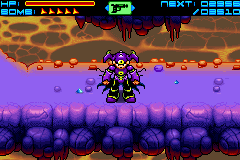
When the Krill set up on a planet, they release a fleet of drone ships that patrol the skies and tunnels. If a drone senses danger, they warp the nearest Krill pilot to their cockpit, and the pilot must then destroy the enemies before returning to the planet.
All enemies destroyed in Shooter Mode will reward Recker with EXP, allowing him to level up and become more powerful.
Gun Data
You'll find Gun Data in the exploration segments of the game. Gun Data consists of the beginning, middle, and end of a weapon: Cannon Type, Bullet Type, and Impact Type.
•
The Cannon Type determines the weapon's orientation and trajectory.
•
The Bullet Type sets the nature and special properties of the projectile.
•
The Impact Type affects what happens once the bullet hits its target.
Given the many types of Gun Data, there are literally thousands of combinations.
Tool List (Exploration Mode)
Throughout the game you will find various Tools to help you on your quest.
•
Earth Gun: A standard Earthling gun. It is unable to harvest EXP like Krill ships can.
•
Scanner: Use this item like an X-ray to scan for hidden objects. Often switches are hidden beneath the floor!
•
Krill Puck: A hockey puck shaped object that Recker can kick at enemies, exploding on contact. It will bounce off of the walls of environments as it searches for targets. It is useful for triggering proximity mines.
•
Krill Boots: Equip to run extra fast. They also allow you to perform a dive crush while falling. To perform a dive crush, press the A Button while falling.
•
Girl Wings: A parasitic backpack that sprouts wings, allowing Recker to travel short distances in the air. Land to instantly recharge the Girl Wings.
•
Warp Tool: Changes Recker into an otherworldly fluid that can pass through solid obstacles.
Cannon Types
•
17. Locked Movement Cannon: While firing, current direction is locked.
•
18. Node Control: Auto fires; steer the ship or the Helper Node.
•
19. Free Aim Cannon: Auto fires; control switches between ship and cannon.
•
20. Twin Nodes: 2 Helper Nodes flank the ship.
•
21. Node Orbit: A Helper Node orbits the ship.
•
22. Double Node Orbit: 2 Helper Nodes orbit the ship.
•
23. Triple Node Orbit: 3 Helper Nodes orbit the ship.
•
24. Sweeper: A Helper Node moves horizontally back and forth.
•
25. Double Sweeper: 2 Nodes move horizontally at varying range.
•
26. Patrol Node: A Helper Node moves back and forth vertically.
•
27. Double Patrol: 2 Nodes move back and forth vertically.
•
28. Mirror Node: A Helper Node that does the opposite of the ship.
Bullet Types
•
1. Short Shot: Limited range bullets.
•
2. Normal Shot: Standard shots of average strength.
•
3. Heavy Shot: A large projectile with a wide hit area.
Impact Types
•
1. Absorb: Shots are removed on impact.
•
2. Splinter: Shots may burst into deadly shards.
•
3. Barrier: Shots create vertical walls.


.png)

 (En,Fr,De,Es,It).png)
 (En,Fr,De,Es,It).png)


.png)
.png)
 (En,Fr,De,Es,It).png)
_1.png)
