STARTING THE GAME
ADJUSTMENT OF THE GUNCON
When you start a new game, the "Guncon Adjustment" screen appears. You must adjust the Guncon on this screen.
TITLE SCREEN
To enter the Menu screen from the Title screen, press the (A) or (B) Button on the Guncon.
MENU SCREEN
To select "Arcade," "Special," or "Option," shoot one of them on this screen.
ARCADE MODE
The "Arcade" version has two types of modes: Story Mode and Time Attack Mode. To select, aim at one of the modes with the Guncon and shoot.
STORY MODE
This mode consists of three stages, each with four areas. If you survive through the first three areas and defeat the boss, you clear the stage. You will finish the whole game and see an ending after clearing all three stages.
The game will end if you run out of time or lose all your lives, but you can continue as long as you have credits left. To play an easier level, shoot outside the screen once on the Mode Select screen. The game will automatically switch to EASY mode. ("EASY" will appear on the screen.)
TIME ATTACK MODE
Choose one of the three stages in this mode. Your objective is to clear each stage as quickly as possible. The section time is recorded during each game.
There is no limit on the number of lives in this mode. However, the game is over when the time reaches zero. If you achieve a score high enough to be ranked, you can enter your name.
SPECIAL MODE
Richard has received another command. He must sneak into the armed group, "Kantaris." Although their headquarters looks like a hotel on the lake, it is actually a weapon producing factory. They have been supplying weapons to Wild Dog. Richard immediately rushes to their headquarters to reveal their plans.
BRC (BRANCH REFLECTED CONDITIONS) SYSTEM
Special Mode is the new original game for the PlayStation version. It adopted the BRC System that determines the route to the next area depending on the move the player makes. For example, after completing area 1 within the given time, Richard will move to the elevator to advance to the next area. However, if the area is not finished within the given time, then Richard moves to the stairs to advance to the next area. As a result, the route that Richard takes and the content of the area changes depending on the success with the current area.
There are other conditions that change the route and the content of an area such as speed of eliminating enemies. Keep a look out for faster ways to end each stage.
OPTIONS
There are four options in this menu: Button Configurations, Saving and Loading with the Memory Card, Screen Adjustment, and Guncon Adjustment. To select one, aim at the option and shoot. To cancel, press the (A) or (B) Button.
MEMORY CARD
Save and load during the game. For example, you can save your game ranking.
BUTTON CONFIGURATION
Configure the buttons and reload options. On Button Configurations, you can change the reload button and the pause button. On Reload Configurations, you can change the button to reload with either the button released or being pressed.
GUNCON CALIBRATION
For the adjustment operations, please refer to page 6.
ADJUST SCREEN
The display position of the screen may be off depending on the TV. To fix this, shoot the arrow displayed on the screen (up and down, right and left) to adjust. To return to the Option screen, press the (A) or (B) Button.
HOW TO PLAY
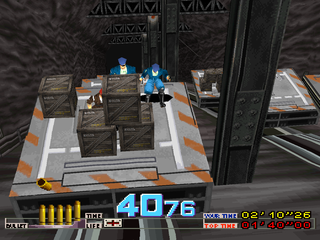
Attack and reload bullets or hide skillfully and beat as many enemies as possible when each area starts. By defeating a certain number of enemies within the time limit, you will advance to the next area.
•
NUMBER OF THE BULLETS LEFT: The maximum stock is 6 bullets. Replace the bullets by ducking and reloading. When "WAIT" is displayed, it is a moving scene and you cannot attack. As soon as the "WAIT" disappears and "ACTION" appears, you can start attacking again.
•
LIFE: (Story Mode and Special Mode Only) The game is over when all the lives are gone.
•
TIME LIMIT: The time turns to red in the last 10 seconds. The game is over when you cannot clear the area within time limit.
•
BEST TIME: The best time for clearing the area is ranked as No. 1.
•
YOUR TIME: Time elapsed from the start of the game. In Time Attack mode, the score and the ranking is related.
•
CURRENT RANK: (Time Attack Only) It displays the name, time, and ranking of the 4 players (2 players ahead of you and 2 players behind you) out of the 20 players that are ranked.
PAUSE SCREEN
To pause during the game, press the (B) Button (initial configuration). Menus are as follows:
•
GUNCON CANCEL: Press the (B) Button to play again.
•
Controller PAUSE: Press start.
•
QUIT GAME: To quit the game, press the (B) Button while pulling the trigger.
•
QUIT GAME: Pause + Press + + (start)
RULES
RELOADING
Release the (A) Button to load more bullets or to hide behind a wall or building. Hide to avoid the enemy's heavy attack, but remember that you cannot attack while hiding. Press and hold the (A) Button to start attacking again.
.png)

.png)
