GETTING STARTED
1. Set up your PlayStation®2 computer entertainment system according to its instruction manual.
2. Make sure the MAIN POWER switch (located on the back of the console) is turned on.
3. Press the RESET button. When the power indicator lights up, press the open button and the disc tray will open.
4. Place the Crazy Taxi™ disc on the disc tray with the label side facing up. Press the open button again and the disc tray will close. 5. Attach game controllers and other peripherals, as appropriate. If you wish to save your game, insert a MEMORY CARD (8MB) (for PlayStation®2) (sold separately) into MEMORY CARD Slot 1.
Follow on-screen instructions and refer to this manual for information on using the software.
Note
Crazy Taxi is a one player game. PlayStation®2 [front panel]
STARTING UP
Crazy Taxi™ is a one-player game that is played using the DUALSHOCK™2 analog controller. Connect the controller to be used to controller port 1 of the PlayStation®2 console. Analog Controller (DUALSHOCK®2)
•
right directional button
MODE SELECTION MENU
Use OO on the LEFT ANALOG STICK/DIRECTIONAL BUTTONS to select an item and press the BUTTON to enter your selection. Select 'EXIT' or press the BUTTON to return to the title screen.
MODE SELECTION
ARCADE
In this game mode, play using the same course as the one featured in the Arcade version of Crazy Taxi. ORIGINAL
Select this game mode to play using the specially designed original course.
CRAZY BOX
Fine-tune your cab driving techniques by clearing each of these unique mini-games.
OPTIONS
Use this mode to modify various settings of the game.
RECORDS
Here you can view the records and rankings for each of the game modes.
SAVE & LOAD
Use this mode to save or load game data or perform name entry for player files.
ARCADE/ORIGINAL MODE
Both the Arcade and Original game modes have the same rules, content and menu. The only difference between these two modes is the course on which you play.
After selecting either "ARCADE" or "ORIGINAL" from the mode selection menu, the following mode menu will be displayed. Use OO on the LEFT ANALOG STICK/DIRECTIONAL BUTTONS to select a mode and press the BUTTON to enter your selection. Select 'EXIT or press the BUTTON to return to the title screen.
ARCADE Mode Menu
ORIGINAL Mode Menu
PLAY BY ARCADE RULES
Select this item to play according to the same rules as used in the Arcade version of Crazy Taxi. For details, see p. 9-11. WORK FOR 3 MINUTES
Play freely for three minutes. Note that in this mode there are no time bonuses (see p. 11) available.
WORK FOR 5 MINUTES
Play freely for five minutes. Note that in this mode there are no time bonuses available.
WORK FOR 10 MINUTES
Play freely for ten minutes. Note that in this mode there are no time bonuses available.
GAME FLOW
1) Pick Up a Customer
Human characters located in the city with a "$" icon over their heads indicate potential customers waiting for a taxi ride. To pick up a customer the player must brake the cab to a complete stop within the stop zone - the circular outline that appears around the customer. The customer will then automatically approach and get in the cab.
NOTE
While waiting for the customer to get into the cab, the game clock will continue to run but control of the cab is not possible.
2) Drive to the Destination
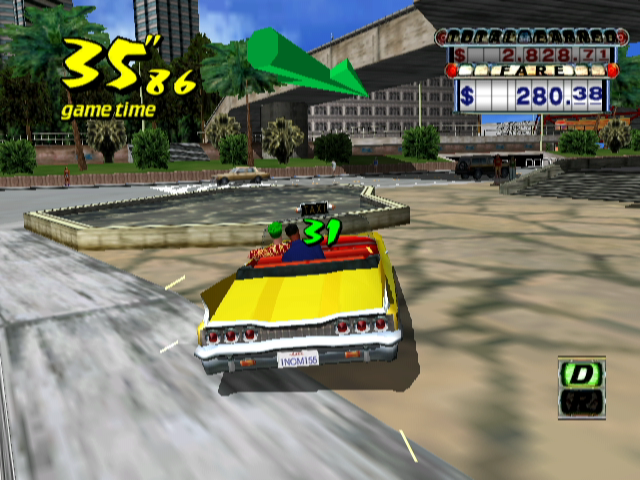
Once the customer gets in the cab the following 3 items appear on the game display: the "Destination and Distance Counter" appears briefly to the left, the "Directional Arrow" appears at the center top and the "Customer Time Limit" appears over the customer's head. It is your job to travel in the direction indicated by the arrow and deliver the customer to their destination before the customer time limit reaches 0.
Provided you reach the destination in time, you will be paid the base fare as well
.png)

.png)