Inputting Your Name
•
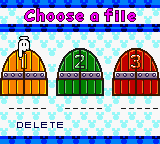
To select a letter, move Mickey's glove with the Control Pad. Press the A Button to enter that letter in the name line.
•
Continue selecting letters until your name is complete.
•
Select ◀ to erase backward, select ▶ to leave a blank space.
•
When your name is complete, select OK.
Game Modes
Use the Control Pad to move the cursor and press the A Button to confirm.
•
1P: Choose from 4 characters and play 6 different types of Tetris.
•
2P: Challenge your pals! You'll need 2 Game Boy systems connected by a Game Link Cable (sold separately). Players can choose from 4 characters (but both players can't choose the same character) and play 3 different 2-player Tetris games.
•
QUEST: Challenge the characters in the Tetris Coin Rally. Play different Tetris games to collect coins. Collect enough coins and win the Rally!
•
DATA: Check out the best players and the highest scores. Highlight a data line and press the A Button.
Starting Games
2-Player Game Link Cable Connection
For 2 player games, turn off both Game Boy units, insert the Game Link Cable in both units (follow the Game Link Cable instruction manual) and turn on the Game Boy units. Now you're ready to play!
Starting 1 and 2 Player Games
1. Select a Tetris game and press the A Button. (After you complete Quest Mode, more Tetris games become available.)
2. Select your character and press the A Button.
3. Select a skill level: EASY, NORMAL, EXPERT, and press the A Button.
4. In 2 player games, choose the number of rounds (1, 3, 5) for your match and adjust the handicap.
Basic Rules of Tetris
Arrange the blocks falling from the top of the screen so that they stack together without any open spaces. Use the Control Pad to move the blocks left/right and press the A or B Button to turn the blocks while they're falling.
When you fill an entire line from left to right with blocks, that line disappears. The line can be anywhere up or down in the block stack.
If the stack reaches the top of the block bin, the game ends.
Standard Tetris (1P)
Turn the shapes to fit them together when they reach the bottom. Fill up every square to make the lines vanish and score points.
•
GUIDELINES: Help you see the columns.
•
NEXT BLOCK WINDOW: See your next block before it falls.
•
LINES: How many lines vanished!
•
TIME: How long you've been at it.
Updown Tetris (1P or 2P)
Race your opponent to the finish! When you clear a line of blocks, it goes to your opponent's bin.
Watch out! The same thing happens to you - and you end up with your opponent's blocks! If one player goes faster, the other player's blocks keep rising up. This is a test of speed and skill, so put all you've got into it!
•
OPPONENT'S TOP GAUGE: Shows where your opponent's highest block is in the block bin.
Magical Tetris (1P or 2P)
Play a head-to-head game with Standard Tetris rules – and some special features!
•
OBSTACLE BLOCK HOLDING AREA: Obstacle Blocks sent by your opponent stack up here!
•
MAGICAL TIMER/MAGICAL LEVEL: The higher the magical level, the more Obstacle and Counter blocks your opponent gets when you perform a Magical Attack. (See page 17.)
•
COMBO COUNTER: The number of combos you've made. (Combos are two or more lines cleared one after the other.)
•
Obstacle Block Holding Area
•
Magical Timer/Magical Level
Magical Attack - Obstacle Blocks
Whenever you clear a line, an Obstacle Block is sent to your opponent's Holding Area. The more lines you clear at once, the more Obstacle Blocks your opponent gets. (You'll get Obstacle Blocks if your opponent moves faster, so get going!)
Counterattack - Counter Blocks
If you clear a line when an Obstacle Block is in your Holding Area, that block gets sent back to your opponent. When Obstacle Blocks get sent back, they're called Counter Blocks.
You and your opponent can ricochet the same Counter Block back and forth - each time it switches sides, it grows! (You'll see "?" in the Holding Area.) A Counter Block can get as big as 5x5 squares.
Magical Gauge
Whenever you clear a line or are attacked by your opponent, your Magical Gauge fills up a bit with magical energy. When the gauge fills all the way up, any blocks in your bin that are at the same level or higher than the gauge will disappear.
Each time you use the Magical Gauge, it grows longer. Hint: The guidelines will start blinking when the gauge is almost full.
Pentris
A Pentris Block is a special kind of Obstacle Block. If you can clear 5 lines at once with a Pentris Block, your character will say "Pentris!" and send a more complicated block to your opponent.
Magical Timer
As you play Magical Tet
.png)



 (En,Fr,De,Es,It,Nl,Sv).png)







 (En,Fr,De,Es,It).png)