Customizing Game Settings
To change the score needed to win the initial rounds, highlight Score To Enter The Fast Money Round and use the A button to decrease the necessary score (to a minimum of 100 points) or the B button to increase it (to a maximum of 999 points). To change the time limits in the fast money round, highlight First Stage and use the A button to decrease the time limit (to a minimum of 10 seconds), or the B button to increase it (to a maximum of 999 seconds). Use the same procedure to change the time limits in the Second Stage as well. To change the number of points needed to win the jackpot, highlight Jackpot Score and use the A button to decrease the score (to a minimum of 10 points) or the B button to increase it (to a maximum of 999 points). When you are finished, highlight Done and press the A, B, or C button.
Customizing Families
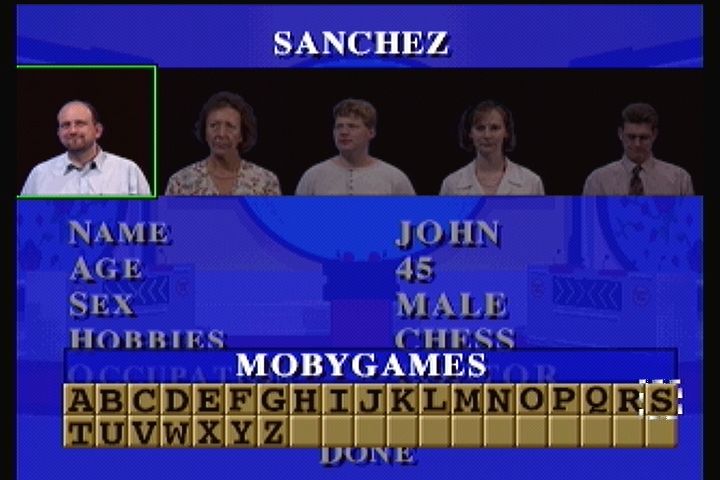
To change the names and characteristics of a family, use the control pad to highlight Customize a Family. There are four families: Sanchez, Williams, Murray, and Khera. Press the right and left arrow keys until the desired family is on the screen with their family name highlighted. Press the A, B, or C button to bring up the family data screen. The father's picture is highlighted by default. To enter new information, use the up and down arrow keys to highlight the appropriate field, then press the A button. You may enter first and last names of up to eleven letters each by using the control pad to move the cursor, the A button to enter letters, the B button to delete letters, and the C button to lock in your choices.
Use the same procedure to enter hobbies and occupation. Age can be decreased to 0 and increased to 199. Sex can be toggled between Male and Female, while Intelligence toggles between Hopeless, Poor, Average, Good, and Genius.
When complete, highlight Done and press the A, B, or C button. Any customizing you do of a family is lost when you turn the 3DO System off. Restarting an Old Game
From the main menu, highlight Restart Game to continue a game you have previously saved. Games may be saved during regular play by pressing the X button. Use the control pad to select a save game slot, and press the A button to bring up the alphabet.
Then use the control pad to move through the letters and the A button to enter letters as you type in a name for your saved game. Use the B button to delete letters. When you are finished, press the C button to lock in the name of your saved game.
Starting a New Game
Highlight Start Game to start a new game. Use the control pad to view the four different families, and press the A button when the family you want to play is on the screen. Highlight View Hi-Scores to see all-time high scores. As your family wins games, its name will be added to this list. Use the control pad to move the highlighting between Family vs Family, Family vs 3DO System, 3DO System vs 3DO System, and Practice. Game Modes
If you choose to play a practice game, you can select which rounds you want to play. You can choose to turn on the Bullseye, Single, Double, Triple, and/or Fast Rounds by highlighting the round and then using the A button to change the display from OFF to ON.
•
Family vs. 3DO System: The player is pitted against a computer-controlled family. The player's family can play up to five games, but as soon as the computer family wins, they must start again. •
Family vs. Family: Two players' families battle directly. A family can play up to five times, but as soon as an opposing family wins, they are out and must start again. •
Practice: The player has no opponent. The family simply plays until they amass 300 points, and then goes for the big "money" in the Fast Money Round. This game is a good way to learn the game or to relax. The game automatically starts when both families have been selected. The Bull's-Eye Round
Before the Bull's-Eye round, $5,000 is added to each Family's Fast Money Jackpot. To win the Jackpot, families must defeat the other family and score 200 or more points in the Fast Money Round. During the round, families try to add wealth to their Jackpot by guessing the Number One answers to questions. Starting with the Fathers, a member of each family is squared off against their counterpart. The first question is worth $1,000, the second $2,000, etc., until the fifth and final question, which is worth $5,000. If a contestant gets the Number One answer (the Bull's-Eye), their family adds that amount to the Jackpot. A Bull's-Eye Board, the host, and two contestants are shown on the screen. The question box will then appear. The contestants have three seconds to buzz in.
•
Family vs. Family: The first contestant to press any button on their controller wins the chance to answer first.
•
Family vs. 3DO System: The human contestant must press any button before the computer contestant does to win the chance to answer first. •
Practice: There is no opponent, so

.png)


.png)


.png)

.png)
(Vivid Interactive).png)