STARTING UP
1. Set up your Genesis 32X System as described in its instruction manual. Plug in Control Pad 1.
2. Make sure the power switch is OFF. Then insert the Metal Head cartridge into the console. 3. Turn the power switch ON. The Sega screen appears. Then in a few moments, the Title screen appears. 4. If the Sega screen doesn't appear, turn the power switch OFF. Make sure your system is set up correctly and the cartridge is firmly inserted in the console. Then turn the power switch ON again. 5. Press Start when the Title screen appears.
Important
Always make sure the power switch is OFF before inserting or removing the cartridge.
•
Genesis 32X cartridge (sold separately)
Note
Metal Head is for one player. GETTING STARTED
Following the Sega logo is a brief background on your mission and the Title screen. To proceed directly to the Title screen, press Start. Press Start again to see the game menu. YOUR OPTIONS
Highlight OPTION and press Start to bring up the Option screen. Highlight the desired option by pressing the D-Pad UP or DOWN. Change features within that option by pressing LEFT or RIGHT.
To exit the Options menu, use the D-Pad to highlight EXIT, or for a shortcut, press Button B. Then press Button A, B, C or Start to return to the Title screen.
Game Level
Choose the difficulty level of your game. Game Level also determines the number of Continues available. Easy gives you 4 Continues. Normal gives you 2 Continues, and Hard gives you only one chance to save the Federation—no Continues.
Language
Choose to see text in all English or English with Japanese subtitles.
SEGA GAMEPLAY HOTLINE
1-415-591-PLAY
For French instructions, please call:
Instructions en Français, Téléphoner au:
1-800-872-7342
YOUR MISSIONS
Your operation consists of six stages, with two or three missions per stage. You may be ordered to search for specific objects, destroy certain command vehicles, or both. Pay careful attention to your briefings at the beginning of each mission.
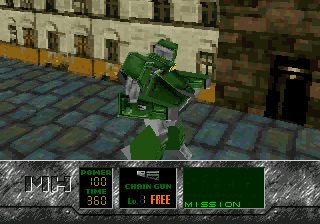
THE CONTROL PANEL
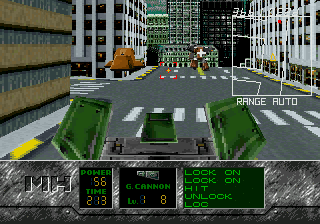
1 Radar
Shows a layout of your territory. The map zooms in and out automatically to include the location of your nearest enemy. Enemies are represented as yellow circles. Your craft is represented as a triangle. Weapons fire is outlined in red.
The radar map blinks out as your Metal Head takes damage and loses power. 2 Target Sight
Using this is easy-just point and shoot. The Target Sight is stationary and moves only when you do.
Available for all weapons except the Hammer Knuckle. Available in all views except the Eagle's Eye View. If you are using a weapon with an automatic homing device, a second target sight will lock on to the nearest object that looks like an enemy. All you have to do is open fire.
VANTAGE POINT
You can battle from any of four points of view, and change views at the touch of a button.
•
Press Mode to return to Normal View
For a special side view, press and hold Button X or Z. Release the button to return to the previous view.
•
Right Hand View: Press Button X
•
Left Hand View: Press Button Z
USING THE 3-BUTTON CONTROL PAD
To change Battle View
Press Start to cycle through the Normal, Belly, Over the Shoulder and Eagle's Eye views. The special side views are not available for the 3-Button Control Pad.
To pause the game
Press Start and hold until the Pause screen appears. Press Start again to resume play.
SETTLING THE SCORE
Conservation counts! At the end of each mission, you accumulate points according to the following criteria:
Enemy Kills
Pick up points for each enemy destroyed. The number of points scored varies with the difficulty level of the game.
Shield Remain
Receive points for the percentage of shield power remaining at the end of the stage.
Time Remain
Receive points for the amount of time remaining at the end of the stage.
Reserved Ammo
Receive points for the amount of ammunition you have left at the end of the stage. This does not count free ammo, such as that used by the Chain Gun or Laser.
EQUIPPING YOUR METAL HEAD
Before you begin each new stage, the Equip screen appears. Here you can replenish your ammo or purchase more powerful weapons and equipment with points earned in previous missions.
If you are continuing a game, this screen appears before you begin play and allows you to purchase equipment with the points scored in your previous game.
•
This laser can pierce mech, armor.
You can purchase a weapon for each arm of your Metal Head, and as many additional equipment items as availability and your points 
 (En,Ja).png)
