Getting Started
To start playing, insert the Nintendo GameCube™ Game Disc. You will then see the Sign-in Screen where you can create a new game or load a previously saved game. It is strongly advised that you insert a Nintendo GameCube™ Memory Card to save your progress. If you turn off the console after playing without a Memory Card, your progress and records will not be saved. Create a New Game, Save and Load
To begin a new game, you must enter your name. This automatically creates a saved file that uses 5 blocks on a Nintendo GameCube™ Memory Card. From this point on, all game data is saved automatically to this file. To load a saved game, select a Memory Card and then select a game to load.
Key Features
•
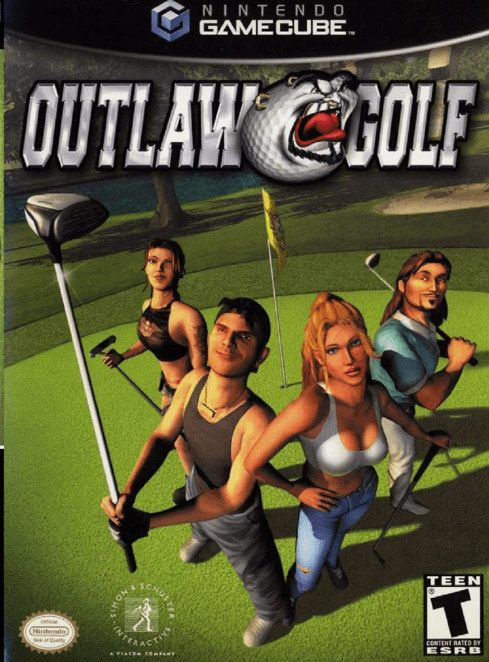
10 unique characters, each with a different caddy.
•
Tutorials—located in the Options Menu, which can be accessed by choosing “Options” after pressing START.
•
Exhibition Mode features 8 different types of golf for 1-4 players.
•
Tour Mode offers 30 events on 3 courses—unlock more characters, clubs and balls.
•
The Outlaw Range (located in the Tour Menu) offers 12 different games—win them to improve your character's statistics.
•
Game difficulty varies depending on play—play badly and the game gets harder, play well and the game gets easier—beat your caddy to improve your composure.
•
Play 1-4 players, with only one Nintendo GameCube™ Controller required. Game Modes
Outlaw Golf offers 2 ways to play: Exhibition Mode for Multiplayer games and Tour Mode for Single Player. Tour Mode includes the Outlaw Range where you can build up your character skills. Exhibition Mode
Exhibition Mode features 8 different Multiplayer games. Use this mode to play games with friends or against computer opponents. Up to 4 can play at a time, using 1-4 controllers.
Exhibition Games
•
Stroke (1-4 Players): Traditional Golf. Counts number of shots over each hole and course. Lowest score after 18 holes wins.
•
Match (2 Players Only): Scored by counting holes won by each player, rather than by overall stroke score. The game can end before 18 holes, whenever one player clinches the majority of holes.
•
Skins (2-4 Players, no teams): Players get money for winning holes. Whoever has the most money at the end of 18 holes wins.
•
Best Ball (4 Player team play): Scored stroke-style. Both team members shoot the entire hole, and the team takes the best score for that hole. The best overall score wins.
•
Scramble (4 Player team play): Scored stroke-style. Similar to Best Ball except that each team uses its best shot after every stroke.
•
My One and Only (1-4 Players): Scored stroke-style. Each player chooses 1 club and a putter and attempts to shoot the lowest score over 18 holes. Composure and Beatings do not apply in this mode.
•
Casino (2-4 Players): Each player bets $1 on each shot, and has the option to stay in or drop out after each shot. The hole winner takes the pot. If there is a tie, the money carries to the next hole, and all players are again eligible. Players who drop out at any time on a hole come back in on the next hole. Whoever has the most money at the end of 18 holes wins.
•
Time Attack (1-4 Players): Players win holes by finishing each hole as fast as possible, no matter how many strokes are taken. Win by finishing 18 holes faster than other players. Composure and Beatings do not apply in this mode.
Tour Mode
Tour Mode is for Single Player and offers 30 different Events on 3 courses. Complete Events to unlock new characters, clubs and balls. Get Event descriptions by pressing the X Button when the Event is highlighted.
In Skins Events, the winner is first determined by the amount of money won. If two players win the same amount of money, the winner is then determined by the number of skins won. If both players have the same amount of money and skins, the human player will still qualify.
Outlaw Range
Only in Tour Mode. Use the Outlaw Range to practice shots and improve your character's statistics. Complete 12 different games to upgrade your character's distance, accuracy, composure and control.
Each game won gives you points to distribute, as you wish, among those criteria. You may need to unlock better clubs in Tour Mode to successfully complete some Range events.
Setting Up a Game
Exhibition Mode Setup
In Exhibition Mode, use this screen to choose the number of players and controllers. Select the controller and player using the Control Stick or the + Control Pad. More than one player can share the same controller.
Computer-controlled Players
Select the CPU icon to have computer-controlled players in some or all of any remaining slots for a game. Note that Tour Mode automatically creates computer-controlled players.
Game Setup in Tour Mode
Starts with the Character Selection Screen.
Character Selection
Navigate through Character choices using the Control Stick or the + Control Pad. Move the Control Stick Left and Right to select golfers, Up and Down to select outfits.
Each character has different attributes: distance, accuracy, composure and control. Improve your character's attributes by completing games in the Outlaw Range.
In Tour Mode,
.png)