Starting Up
1. Set up your PlayStation game console according to its Instruction Manual. 2. Insert the MORTAL KOMBAT® 3 disc and close the CD door.
Note: Make sure the PlayStation game console's power is off before inserting or removing a compact disc. 3. Plug in one or two game controllers and turn the PlayStation game console ON. The opening story, kombatant bios, and battle demos will begin. Read bios to learn who's who; watch demos for fighting pointers. 4. Press the Start Button at any time during the demo to see the KOMBAT Modification Screen.
5. Press any Action Button to start the game.
Notes
•
The Action Buttons are Δ, Ο, Χ, L1, L2, R1 and R2 on the PlayStation controller. •
You can configure the button controls, sound/music, and game settings before starting the game. See pages 4-5.
Configure Menus
1. At the KOMBAT Kube Screen, press left or right on the Directional Pad to rotate the Kube to different Configure selections.
2. Press any Action Button to select a title and see its menu.
3. Press up or down on the Directional Pad to highlight different menu options.
4. Press left or right on the Directional Pad to change the option's setting.
Note: All settings are reset to their defaults when you turn off the PlayStation. Controller Configure Menu
Customize the combat buttons on your controller to suit your fighting style. Both players can change their combat controls individually. Press up or down on the Directional Pad to move through the menu, and press left or right to change the configuration of the selected button.
•
EXIT: Return to the Game Selection Screen.
Sound & Music Menu
•
Stereo: Switch Stereo Sound output ON or OFF, depending on your television or monitor capability.
•
Pan Control: Designate a side for combat sound FX (grunts, taunts, screams, etc.). Choose from either the same or opposite side on which they occur.
•
Sound: Turn combat sound FX (grunts, taunts, screams, etc.) ON or OFF.
•
Music: Control the music volume, from SILENT to KRANKED!
Game Configure Menu
•
Difficulty: Tame the computer's skill level with five settings from VERY EASY to VERY HARD. Two players will both fight at the same chosen level. Default: MEDIUM. Note: This does not have any effect on a two-player match.
•
Violence: ON allows Fatalities and extreme violence; OFF does not. Default: ON.
•
Blood: ON allows blood and fatalities during gameplay; OFF does not. Default: ON.
•
Shang Morph: Choose who Shang Tsung will have the ability to morph into. OFF prevents Shang Tsung from morphing at all, OPPONENT allows Shang Tsung to morph only into the character he is fighting against, and ALL allows Shang Tsung to morph into any of the other thirteen combatants. Default: OPPONENT.
•
Clock: The clock limits each round to 99 seconds. When the clock is DISABLED, rounds continue until one combatant wins. Default: ENABLED.
•
VS Screen: In two-player games, you can enter combat codes on the VS Screen before each battle to enable special powers and enter hidden levels. When the screen is DISABLED, it does not appear. Default: ENABLED.
•
EXIT: Return to the Game Selection Screen.
Starting Kombat
Choosing A Kombatant
The Kombatant Grid appears before each battle.
1. Use the Directional Buttons to mark your kombatant. Player 1 (green) and 2 (red) have different selection boxes, and can choose different kombatants or the same one.
2. Press any Action Button to confirm your selection before the game does it for you.
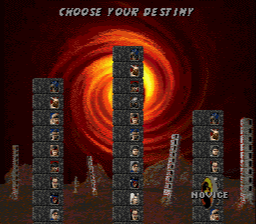
Choosing Your Destiny (1-Player Games)
In one-player games, you signal your desire on the Destiny Selection Screen. Your choice of Novice, Warrior, or Master determines the number of kombatants you will face, their fighting order, and their toughness.
Use the Direction Buttons to select a destiny pole, and then press any Action Button to confirm. You will fight all the kombatants shown, one after the other. You must defeat all the challengers plus two bosses to achieve your destiny.
Destiny
•
Novice: 6 Challengers, 2 Bosses
•
Warrior: 8 Challengers, 2 Bosses
•
Master: 10 Challengers, 2 Bosses
The VS Screen (2-Player Games)
In two-player games, the VS Screen (if ENABLED, see page 5) appears as soon as the fighters are selected and before kombat begins. If you know a kombat kode, and you're fast, you can enter it in the grid at the bottom of the screen. Kombat kodes bestow special powers, take you to hidden levels, and entertain you with surprises (see page 27).
Joining in Games
A second player can join in a game by pressing the Start Button on the unused controller (either 1 or 2). If
.png)



.png)










_1.png)

.png)
.png)
_1.png)
_1.png)
_1.png)
_1.png)







.png)


.png)
.png)
