Setting Up
Set up your PlayStation game console according to the instructions in its Instruction Manual. Make sure the power is off before inserting or removing a compact disc. •
Insert the Strikers 1945 disc and close the disc cover.
•
Insert game controllers and turn on the PlayStation game console. •
Follow on-screen instructions to start a game.
Game Start
Press "START" button and go to MODE SELECT screen.
Original Mode 1
This is a vertical scrolling type of game based on new game balance. The screen is a non-stop forced scroll.
Original Mode 2
This is vertical scrolling type too, but it has the same game balance as the arcade version. Moving your fighter scrolls the screen up and down as well.
Save/Load
You can save the score ranking and option settings here. You can also load these data here as well.
Mode Menu
Select Original 1 or Original 2 mode and go to the Menu screen. Use the Directional buttons to highlight, and confirm your choice by pressing the button.
Difficulty Setting
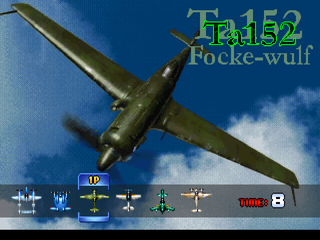
After setting the difficulty go to Fighter Select screen then the game will start.
Quick Select
•
Tip: Press L1 button + START button to go to QUICK START screen.
Option
Use Directional buttons up or down to select OPTION menu, and left or right to change the setting.
•
FIGHTERS: Sets number of fighters
•
EXTEND: Sets the "Extend" score. You will gain an extra fighter every time your score reaches the Extend score.
•
SOUND: Selects STEREO or MONO
•
KEY CONFIG: Sets the controller configurations
•
LOAD: Loads score ranking and option setting from Memory Card.
•
SAVE: Saves score ranking and option setting to Memory Card.
Ranking
Pressing left and right on the Directional buttons switches the rankings and sees each difficulty level's ranking.
Basic Rules
Power Up
When you capture a Power up item, your fighter upgrades its attack power. You can do this up to 4 times.
When you get a Support attack item, the amount of SUPPORT ATTACK you may use increases. You can stock up to 9 Support attack items at the same time.
Power Down
When you touch enemies, your fighter's attack power is downgraded.
Game Over
When an enemy attack hits your fighter, you will lose one of your fighters. Once all your fighters are gone, the game is over.
Continue
You can use the CONTINUE function as many times as you want until you clear all 8 stages. If your difficulty setting is higher than 4 and you clear all 8 stages, the game starts from the beginning. At this time, you cannot use the CONTINUE function anymore.
Pause Menu
Press the START button to PAUSE the screen during game play. Press the SELECT button to open the Menu screen.
•
Return to game: Go back to game.
•
Exit to Main Menu: Go back to MODE SELECTION screen.
Super Shot
There is a gauge on the bottom left of the screen. This is the SUPER SHOT gauge.
Keep shooting to increase this gauge. There are up to 3 levels in this gauge and it will affect the attack power of the Super Shot.
Press Triangle button to use this Super Shot. When the gauge indicates level 3 and you fire the Super Shot, the power is discharged at the maximum level.
.png)

.png)
.png)
.png)


.png)
.png)
.png)
.png)
_1.png)
 (PCE) (PSN).png)
_1.png)