STARTING THE GAME
PlayStation®2 Computer Entertainment System Components
Multitap Components
•
multitap connector (for PlayStation®2)
Setup Instructions
1. Set up your PlayStation®2 computer entertainment system according to the instructions in its Instruction Manual.
2. Make sure the MAIN POWER switch (located at the back of the console) is turned ON.
3. Press the RESET button. When the power indicator lights up, press the OPEN button and the disc tray will open.
4. Place the 2006 FIFA World Cup™ disc on the disc tray with the label side facing up. Press the OPEN button again and the disc tray will close. 5. Attach game controllers and other peripherals, as appropriate.
6. Follow on-screen instructions and refer to this manual for information on using the software.
Progressive Scan Mode
•
To enable Progressive Scan mode press and hold the button and the button on the language select screen with the desired language selected.
Multitap Usage
•
When using the multitap (for PlayStation®2), a controller must be connected to controller port 1-A.
Online Information
•
CHECK OUT ONLINE AT WWW.EASPORTS.COM
ON THE PITCH
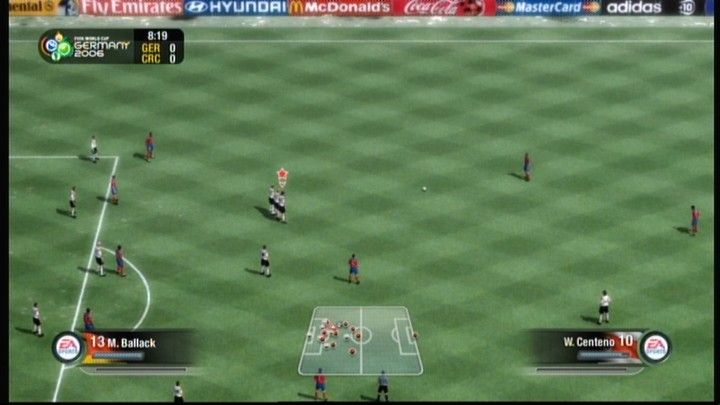
Get familiar with the on-screen icons, track your stamina, and master all the fundamentals in 2006 FIFA World Cup. CONTROL HIGHLIGHTS
•
Controlled player in possession of the ball
•
Controlled player when not in possession of the ball
•
Off-screen controlled player indicator
•
A player with great skill who can dominate any game
PLAYER STATUS BAR
•
FITNESS LEVEL/PLAYING STYLE
•
Fitness level/Playing style
During a match, a Player Status Bar appears at the bottom of the screen displaying the highlighted player's current level of fitness and playing style.
FITNESS
The fitness level decreases the more a player sprints, slowing him down, but replenishes when he returns to normal pace.
POWER, WEIGHT, AND DIRECTION
•
When shooting or lobbing, a Power Meter appears at the bottom of the screen. Keep the kick or pass button pressed to increase power (elevation and distance) and release when the meter has filled sufficiently.
PASSING
•
Through balls, passes, lobs, and crosses are automatically directed towards a teammate or a teammate's run (in the direction of the left analog stick).
•
To play first-time balls (passing or shooting without first controlling the ball), press the pass or shoot button before the ball reaches your player.
DRIBBLING
•
The faster you travel, the trickier it is to trap an incoming pass or keep control of the ball. Try to balance your pace with the need for control.
•
Place your player between the ball and an opposing player to shield the ball and maintain possession.
SECONDARY DEFENDER
For the defender nearest the ball, tackling isn't always the best form of defense. When facing the man in possession, it's sometimes more effective to block his route to goal and then call in a secondary defender (L1 button) to make the challenge.
TACTICS AND MENTALITY
Press the D-button to make tactical adjustments to your team's attack during the game and the L1 button + D-button to change your defense.
ATTACKING TACTICS
DEFENSIVE TACTICS
Press the SELECT button to show the current Team Mentality, then press the SELECT button again to cycle through the mentalities (Neutral/All-Out Attack/Defensive).
•
See the Tactics Help/Tips & Hints on the My FIFA World Cup menu for more detail. SAVING
•
To save files, choose the SAVE option from the relevant mode menu. You are also prompted to save files upon exiting certain screens.
•
A memory card (8MB) (for PlayStation®2) in MEMORY CARD slot 1 or MEMORY CARD slot 1-A when using a multitap (for PlayStation®2) is required to save data.
•
Make sure you save regularly. Press the O button at the Main menu and in various modes to save your profile.
•
Changes made outside individual game modes are applied in all game modes. Changes made within game modes are specific to that competition (except Game Settings).
LOADING
•
Select a Profile upon boot-up to load previously saved game settings.
•
To load a saved file after you've started the game, select LOAD from the My FIFA World Cup screen (or at the prompt when starting 2006 FIFA World Cup mode). Select a file and press the X button to load it. •
To view details on a file, highlight it and press the ☐ button. This will help distinguish between multiple save files.
GAME MODES
Leave a lasting impression on the competition by participating in one of the
.png)

.png)








.png)
_1.jpg)