Starting Up
1. Set up your Sega Saturn™ system as described in its instruction manual. Darius Gaiden™ is for one or two players. When you play alone, connect the control pad to Terminal 1 or Terminal 2. When 2 players are playing simultaneously, connect 1P pad to control terminal 1 and 2P pad to control terminal 2. 2. Place the Darius Gaiden™ disc, label side up, in the well of the CD tray and close the lid.
3. Turn on the TV or monitor and the Sega Saturn. The Sega Saturn™ logo appears on screen. (If nothing happens, turn the system off and make sure it is set up correctly before turning it on again.) 4. If you wish to stop the game in progress or the game ends, press the Reset Button on the Sega Saturn™ console to display the on-screen Control Panel. Important: Your Sega Saturn™ CD contains a security code that allows the disc to be read. Be sure to keep the disc clean and handle it carefully. If your Sega Saturn™ system has trouble reading the disc, remove the disc and wipe it carefully, starting from the center of the disc and wiping straight out toward the edge. Default Controls
•
Move your Ship (8 directions)
Getting Started
By pressing the START BUTTON during the demonstration screen, you will be taken to the Title Screen. You can watch a demonstration game on the Demonstration Screen.
At the Title Screen, press UP or DOWN on the D-PAD to choose either Game Start or Options. To begin playing (before or after setting options), highlight Game Start and press the START BUTTON. To set Options, select Options and press the START BUTTON.
For 2 players: When another player wants to join an on-going game, press the START BUTTON on the new player's control pad.
About Options
In the Options Screen, you can change the game's settings. To select an option, press UP or DOWN on the D-PAD. Press LEFT or RIGHT on the D-PAD to toggle to the desired setting.
•
LEVEL: Select from 4 levels of difficulty: Easy, Average, Difficult or Very Difficult.
•
Control: Allows you to change the default control settings to suit your play style. Press LEFT or RIGHT on the D-PAD until the desired configuration is displayed.
•
Audio: Set the sound output to either monaural or stereo.
•
Sound Test: You can listen to background music or special effects in the game. Press LEFT or RIGHT on the D-PAD to toggle to a particular sample, then press the A BUTTON to listen to it.
•
Exit: Will return you to the Title Screen.
About the Game
•
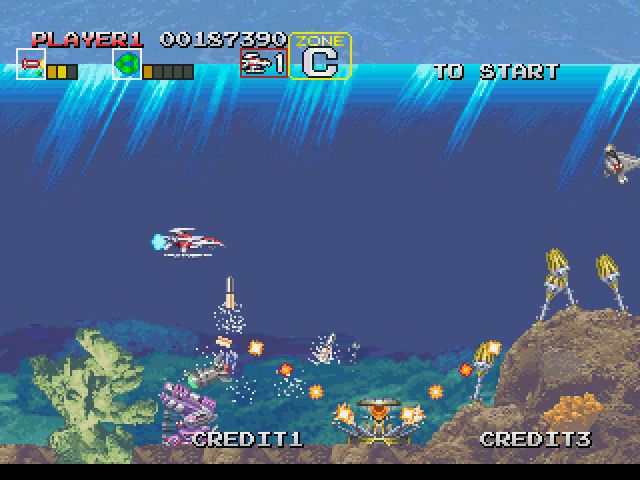
The game consists of 7 Stages, including 28 sub-zones.
•
1P and 2P possess credit(s) separately, with each player receiving an initial credit amount of 3 per player. When all of your ships are destroyed, the game is over.
•
The player's objective is to control his/her own ship, Silverhawk, and to shoot down appearing enemy forces. By destroying the boss at the end of each stage, the player advances to the next stage. When the player clears all the stages, (s)he will receive an ending scene and the game will be over.
The Zone System
There are 7 Stages to master, subdivided into 28 Zones. You move through the stages by completing a chosen zone within each stage. After destroying the giant battleship at the end of each stage, a zone selection screen will appear with all the available zones displayed. You can select the next zone by pressing UP or DOWN on the D-PAD. Finalize your choice by pressing the C BUTTON. There are many different paths to success, depending on which zones you choose. Enjoy experimenting!
Black-Hole Bomber
This bomber sweeps all the enemies from the screen.
•
When you press the B Button, you can utilize a Black-hole Bomber as long as you have the bomber(s) stored in reserve.
•
At the start of the game you will have 3 Black-hole Bombers. Gather violet pick-ups to increase your stock of Black-hole Bombers. (You can only stockpile up to 5 Black-hole Bombers.)
When you press the B Button, there will be a black-hole in the middle of the screen. At this time, your plane is omnipotent, as most enemy shots are absorbed into the black-hole. However, the Boss, Average Boss and some other enemies are merely pulled towards the black-hole.
After a while, the black-hole starts to diminish and releases its energy and damages any enemies on the screen.
Continue, Game Over, Name Entry
Continue: You can continue the game up to 3 times by utilizing the continue screen. Press the "Start Button" before the count reaches 0. You can start a game where the (previous) game ended.
Game Over: When you lose all of your planes (lives), the game is over.
Name Entry: When the game is over, if your score is among the top five highest scores, you can enter up to 3 letters for listing. Use the D-PAD to choose the letter, and finalize your choice with the A, B or C Button.
ZONE GUIDE
There are 7 stages and 28 zones in this game. On Land, On The Water, Colonies, Arable Land, Desert, Bottom Of The Sea....
.png)

.png)
