Rapid Weapon Exchange
Pressing the Select button stores the current weapon (blue background) and automatically stores the previously selected weapon (green background).
This allows you to switch back and forth quickly between the two weapons you prefer to use most often.
Pause Game
Press the Start button to pause a game. During the break, music and sound effects shut off and the in-game Option menu is displayed.
Menu Functions
The functions below refer to the default configuration game controls.
•
To move the rotating selection frame, press the directional arrows up or down.
•
To select an option, press the X button.
•
To return to the previous menu, press the Triangle button.
START
Before beginning a new game, you can choose from three difficulty levels. We recommend that you initially play the game in Normal Mode. However, if you find the game is still too difficult, select Easy Mode.
EASY
In this mode you encounter fewer and less lethal enemies, as well as more memory upload terminals. You are also alerted to search zones by a two-second sound.
When you hear it, press the Circle button (Search/Action). During combat, you are automatically aligned with the closest enemy when the Square button (Attack) is pressed or when a blow is delivered.
NORMAL
In this level, no sound alerts you when you've entered a search area. It's up to you and your intuition to find the hidden items!
HARD
In this level, the enemies are even stronger and harder to overcome. You also have more freedom of movement due to the fact that your blows are NOT automatically aimed at the closest enemy.
However, you are still automatically aligned with the enemy when the Square button (Attack) is pressed.
CODE
This function allows you to enter an eight-letter code to enter a specific world directly. The password for each world is displayed at the beginning of each level.
It is recommended that you write it down as this is your code to return to that point in the game. Each level's code retains all of your game data (i.e., energy, extra lives, non-infected memory stock). Note: There is no code for the first level.
•
To enter the code, press the Left/Right directional arrows to select a letter-coding wheel.
•
Then use the Up/Down directional arrows to choose a letter on the wheel.
•
Press the X button to accept.
•
Each level's code retains all of your data up to that point in the game.
OPTION SOUND
This function allows you to adjust the settings for the game sound effects and music. Use the Up/Down arrows to make a selection, and the Left/Right arrows to adjust the setting:
•
Sound: Sets the volume of the game sound effects.
•
Music: Adjusts the music volume.
•
CD: Sets the volume for all sound.
•
Stereo/Mono: Selects the sound mode you prefer.
•
Balance: Adjusts the left and right channel balance.
CONTROL EAR VIEW/FRONT VIEW
The Left/Right directional arrows enables you to display an illustration of the control from the back or the front.
MODEL A, B, C, D, and E
This function allows you to choose the controller configuration that suits you best. Time Commando has five illustrated controller settings.
Simply scroll through them with the Left/Right arrows to make your selection. (Select Rear View/Front View of the illustration for a more complete view.) After making your selection, choose Back (Triangle) on the Option screen and press the X button to accept.
Game Screen Description
Player Energy
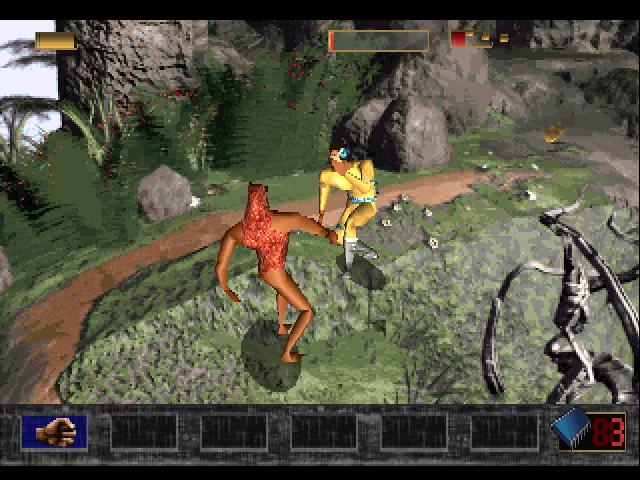
Your energy level is indicated by gold energy batteries. The maximum number of batteries you can have at each time is four.
Each time you are hit, your battery loses energy. When your battery level reaches zero, you die.
Extra Lives
Each extra life is visually represented by the Time Commando insignia. The maximum number of extra lives you can have at one time is three.
Each time you die (i.e., your battery level is zero or the virus has completely contaminated the computer's memory), you can continue to play the current game if you have an extra life.
In this case, your energy is recharged to the maximum level, but no more than the number of batteries. During the few seconds of flashing, you become invulnerable.
Enemy's Energy
Each time you're confronted by an enemy, the enemy's life bar will be displayed. When the bar is empty, the enemy is dead.
Infected Memory Indicator
This bar indicates the virus' gradual infection of the HTC system memory. A few minutes before the computer's memory is completely contaminated, you will hear a steady beep that grows louder as the indicator becomes full.
When the indicator is completely filled, the virus takes over the system and you die.
Non-Infected Memory Stock
Throughout the game, you must collect as many non-infected memory circuits as possible. Represented by blue chips, these circuits must be fed into the memory upload terminals to stall the virus' progress.
List of Available Weapons
You enter each new world without any weapons. To obtain weapons, you can take them from a dead enemy, pick them up off the ground, or search for them throughout the various worlds.
Each time you find one it is stored in your weapon inventory boxes. Additional information may be displayed above or below them, depending on the characteristics of each weapon.
For those weapons that require ammunition, the total amount of ammunition available is displayed below them. Below each firearm, there'



.png)
_1.png)
.png)
_1.jpg)
 (Disc 2).png)

 (v1.0).png)


 (Disc 2).png)