LOADING
1. Make sure the power switch is OFF.
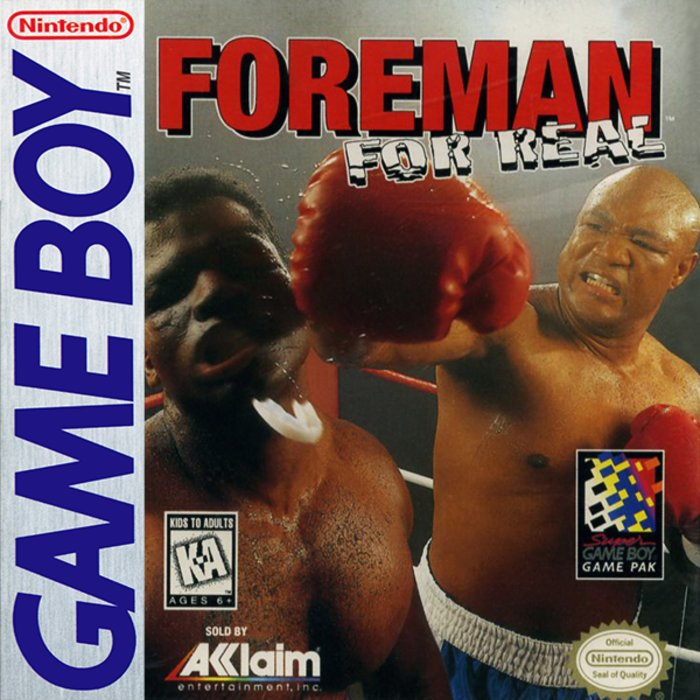
2. Insert the Foreman For Real™ Game Pak as described in your NINTENDO® GAME BOY® instruction manual.
3. Turn the power switch ON.
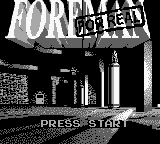
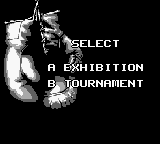
When the Foreman For Real™ title screen appears, press the START BUTTON. You will then see a game mode screen with 2 choices: Exhibition and Tournament.
USING SUPER GAMEBOY
Correctly insert the Game Boy Game Pak into the Super Game Boy. Next, insert the Super Game Boy into the Super NES and move the power switch on the Super NES to the ON position.
For further operation information, please consult your Super Game Boy and Super NES instruction manuals.
GAME MODES
Foreman For Real™ has two exciting modes of game play:
•
Exhibition - In Exhibition mode, you compete to bring your boxer up to the professional level. In Exhibition play, rounds are scored on cards by judges, with a 10-point scoring system. Exhibition matches do not count towards your ranking.
•
Tournament - In Tournament mode, you contend for the heavyweight crown. Tournament play is scored by how much prize money you earn. The bigger the match, the bigger the purse.
Go get 'em, Champ!
PASSWORD
In Tournament mode, Foreman For Real™ has a password feature which allows you to return to a certain spot without having to restart play from the beginning of the game.
After selecting Tournament mode, press the B BUTTON to select this feature. To input a password, press any direction on the CONTROL PAD to highlight the desired letter or number, then press the A BUTTON to enter it. Press the B BUTTON to DELETE if you make a mistake.
When you are satisfied, press the START BUTTON to begin boxing.
To see controls, please refer to the Quick Reference Chart on page 11.
CHOOSING YOUR BOXER
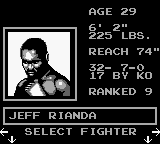
Once you've chosen your mode of play, it's time to select a fighter. Foreman For Real™ features 20 boxers (including "Big" George Foreman), each with unique talents and boxing styles.
To browse the available boxers, press LEFT or RIGHT on the CONTROL PAD. To choose a particular boxer, press the SELECT BUTTON when the desired boxer is on screen.
You will be able to view the personal statistics of each boxer: Name, Age, Rank, Record, Height, Weight and Reach. Press UP or DOWN on the D-PAD to see his hometown, nickname, and five Attributes that separate the weak from the strong: Offense, Defense, Speed, Power and Stamina.
SELECT OPPONENT
To choose your fighter's next opponent, press the START BUTTON when this option is highlighted. You can then scroll through the available eligible opponents by pressing LEFT or RIGHT on the CONTROL PAD.
To scroll through a prospective opponent's attributes, press UP or DOWN on the CONTROL PAD. Once you have decided on an opponent, press the SELECT BUTTON when the desired boxer is highlighted. You will then advance to the options screen.
ARCHETYPES
Although this is not displayed in a boxer's profile, it's up to you, as a young fighter working your way to the top, to figure out which of the 10 styles of boxer your opponent is modeled after:
•
Bull - Powerful, fast and incredibly strong, the Bull is mean and works with a straight ahead style. His weaknesses are low stamina and sometimes a glass jaw.
•
Counter Puncher - This type keys off his opponent's punches and has excellent speed and skill. He will punch through the opponent when his opponent throws a blow.
•
Knock Out Artist - A big boxer with a long reach and great upper body strength, this type of boxer relies on landing the big punch, rather than wearing his opponents down.
GAME OPTIONS
Foreman For Real™ features a number of exciting ways to set game play to your individual preferences. To select any option, highlight it by pressing UP or DOWN on the CONTROL PAD.
To cycle through to the desired setting on an option, press LEFT or RIGHT on the CONTROL PAD. Once you have set all your options, you're ready for the ring! Press the START BUTTON to begin boxing.
Foreman For Real™ allows you to customize game play in the following areas:
•
Rounds - Option allows you to play in matches from 3 to 12 rounds.
•
Music - Option allows you to play with the Music ON or OFF.
•
Sound Effects - Option allows you to play with Sound Effects ON or OFF.
•
Time - Option allows you to play in 1, 2, or 3 minute rounds.
•
Skill - Option allows you to play at either Easy (beginner), Med (intermediate), or Hard (advanced) levels of boxing skill.
PAUSE OPTIONS
FIGHTER STATUS
This option allows you to see the current physical status of each boxer at any point during gameplay. Each boxer's damage status is displayed by a number, with zero (0) equal to untouched, and eight (8) equal to almost KO'd.
UNOFFICIAL SCORE
This option allows you to see estimates of how you're doing. The estimated number of punches thrown
.png)

.png)