Loading the Game
1. Make sure the power switch is OFF.
2. Insert the Foreman For Real™ Game Pak as described in your SUPER NINTENDO ENTERTAINMENT SYSTEM® instruction manual. If you'd like to play a two player game, make sure both controllers are plugged in at this time. 3. Turn the power switch ON.
When the Foreman For Real™ title screen appears, press the START BUTTON. You will then see a main menu with 4 choices: One Player, Two Player, Options and Password. To make your choices, highlight the desired option by pressing UP or DOWN on the CONTROL PAD, then press the START BUTTON.
One or Two Players
Foreman For Real™ allows up to two players to climb into the ring. In a One Player game, you box against a computer-controlled foe in any game mode. If you'd like to play a One Player game, highlight One Player, then press the START BUTTON. You will then see the game mode screen, where you can choose from the three game modes.
A Two Player game pits your boxing skills against a friend in Exhibition mode. To play a Two Player game, highlight Two Player, then press the START BUTTON. You will then be brought to the boxer selection screen.
Game Modes
Once you press the START BUTTON, you will be brought to the Game Mode Select screen. Press UP or DOWN on the CONTROL PAD to highlight the desired mode, then press the START BUTTON to begin boxing in the selected mode. Foreman For Real™ has three exciting modes of game play:
•
Exhibition: In Exhibition mode, you compete to bring your boxer up to the professional level. In Exhibition play, rounds are scored on cards by judges, with a 10-point must score system. Exhibition matches do not count towards your ranking.
•
Career: In Career mode, you will be competing in professional matches, hoping to advance to the title match. In Career mode, your score is measured by your money-making ability. You're a professional now! Press the START BUTTON to begin setting your Game Options.
•
Tournament: In Tournament mode, you contend for the heavyweight crown. Up to 15 players can participate in Tournament mode. Tournament play is a knock out competition. You must defeat all the other contenders before you can challenge Big George. Go get 'em Champ!
Game Options
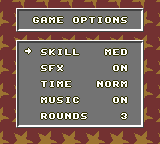
Foreman For Real™ features a number of exciting ways to set game play to your individual preferences. To do so, press UP or DOWN on the CONTROL PAD to highlight OPTIONS, then press the START BUTTON. You will then see the Game Options Screen. To select any option, highlight it by pressing UP or DOWN on the CONTROL PAD.
To cycle through to the desired setting on an option, press any of the buttons (A, B, X, or Y) on the CONTROL PAD. Once you have set all your options, you're ready for the ring! Press the START BUTTON to begin boxing. Foreman For Real™ allows you to customize game play in the following areas:
•
Skill: Allows you to play at either Amateur (beginner), Contender (intermediate), or Professional (advanced) levels of boxing skill.
•
Music: Allows you to play with the Music ON or OFF.
•
Red Out: This option warns you when your boxer is on his last legs. When on, the screen will pulse red to indicate that your boxer is about to go down.
•
Sound Effects: Allows you to play with Sound Effects ON or OFF.
•
Time: Allows you to play in NORMAL or QUICK three minute rounds.
•
View: Allows you to play with FRONT, BACK or SWITCH views. FRONT view allows you to play as the foreground boxer, facing your opponent, and watching him fall as you bring him down. BACK shows the action from the opponent's point of view, and SWITCH allows you to pound on your opponent using the FRONT view one round, and the BACK view on the next round.
•
Rounds: Allows you to play in 3, 6, 9, or 12 round matches.
•
Exit: Allows you to return to main menu to start match.
Password
Foreman For Real™ has a password feature which allows you to return to a certain spot without having to restart play from the beginning of the game. To select this feature, highlight Password at main menu and press the START BUTTON.
To input a password, use the CONTROL PAD to highlight the desired letter, number, or symbol, then any BUTTON to enter a symbol. Go to DELETE if you make a mistake. When you are satisfied, select ENTER, and press the START BUTTON.
Choosing Your Boxer
Once you've chosen your mode of play, it's time to select a fighter. Foreman For Real™ features 20 boxers (including "Big" George Foreman), each with unique talents and boxing styles. To browse the available boxers, press UP or DOWN on the CONTROL PAD. To select a boxer, press the START button when the desired boxer is on screen.
Each boxer you will see has personal statistics: Name, Age, Rank, Record, and five Attributes that separate the strong from the weak: Offense, Defense, Speed, Power, and Stamina. Press RIGHT on the CONTROL PAD to see Boxer Profile, Height, Weight, Reach, and Hometown.
Each boxer has different attributes and abilities which are displayed as greater or lesser amounts (on a scale of 1 to 100, with 100 being the highest) for the following attributes:
•
OFFENSE: Ranks ability to inflict punishing blows on opponent.
•
DEFENSE: Ranks ability to block punches and in general avoid damage.
-
.png)

.png)


.png)
.png)
