Getting Started
Make sure the POWER switch is OFF. Insert the Tron 2.0 Killer App Game Pak into the Game Boy Advance slot. Turn the POWER switch ON.
NOTE: The Tron 2.0 Killer App Game Pak is for the Game Boy Advance system only.
When the title screen appears, press Start to proceed to the Main Menu.
Menu Controls
Use the following buttons to navigate the menu screen:
•
+Control Pad Up / Down: Highlight menu options
•
B Button: Return to the previous screen
Main Menu Options
•
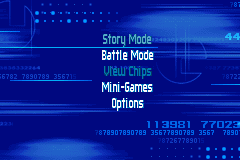
Story Mode: Battle the corruption by playing as Tron or Mercury. Each character has their own goal and storyline.
•
Battle Mode: Play against the computer or Link up to three friends, and then fight or race your way to victory. You may race against 3 players in Light Cycle, or battle one opponent in Battle Tanks or Recognizers.
•
View Chips: View collected Upgrade Chips, character cards, and cheats. You may also trade them to friends.
•
Mini-Games: Access System Security, Firewall, and Fragment mini-game puzzles, as well as classic Tron and Discs of Tron arcade games.
•
Options: Turn “On” or “Off” the Music, Sound FX, and Tutorial mode. You may also view the Credits.
Story Mode
If you select an empty game slot, you will be given the option to choose between the Tron and Mercury storylines.
Select one of the used slots to continue a saved game. Select one of the used slots to delete the saved game.
Special Feature: Merge
Merge collected Upgrade Chips from a saved game to a new game. Just start a new game in a slot that already holds a saved game. Once you merge your chips, you may again choose to play as Tron or Mercury.
Battle Mode
While playing as Tron or Mercury, you will occasionally find yourself at the controls of a Light Cycle, Tank, or Recognizer. In addition to Power-Ups, each game also has a number of Upgrade Chips that can be activated once they are found within the Story Mode game.
Power-Ups
Similar to Upgrade Chips, Power-Ups offer temporary upgrades and are found throughout the digital universe.
•
EM Grenade: Causes considerable damage to enemies caught within its blast radius.
•
Advanced Jump: Allows you to double-jump for a limited time.
•
Rapid Fire: Rapidly fires a pulse weapon for a limited number of shots.
•
Spread Attack: Gives you a triple disc attack for a limited time.
•
Stun Disc: A powerful stun weapon that briefly freezes enemies.
Light Cycles
Race against up to 3 computer-controlled opponents or 3 friends via the Game Link cable. You start with the basic blue Light Cycle and solid light trail. Activate collected Light Cycle Upgrade Chips from Story Mode to change the type of Light Cycle, color or type of light trail. You may also activate enhancements that will give you an extra edge on the game grid.
Select one of the available grid maps. You start with 4 maps. Unlock additional Light Cycle maps as you beat them in Story Mode. Successfully complete both the Tron and Mercury story lines, you will unlock 26 bonus maps.
Controls:
•
+Control Pad Up / Down / Left / Right: Move
•
B Button: Activate Upgrade
•
A Button: Activate Power-Up
Maze Walls and Floors
Enemy tanks and recognizers aren't the only things to look out for. The mazes themselves are riddled with helpful and dangerous zones.
•
Red Walls: Touching a glowing red wall will inflict damage to your recognizer.
•
Green Floor: Drive your tank over green floor tiles to get a speed boost.
•
Yellow Floor: Driving over a yellow floor tile will slow your tank to a crawl.
•
Red Floor: Touching a red floor tile will inflict damage to your tank.
•
Pink Floor: Touching a pink floor tile will instantly derez your tank.
Trading Chips
To access all of your Upgrade Chips, select the View Chips option from the Main Menu. Select the game slot containing your saved game. From here, you may view your Upgrade Chips or trade them to friends using the Game Link cable.
Use the +Control Pad to highlight a chip. Press the A Button to view the chip's details. If you have not yet viewed a collected chip, its block on the grid will contain a Question Mark (?).
To trade a chip, highlight it on the grid and press Select. The chip's details will shift to the right side of the screen, and a details window will appear on the left for your connected friend's chip information. When you see a chip that you would like to trade for, press the A Button. If the owner of the chip agrees to the trade, they must press the A Button also. To select a different chip from your library, press the B Button to exit the trade window.
Bonus Games
TRON Arcade Game
Fight your way through 4 digital arenas: Battle Tanks, Light Cycles, Grid Bug Swarm and MCP Showdown.
Controls:
•
+Control Pad Up / Down / Left / Right: Move
•
L Button / R Button: Rotate Aim
Discs of Tron Arcade Game
Enter the Disc Arena and battle for survival in this classic arcade game.
Controls:
•
+Control Pad Up / Down / Left / Right: Move
•
+Control Pad Up / Down: Aim



 (En,Fr,De).png)







 (En,Fr,Es,Nl).png)



.png)
