Game Menu
When you press START on the title screen, the game menu will be activated. You can then select your game mode.
Types of Games
•
Player Vs. CPU: Records how many consecutive rounds you can triumph over the computer.
•
Challenge: Evaluates a player's skill level. Rankings and Titles are posted for all to see.
Option Menu
Select the option you want to set with the ↑ or ↓ CONTROL PAD. Select the content with the → or ← CONTROL PAD.
•
GAME LEVEL: Set overall difficulty level to Easy, Normal or Hard.
•
CREDITS: Set the number of times you can continue after losing a game.
•
MUSIC TEST: Select background music during the game.
•
SFX TEST: Select a sound effects sample.
•
EXIT: Back to Game Menu.
Advanced Operation
Adjusting the Pointer
•
SELECT + CONTROL PAD ← - As you press, the pointer will adjust slightly to the left.
•
SELECT + CONTROL PAD → - As you press, the pointer will adjust slightly to the right.
•
CONTROL PAD ↑ - Set the pointer at a 90 degree angle.
Basic Rules
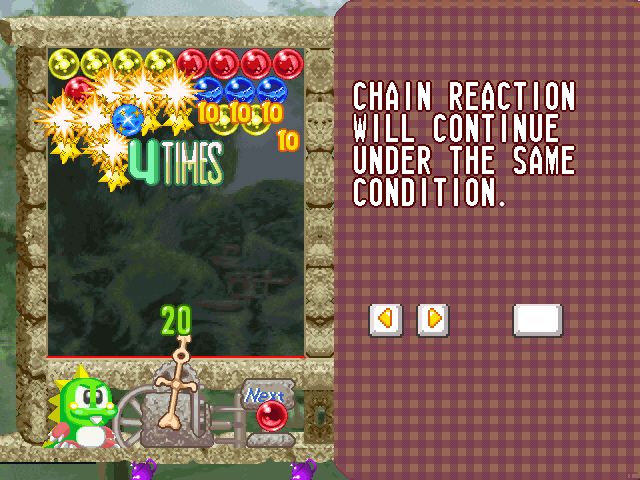
Launch the bubbles from the launching table and erase the bubbles before they go over the deadline.
How to Drop Bubbles
Eliminate bubbles by touching 3 or more bubbles of the same color to make them drop. If you manage to drop them all at once, you will get a high score!
In a Player vs. CPU game, your dropped bubbles appear in your opponent's field, and the opponent's dropped bubbles appear in yours.
Game Over
Once the bubbles go over the line, the game is over.
Continuing
When you press START during the count down at game over, you can re-start the game. Set the number of credits on the Options menu.
Balance Field
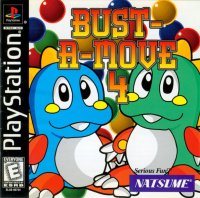
In Bust-A-Move 4™, some rounds take place in a Balanced Field (a weight scale with pulleys) and more precise playing strategies are required.
Pulleys
When you erase bubbles on either side of the central Balance Point (right or left pulley), the bubbles are deleted.
Weight of Pulleys
The bubbles stick to the pulley lines. A line will be lighter as bubbles are eliminated. As you stick the bubbles to one side, the side with more bubbles will drop.
Movement of Pulleys
•
No matter how unbalanced in weight the pulleys look, unless you stick the bubbles on either side, the pulley will not move.
•
The vibration of the pulley lines shows the unbalanced weight of both sides. When the pulley is in-balance, the pulleys will remain immobile.
•
Field vibration is a foreshadowing that the pulley lines with bubbles will descend.
Special Bubbles
•
Star Bubble: Can eliminate all of the same color bubbles as the color of the bubble that was shot.
•
Rainbow Bubble: When the attached bubble is eliminated, the Rainbow Bubble will turn into the same color.
•
Jama-Block: You cannot eliminate this, only drop it. You can still clear the round even if this block is left on the screen.
•
Fulcrum Block: This is the block that you can eliminate only if you eliminate all the attached bubbles.
•
Anti-Gravity Block: This is the block that tries to float upwards. The bubbles (the chunk) that are attached to this block also float upwards. Fulcrum Block, Jama Block and Fulcrum Block will become a normal Fulcrum Block once they hit the ceiling. The way to eliminate this block is the same as Fulcrum Block.
Name Entry
When your score is among the 10 highest scores, you can enter your initials (up to 3 letters). Choose the letters with the CONTROL PAD and finalize your selection with the A BUTTON.
Game Modes
Puzzle
1. Select the Game: Choose the game you want to play with the CONTROL PAD and finalize your selection with the A BUTTON.
2. Select the Difficulty of the Game: When you play Puzzle Mode, you can select the difficulty of the game. Choose the level with the CONTROL PAD ← or → and finalize it with the A BUTTON.
3. Select the character: Choose the character you wish to play with the CONTROL PAD and finalize your selection with the A BUTTON and the game will start.
Puzzle Difficulty Levels
•
Easy: A guideline will be shown at all times, and this level completes in five rounds.
•
Normal: This is a normal level of difficulty.
•
Expert: The bubble positioning is complicated and the player needs to be a master of technique.
Puzzle Game Flow
•
Rule: When you eliminate all the bubbles on the field, you will clear the round. In this mode, there is no difference in character's ability.
•
Selecting the Course (Zone): Once you clear a round, you can select the next zone of your choice. Once you clear the final zone, the game will reach the ending.
Player vs. CPU
Player vs. CPU Game Flow
•
Selecting the Character: Choose the character with CONTROL PAD and finalize your choice with the A BUTTON.
•
Rules: When you defeat the opponent character, the next opponent character will appear. The game will be endless as long as you are winning the match.
•
Game Over: Win 16 or more consecutive matches to complete the illustration.
•
Hidden Character Appearance Conditions: When you win matches successively in Player Vs. CPU, you
.png)

_2.png)
 (GB Compatible).png)




_1.png)

.png)

.png)





 (En,Fr,De,Es,It).png)

 (En,Fr,De,Es,It).png)

.jpg)

.png)




 (En,Fr,De,Es,It).jpg)