How to Use the DK Bongos
If it's your first time, get set for a crash course in drumming! If you're a seasoned pro, a little refresher course never hurt anyone!
Drumming to the Beat
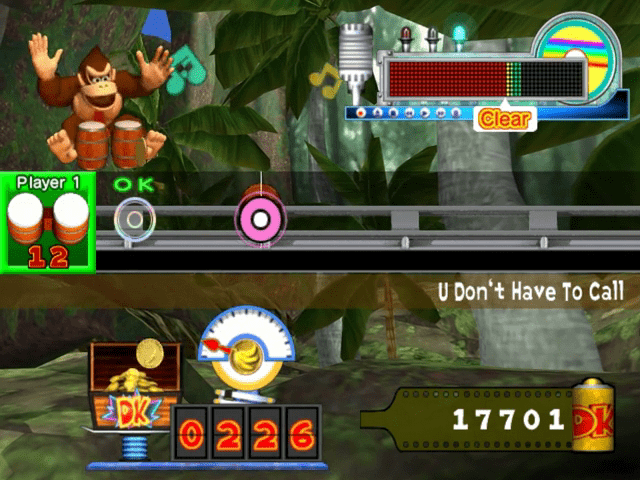
Once a song starts, music notes begin scrolling across the screen from right to left. Hit the notes when they overlap the transparent target ring on the left side of the screen. The better your timing, the more points and coins you'll earn.
Be right on time for a "Great" performance. As the notes pass over the target ring, you'll either drum or clap. If you nail the timing, you'll see a "Great" appear.
If you're close, but not quite perfect, you'll get an "OK" on-screen. If your timing is really off, you'll get a "Bad." If you totally miss the timing on a note, you won't see anything on-screen, but in the final score, you'll see a "Miss" for each note you missed.
Timing
•
Left Control Stick or + Control Pad
•
Any combination of left and
•
Both right notes at the same time
•
Right A, B, X, & Y Button or C Stick
Note Reading: 101
The different types of notes tell you which part of the DK Bongos to hit and how to hit them. For all drum and clap rolls, continue drumming or clapping for as long as the roll is in the target ring.
•
Left and right drum roll
Street Performance / Monkey Target Ring
Play notes as they pass through the target ring. The better your timing, the better the result.
There are three timing marks: Great, OK, and Bad.
Notes
Notes move from right to left. Hit the notes when they're in the target ring.
•
For, you can hit both drums together, or you can alternate between the two.
Combos
If you hit consecutive notes with either Great or OK timing, you've made a combo! The longer you can sustain a combo in a song, the more points you score.
If you hit a note with bad timing or miss a note altogether, that combo is over. Rolls are not included in combos.
How to Play
Put the Donkey Konga 2 Game Disc into the Nintendo GameCube and insert a memory card into slot A. Close the Disc cover and press the POWER Button. Before Starting a Game
In order to save your progress, you'll need to insert a Memory Card with 5 free blocks into Slot A. Even though you can play without creating a save file, your scores and results will not be saved unless you do.
About Saving
Donkey Konga 2 saves automatically at the end of each song or minigame. In order to save, you must have a Memory Card with at least 5 free blocks inserted into Slot A. You can have only one Donkey Konga 2 save file per Memory Card. Please refer to the Nintendo GameCube instruction booklet for information on formatting Memory Cards and managing files. Please do not turn the power off or pull the Memory Card out while saving. This could damage the Nintendo GameCube or the Memory Card. Selecting Modes
Press START/PAUSE on the title screen to bring up the mode-select screen. Press on the left or right bongo to scroll through the modes, and press START/PAUSE to make your selection.
•
Street Performance (1 to 2 players, Pages 18-19): This is the main game, where you perform songs and earn coins.
•
Challenge (1 to 2 players, Pages 20-21): Test your skills in this mode, and see how many songs you can clear in a row!
•
Battle (2 players, Pages 22-23): Two players duel it out to see who's the better drummer. You can choose this mode only as long as two or more DK Bongos or Nintendo GameCube Controllers are inserted into any of the four Controller Sockets. •
Concert (1 to 4 players, Pages 24-25): In Share mode, grab a buddy and share one set of DK Bongos—you and your friend have to play together in perfect synch! In Quartet mode, grab three friends and form an all-bongo superband. If you don't have enough players, the computer will play the spare parts.
•
Music Lab (1 to 4 players, Pages 26-28): Come here to play minigames like Rhythm Keeper and Barrel Race.
•
Freestyle Zone (1 to 4 players, Pages 29): Drum to your heart's content in this freeform jam session!
•
Shopping Mall (Pages 30): Spend the coins you've earned here to buy sound sets and music.
•
Electric Hut (Pages 31): Adjust the settings for the DK Bongos, GameCube Controller, and game sound. •
Hall of Records (Pages 31): Check out your high scores and read Dixie's Notes.
**Before