STARTING A NEW GAME
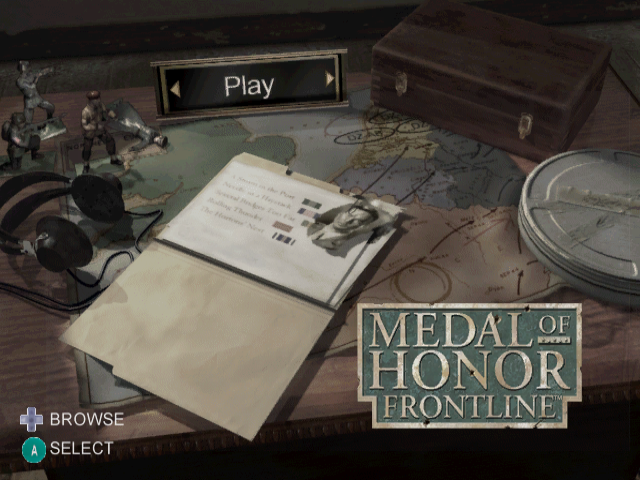
To begin a new game from the Main menu, highlight PLAY and press the A Button. The Mission Log screen appears.
To begin a new campaign, press the +Control Pad to highlight the Save/Load/New Game options.
•
To load or save a game, press the Control Stick to select LOAD GAME or SAVE GAME. Then, press the A Button.
•
To begin a new game, press the Control Stick to select NEW GAME. Then, press the A Button.
In the Difficulty screen, select the difficulty level for your game. To set your difficulty, press the Control Stick to highlight your choice. Then, press the A Button.
In the Choose Controller Configuration screen, press the +Control Pad to select the controller. Then, press the A Button. You can choose from a wider variety of controller configurations through the Options screen.
After you review the controls in your selected configuration, press the A Button to begin the campaign at Normandy.
NEXT MISSION
If you have loaded or started a game, you can proceed to the next mission in the game.
To begin a new game when one is loaded, select NEW GAME in the Load/Save menu.
OPTIONS
From the Options screen, you can enter passwords and secret codes, as well as change audio, difficulty and controller settings. Through the Options menu, you can also toggle display of sub-titles.
To select an option, press the +Control Pad and press the A Button. To return to the Main menu, press the B Button.
PASSWORDS
Your OSS controllers may place passwords in the local media (such as gaming magazines and websites). Enter these passwords into the Enigma Machine to unlock a Bonus. After you enter a password, a new extra is available in the Bonus screen.
•
To select a letter, press the Control Stick and press the A Button.
•
To enter the selected password, select SEND and press the A Button. The password is entered.
To get to the Bonus screen after entering a password, press the B Button to return to the Options screen. Then, press the +Control Pad to highlight BONUS and press the A Button.
BONUS
A Bonus can unlock cheats and special features.
•
To highlight a different secret code, press the Control Stick↑.
•
To toggle use of a highlighted secret code, press the A Button.
•
To go back to the Options screen, press the B Button.
CONTROLLER
To select a different controller, press the Control Pad to highlight the controller on-screen and press the A Button. To browse from the available configurations, press the +Control Pad. To select a configuration, press the A Button.
•
INVERT Y-AXIS: When ON, reverses your up/down axis.
•
CROSS HAIRS: When ON, the aiming crosshair is on-screen at all times.
•
GRENADE COOK: When ON, you can hold on to the grenade and shorten the amount of time it takes to explode.
•
RUMBLE: When ON, your controller vibrates based on game events.
AUDIO
•
SOUND EFFECTS: To adjust volume level for sound effects and ambient sounds in the game, press the A Button.
•
MUSIC: To adjust volume level for music in the game, press the A Button.
•
SOUND TYPE: Press the A Button to toggle between STEREO, MONO and DOLBY SURROUND.
DIFFICULTY
•
EASY: Player is a skilled marksman and heals fully between levels. Enemies are new recruits.
•
NORMAL: Player and enemies are evenly matched. Some healing occurs between levels.
•
HARD: This is war! Your enemies are truly dangerous. No healing occurs between levels.
SUBTITLES
When ON, subtitles are displayed for most non-English dialog in the game.
CREDITS
In the Credits, you can meet all of the people that have made history come to life.
•
To see the Credits, press the A Button.
•
To go back to the Main Menu, press the A Button.
PLAYING THE GAME
To succeed at your missions, you need to know your weapons, objectives and controls. Full victory comes from knowing more than just how to aim and shoot.
MISSION OBJECTIVES AND OTHER CONTROLS
Before a mission, you can review the objectives in the Briefing screen. During a mission, you can re-check the objectives as you accomplish them in the Pause Screen.
To pause the game and open the Pause Screen, press START/PAUSE.
COMPASS AND HEALTH METER
Pay attention to your compass. In addition to assisting in navigation, the compass can be a lifesaver.
On the game screen, you should pay regular attention to the compass and health meter. Also, you should be aware of your ammo levels. From time to time, important text messages appear at the top of the screen.
When you are hit by enemy fire, a red flash appears in the quadrant of the compass from which the shot came. As you take damage, the ring around the compass shrinks, changing from green to red, until the ring and your health are gone.
MOVEMENT CONTROLS
The following controls are for the MOH Sharpshooter controller configuration.
•
To move forward and back, press the Control Stick 1.
•
To strafe left and right, press the Control Stick →.
•
To look up and down, press the C Stick.
.png)

.png)