MAIN MENU: THE WAR ROOM
From the War Room, you can get briefed and oriented on the campaign, start a new mission, learn more about the game, load or save a game, or select new game options.
OPTIONS
Set controller, audio, video, subtitles and gameplay options.
PLAY
Begin the campaign on the beaches of Normandy and load or save games.
NEXT MISSION
(If available) Start the next mission in your current campaign.
GALLERY
Review History and the Making Of each mission in the campaign. You can also watch the credits.
PERSONAL RECORDS
Review your personal stats and medals.
PLAY
Ready to enlist in the OSS? From the Play screen, you can hit the beach at Normandy or manage your saved games.
•
To begin the campaign with the D-Day invasion at Normandy, highlight D-DAY and press the button, press the button again to begin "Your Finest Hour".
•
To load or save a game or start a new campaign, press the D-Button to select the game management options. Then, press the D-Button to select your option and press the button.
•
To return to the War Room, press the button.
THE CAMPAIGN
The Allied campaign to retake Europe is about to begin, but the OSS has its doubts. While Eisenhower and his generals prepare for the big battle at Normandy, the OSS is readying for the smaller ones far behind enemy lines, where its agents may decide the outcome of the war. The OSS is taking matters into its own hands, and the best ones for the job belong to you, Lt. Jimmy Patterson.
Climb into a Higgins boat off the coast of Omaha Beach, Dog Red Sector. At dawn on June 6, 1944, you can join the first soldiers to hit the beach at the Atlantic Wall in the greatest battle of World War II. Then make your way far behind enemy lines and into the heart of the enemy defense.
MISSION LOG
After a mission has been completed, you can replay it at any time from the Mission Log screen.
•
To select a different mission to play, press the D-Button to select your option and press the button.
BRIEFING
From the Mission Log screen, you can get the latest Allied intelligence on your next mission and all of your completed missions.
•
Press the D-Button to highlight a mission then press the button to select it.
•
To see the mission briefing, highlight BRIEFING and press the button.
JOURNALS
The Journals will give you specific intelligence about your next mission.
•
To go to the next page, press the button.
•
To return to the previous page, press the button.
LOAD/SAVE
A saved game of Medal of Honor Frontline requires 149KB of free space on a memory card (8MB) (for PlayStation 2). In the load/save menu, you can load and save games or start a new game altogether.
•
To load, save or start a new game, press the D-Button1 to highlight your choice and press the button.
•
To start a new game when you have already loaded a game, press the D-Button to highlight NEW GAME and then press the button.
•
To return to the War Room, press the button.
LOAD GAME
Never insert or remove a memory card while loading or saving files.
In the load game screen, you can load a previously saved game.
•
To select a game to load, press the D-Button I to highlight the save and press the button.
•
To return to the Mission Log screen, press the button.
SAVE GAME
You can save your game from the Mission Log screen after each successful mission. From the Mission Log screen, press the D-Button to access the load/save menu.
•
To save your current game, press the D-Button to select SAVE GAME and press the button.
•
At the save screen, you can choose to create a NEW SAVE or you can overwrite a previously saved game by selecting one of them.
•
To return to the Mission Log screen, press the button.
NEXT MISSION
If you have loaded or started a campaign, you can proceed to the next mission in the game.
•
To begin a new game when one is loaded, select NEW GAME in the load/save menu.
GALLERY
After completing a mission, you can review the results of your success in the Gallery. View actual footage from World War II to see how your accomplishments are changing the campaign for the Allies. You can also review movies on the making of Medal of Honor Frontline.
During the course of your campaign, you can unlock History and Making of movies by earning a medal for each mission. Check this screen from time to time.
•
To select the Gallery for a different mission, press the D-Button and press the button.
•
Then, to choose to see the History or Making Of videos for the selected mission, press the D-Button and press the button.
PERSONAL RECORDS
In Personal Records, you can review the medals and statistics that you have accumulated in the current campaign.
•
To review Player Stats or Medals, press the D-Button and press the button.
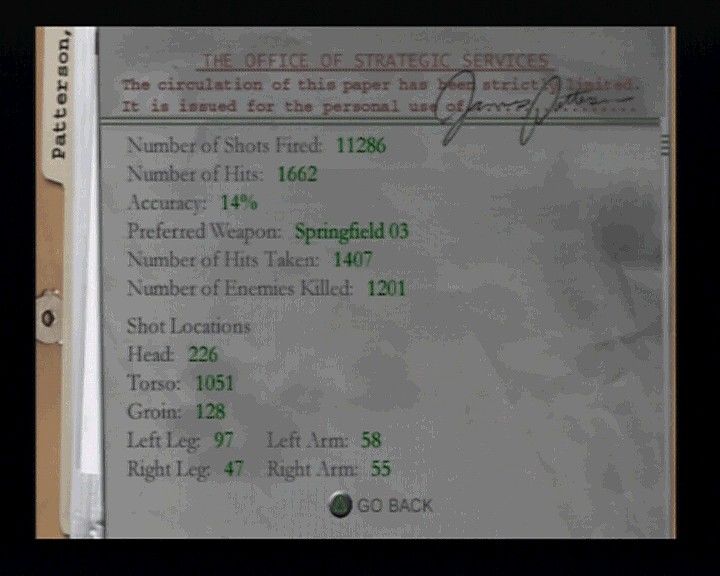
PLAYER STATS
Player Stats include all of the firing and target information from your current game.
•
To return to the Personal Records screen, press the ▲ button.
MEDALS
In your Medals case, you can review the medals that you have earned.
•
To review your earned Medals, press the D-Button any direction.
.png)

.png)
.png)
.png)

_1.png)
_1.png)
.png)
.png)
.png)

.png)