Loading
Set up your PlayStation™ game console according to the instructions in its instruction manual. Make sure the power is OFF before inserting or removing a compact disc. Insert the BattleSport® disc and close the Disc cover. Insert game controllers and turn on the PlayStation™ game console. Follow on-screen instructions to start a game. Quickstart
At the introduction, press START to get to the Main Menu.
From the Main Menu, choose 1 or 2 Player Exhibition Mode and press the START BUTTON. Pay attention to the announcer and he'll guide you through the sign-in process.
After you set up the Arena options, pick an opponent (If you're in 1 Player Mode) and then pick a tank. With that done, you can go to the Equipment Store to pick up a few "accessories" and then you'll head straight into battle.
Exhibition Mode vs. Instant Action
Exhibition Mode is the recommended mode for the new player because it lets you learn about each opponent and tank option and configure the game accordingly.
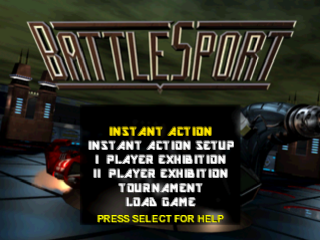
Instant Action mode, on the other hand, uses the default settings and takes you immediately into battle. When you want to change any of the Instant Action defaults, choose Instant Action Setup. There you can configure Instant Action mode for 1 or 2 players, pick an Arena to play in, etc. Experienced players should enjoy using Instant Action Mode to get quickly into a new game. Both the Instant Action Mode and the Exhibition Mode can be played by either one or two players. Tournament Mode
The Tournament Mode is played by one player against a set of increasingly difficult computer-controlled opponents and tanks. Tournament Mode is for the experienced BattleSport competitor who knows his or her tanks and weapons -- enter at your own risk!
Pay attention to the announcer and he'll guide you straight into competition.
Main Menu Options
•
Press the START BUTTON to lock in a menu choice and advance screens.
•
Press the SELECT BUTTON to return to a previous screen.
•
Press the A or BUTTON to cycle option values forward.
•
Press or BUTTON to cycle option values backwards.
Instant Action
When you hit Instant Action, the game uses the preferences that you set in Instant Action Setup and takes you immediately to the game. This mode is the fastest way to get straight into BattleSport. Once you've set your preferences, the game goes automatically to the arena, although you can set up Instant Action mode to let you sign-in (enter your name) before entering the arena. Instant Action Setup
Instant Action Setup, with three 3 minute periods, allows you to choose one or two player mode, which arena to play in (random or 1-50), which opponent to play against (in one-player mode), and what tank you want to use. If you set Instant Action for two players, it also allows you choose both players' tanks. Additional options for Instant Action Setup include:
•
Shot Clock Allows you to turn the shot clock On or Off and to set count down time.
•
Name Entry (Yes/No) Lets you enter your name before the Instant Action game starts. When you exit the Instant Action Setup screen, your setup data will automatically be saved if a Memory Card is present. This data uses up 1 memory block. 1 Player Exhibition Mode
Go up against some of the meanest and best BattleSport gladiators. This is the recommended mode for the beginning player; it allows you to choose your tank and your opponent and provides lots of data on each option.
It also lets you choose the arena and shows you what power-ups are available and what type of goal you're aiming for. Here's what you'll configure in Exhibition Mode:
Signing In
Enter your name in the Sign-In window. Use the DIRECTIONAL BUTTONS and ☑ or ☐ to select each letter, then press the START BUTTON (or select END and press ☑ or ☐ to save your sign-in name and continue.)
Setting Up
Set up your upcoming battle. Scroll down to the other choices to set the Game Type, Equipment Store and Shot Clock options.
Arena Selection
Use your ACTION BUTTONS (▲, ●, ■, ✖) to scroll through the Arena choices and pick one you think you can handle. There's over 50 of them, and no two are alike. See the Arena Features section for more details. Game Type
Lets you play three timed periods (ranging from 1 to 9 minute periods) or score-based battles (ranging from 1 to 99 goals).
Exhibition Mode can be played with or without the Equipment Store, where you can load up on weapons and defenses. See the Equipment Store section for details on what's available.
If you want, adjust the Shot Clock – shot clock violations mean immediate loss of possession. FUMBLE! Press the START BUTTON to confirm your choices and continue.
Select Your Opponent
•
SELECT OPPONENT 'C' FOR MORE
•
BIO A decorated Federation marine. Brick is a bad man. He has killed BS persons with his bare hands, and he is always ready for whoever is next. Maybe you?
Choose your first opponent. Don't waste
.png)


.png)




_1.png)
_1.png)
_1.png)
.png)