GETTING STARTED
Set up your PlayStation game console according to its Instruction Manual. Make sure the power is OFF before inserting or removing a compact disc. Insert the EHRGEIZ disc and close the disc cover. Insert one or two Controllers into the Controller ports and turn ON the PlayStation game console. The opening movie can be skipped by pressing the START button. Main Menu
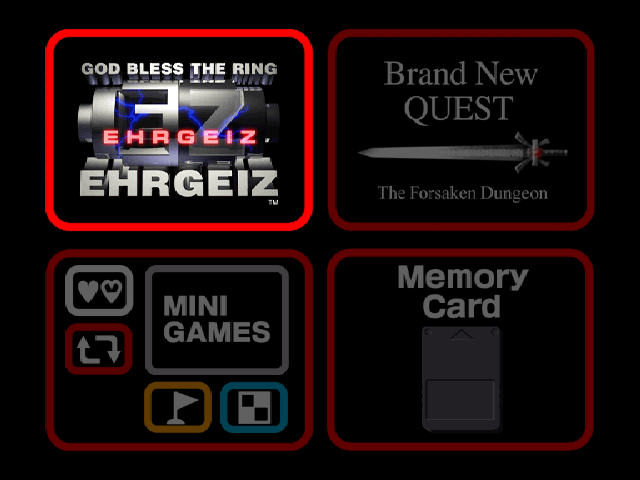
A menu with the following will appear after the opening movie sequence:
Use the directional buttons to highlight an option and press the button to execute. Pressing the button will result in the appropriate screen being displayed.
Returning to Main Menu
From the EHRGEIZ screen, it is possible to return to the main menu by selecting EXIT, or by pressing the button.
For Mini Games, it is possible to return to the main menu by pressing the button during the introduction.
After entering the Brand New QUEST mode, it is not possible to return to the main menu. Please be aware that the EHRGEIZ game data will disappear if not saved.
MEMORY CARD
Select the MEMORY CARD heading from the main menu. This option will allow data to be saved and loaded for the Arcade Mode and the Mini Games Mode only.
Only one memory block is necessary to save game data in both the Arcade Mode and the Mini Games. The QUEST Mode will require two memory blocks. For saving and loading instructions for the QUEST Mode, please see "Saving" and "Loading" on page 26.
EHRGEIZ
THE RULES
The goal of each character is to fight and win battles against opponents that continue to appear through successive stages of battle. Freely use conventional fighting techniques and Special Attacks to weaken the opponent and win. The character who depletes the other's Physical Strength gauge completely, or the character whose Physical Strength gauge remains greater than the other when the Time Limit reaches zero, will receive one set point.
If the Physical Strength gauge of each character becomes empty simultaneously or if at the Time Limit, the Physical Strength of the two characters is equal to one another, the situation is deemed a tie and both parties will receive one set point. The first character to win two set points is the victor.
THE SCREEN
1.
Time Limit
Displays the amount of time left in a match. When the timer reaches zero, the match comes to an end.
2.
Physical Strength Gauge (Blue Bar)
Displays the character's Physical Strength. The gauge on the left represents Player One's Physical Strength, and the gauge on the right represents Player Two's Physical Strength. The gauge will decrease as characters receive damage from an attack. A character is considered knocked out when their gauge depletes.
3.
Special Attack Gauge (Red Bar)
Displays the remaining amount of energy that can be used to perform Special Attacks. The gauge on the left is for Player One, and the gauge on the right is for Player Two. Each time a Special Attack is used, or an Interrupt is performed, the gauge will decrease. When the gauge is depleted, Special Attacks and Interrupts can no longer be performed.
4.
Acquired Set Points
Displays the number of set points acquired for the current match.
ARCADE MODE
This mode allows the character to fight against computer controlled opponents. A second player may choose to join in at any time by pressing the START button of the second Controller. The player who wins the match will be able to continue to fight in the Arcade Mode.
Players may pause the game at any time by pressing the START button. An option to EXIT and return immediately to the main EHRGEIZ menu will be available when the game is paused.
Game Over/Continue
When the selected character loses in the Arcade Mode, the word CONTINUE will appear. If the START button is pressed before the timer reaches zero, the player will be able to continue the game with a rematch. If the player fails to press the START button before the Time Limit expires, the words GAME OVER will be displayed.
VS MODE
This mode allows two players to fight against each other. On the selection screen, by using the directional buttons, each player can select a character to be played.
After character selection, the players will be able to choose the battle stage and handicap level to be played. Upon this final selection, the battle will start.
PRACTICE
Practice allows players to familiarize themselves with their character of choice by letting them fight with an unlimited amount of time and Physical Strength. To begin, the player must choose their character and the character that they want to practice against.
The player may customize the battle to their specification by pressing the START button, which brings up an Option menu. Use the up and down directional buttons to choose an option and press the left and right directional buttons to change the selected settings. To return to Practice, press START.
Practice Options
•
PLAYER/ENEMY: The player may select the controls and set the movement patterns of the computer controlled character.
•
CONTROL DISPLAY: The player can switch ON/OFF the control data displayed at the bottom of the screen which shows the buttons being pressed on Player One's Controller.
•
STATUS DISPLAY: The player can switch ON/OFF the techniques displayed on the screen and the data display for damage.
•
SPECIAL GAUGE: The player can set the Special Attack gauge to FULL or EMPTY.
•
STAGE: The player may select the stage they want to practice in.
•
CHARACTER SELECT: Choosing this option will take the player back to the character select screen.
•
EXIT TO TITLE: Choosing this option will take the player back to