Lower Body Defense
Use Lower Body Defense to defend against special moves and attacks when your opponent is attacking your feet. Lower Body attacks can come from an opponent who is either standing or crouching, depending on the character and his or her moves.
A throw move cannot be defended against!
Game Rules
The winner of the battle is determined according to the following rules:
•
Reducing the opposing character's energy level to "0" so that he can no longer stand is considered a win by knockout and is good for 1 point.
•
If a character falls out of the ring during a battle, that character loses. The character remaining in the ring will acquire 1 point.
•
In a battle with time restrictions, if the battle cannot be settled during the restricted time period, the character with the higher energy level left at the end of the battle will be the winner by decision. The winner will acquire 1 point.
•
When both characters have their energy depleted at the same time (double knockout), or when the energy level for both characters is the same at the end of a restricted time period, the game ends in a draw.
•
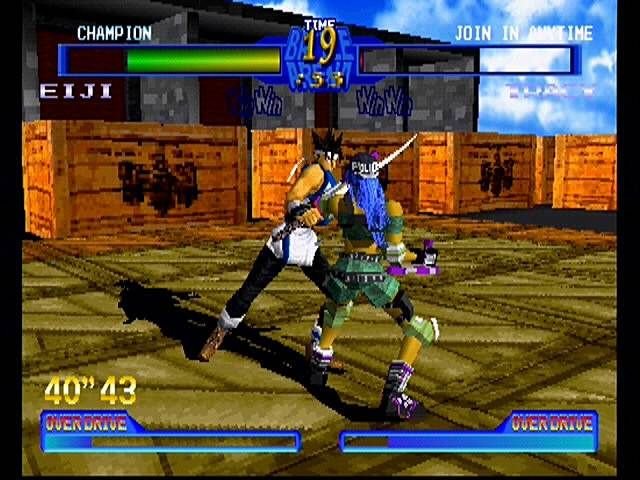
The character to accumulate 2 points first is the winner and moves on to the next battle. (2 points is the default)
Overdrive Gauge
The gauge increases when Special Moves or attacks are performed successfully or when a character is attacked by his opponent. When it reaches its MAX stage, the gauge flashes. This MAX stage will continue for a certain period of time.
While the gauge is flashing, attacks such as Special Moves are enhanced. Furthermore, "Ultimate Moves" can also be used during this time. As the gauge is flashing, it starts to decrease. When it hits zero, the overdrive state is disengaged.
It is up to you to find out, through your battles, how you can best increase this gauge to achieve the Overdrive state.
Playing the 1P Game
Character Selection
By selecting "1P Game" in the game mode, you will be able to play a tournament style game against characters operated by the computer.
Select your character by using the directional keys and then execute your selection with the Button. The computer will then choose its character and the battle begins. (Select the box to determine the characters randomly.)
1P Game
In the "1P Game," you will face eight fighters. When all opponents are defeated, a warrior from the Himitsu Kessha will come forth.
Continue
If you are defeated by an opposing character in the "1P Game," the continue screen is displayed. By pressing on the Start Button during the countdown, you will be able to restart the tournament starting with the opponent that just defeated you.
Pressing a button other than the start button when the continue screen is displayed accelerates the countdown. The game will be over if you do not continue.
Joining a Game in Mid-Play
It is possible to break into a game while a "1P Game" is underway. This is done with the use of another available controller.
Pressing the Start Button on the available controller selects the character that just broke in and interrupted the battle that is currently underway.
Playing the VS Game
Selecting the "VS HUMAN" game mode allows you to play against another player. On the character selection screen, select the character you wish to operate.
Selecting "VS COMPUTER" allows you to play against a character that the computer operates. Select the character that you will be operating first, then select the character that the computer will be operating.
If you are defeated in the "VS HUMAN" mode, you may initiate a continue within the time limit and you will be brought to the character selection screen where you will be allowed to re-choose a character. If you are defeated in the "VS COMPUTER" mode, a continue will initiate a second chance against the same character.
Options During Pause
Pausing during a battle enables three choices: CONTINUE (continue on), OPTION (option mode), and RESET (return to title screen). Make a selection using the Select Button and press the Start Button to execute.
Option Modes
Game Settings and Changes
Select "OPTION" from the game modes to go to the option mode screen. Here, you can make changes to different settings in the game.
Move the directional keys on the controller Up and Down to select the items, Right and Left to change the settings. Press the Start Button or select EXIT to return to the title screen.
Difficulty
This changes the level of difficulty when playing against the computer. "1" is the easiest and "8" is the most difficult.
Bout Time
This changes the length of the bout time. Choose from 60 seconds, 99 seconds or unrestricted (00).
•
Default setting is 60 seconds.
Set Point
This changes the points required to win a battle. The first player to win the number of points set here is the winner.
•
Default setting is 2 points.
These options can be changed only in the main option menu, not during the game. Changing bout time during the match affects subsequent rounds.
Opponent Life Setting
This sets the handicap for players playing in the VS mode. The larger the number, the more defensive power a character will have and the less likely it will be for that character to be damaged.
The handicap that is set here is not related to the level of difficulty that is set in the "1P GAME."
Defense
Setting the guard type to auto enables a character to defend himself from an opponent automatically if that
.png)


.png)







.png)