Play Ball!
•
Set up your PlayStation according to its instruction manual. •
Make sure the PlayStation power is OFF before inserting or removing a compact disc. •
Insert the Frank Thomas "Big Hurt" Baseball™ disc and close the CD door. •
Follow on-screen instructions to start a game.
PlayStation Components
Starting Up
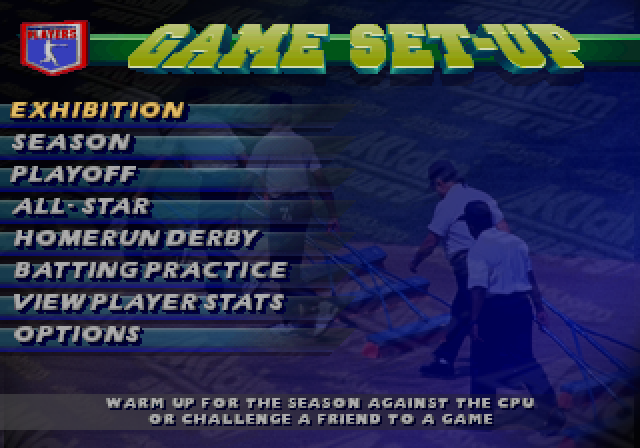
When the Frank Thomas "Big Hurt" Baseball™ title screen appears, press the START BUTTON. You will then see the Game Setup Screen. This screen allows you to select from 6 game play modes and to set Main Options. Moving Through Screens
There are several different sets of options and settings to consider in the various game modes. Different modes have different options.
•
The player with CONTROLLER 1 is responsible for making most selections.
•
In general, after setting options and choosing game types, press the X BUTTON to go to the next appropriate screen to select teams, stadiums, adjust your line up, etc.
•
As a rule, press UP or DOWN on the DIRECTIONAL PAD to scroll through/select options, lists/rosters.
•
Press LEFT or RIGHT on the DIRECTIONAL PAD to change option settings within a screen.
•
Press the X BUTTON to confirm a player, team or option selection/setting.
•
Press the START BUTTON to return to a previous screen.
On-Screen Help
On-screen Help bars with control prompts appear at the bottom of each screen.
Return to Title Screen
To return to the title screen at any time, hold down the SELECT BUTTON and press the START BUTTON for 2 seconds.
Main Options
Frank Thomas “Big Hurt” Baseball™ allows you to customize game play in many exciting ways. Difficulty
Choose between Rookie and Veteran skill levels.
Time of Day
Choose between Day, Night and Random game times.
Announcer
Choose to play with or without the game announcements on.
Sound
This option allows you to play with Sound Effects OFF or ON.
Music
This option allows you to play with Music ON or OFF.
Audio
Choose between Stereo and Mono audio.
Sound Test
Listen to any of the sound effects samples used in the game. To do so, toggle to the desired sound and press the X BUTTON.
Music Test
Listen to any of the music samples used in the game. To do so, toggle to the desired sound and press the X BUTTON.
Configure Controllers
Choose from among 4 pre-set button configurations.
Play Modes
In Exhibition, Season, Playoff and All-Star Game modes, you can choose between two play modes, Quick Play or Regulation Play (9 innings).
Quick Play Mode
It's one strike and you're out! Because of this Quick Play rule, foul balls do NOT count as strikes.
Stats for Quick Play games will vary from those in Regulation Play.
Regulation Play
This follows the established major league rules.
Number of Innings
You can set how many innings any game will be, from 1-9.
One Player Games
This pits you against a computer-controlled opponent. In Season play, Player One controls the team that goes through a season.
Two Player Games
Two players match skills and strategy.
Base Running
Advancing Runners
•
Base runners are advanced by pressing the X BUTTON and the direction of the desired base on the DIRECTIONAL PAD.
•
To return to a base, press the BUTTON and the DIRECTIONAL PAD in the direction of the base.
Advancing & Returning Multiple Runners
When the game situation forces base runners to advance, they do so automatically.
•
To advance all base runners, press the L2 trigger.
•
To return all base runners, press the R2 trigger.
•
To advance multiple runners individually, press the X BUTTON plus the DIRECTIONAL PAD in the direction of the next base for each base runner.
•
To return multiple runners individually, press the BUTTON plus the DIRECTIONAL PAD in the direction of the previous base for each base runner.
Advancing Multiple Bases
Once a ball is put into play, the batter automatically advances towards first. Any additional bases must be manually taken by the player by using the X BUTTON and the DIRECTIONAL PAD.
Leading Off
•
To lead off a base a step, press L1.
•
To return one step, press R1.
Stealing Bases
You can attempt a stolen base by pressing the X BUTTON and the appropriate base direction on the DIRECTIONAL PAD at any time during a pitcher's windup or delivery.
Run Downs
You may find yourself in a rundown if you're caught off base and the ball arrives at your intended base ahead of you.
•
Try to evade pursuing infielders by using the DIRECTIONAL PAD and the X BUTTON to advance or the BUTTON to return to base, toggling between the two as needed.
Using Pinch Runners
Once a pinch runner has been substituted, he assumes the proper base and becomes subject to normal controls.
Basic Defense
Pitch Selection and Control
There are eight basic pitches in this game. Each pitcher can throw three pitches. To choose a pitch, press the appropriate button.
Pitch speed and location are determined with the DIRECTIONAL PAD.
-
.png)

.png)
.png)
.png)




.png)

.png)
.png)







.png)
.png)